Bub 
Max Output Level: -3.5 dBFS

- Total Posts : 7196
- Joined: 2010/10/25 10:22:13
- Location: Sneaking up behind you!
- Status: offline

Re:Mono v Stereo
2012/06/11 15:05:02
(permalink)
Bristol_Jonesey
What's all this "Sonar doesn't let me select stereo v mono"?
Step 1 - insert an audio track
Step 2 - from the Input box, SELECT which input you want to record on. They are usually arranged in three's - one for Left, one for Right and one for Stereo. The interleave will be automatically set
Step 3 - plug something into the input you just selected and record!
Sonar has nothing to do with what kind of track is recorded. For example, if you had an audio card that only showed Mono Inputs in the driver, Sonar would never be able to record in Stereo. And vice versa. You're track is automatically set to Stereo or Mono based off of what the driver says. Sonar couldn't change that if it wanted to.
"I pulled the head off Elvis, filled Fred up to his pelvis, yaba daba do, the King is gone, and so are you."
|
Bristol_Jonesey
Max Output Level: 0 dBFS

- Total Posts : 16775
- Joined: 2007/10/08 15:41:17
- Location: Bristol, UK
- Status: offline
Re:Mono v Stereo
2012/06/11 15:09:40
(permalink)
Show me an audio card that only lets you record mono.
I might be totally wide of the mark Bub, but I've never seen one, even the lowly Realtek onboard chip gives me loads of options for input selection, including the 3 choices I mentioned previously.
CbB, Platinum, 64 bit throughoutCustom built i7 3930, 32Gb RAM, 2 x 1Tb Internal HDD, 1 x 1TB system SSD (Win 7), 1 x 500Gb system SSD (Win 10), 2 x 1Tb External HDD's, Dual boot Win 7 & Win 10 64 Bit, Saffire Pro 26, ISA One, Adam P11A,
|
CJaysMusic
Max Output Level: 0 dBFS
- Total Posts : 30423
- Joined: 2006/10/28 01:51:41
- Location: Miami - Fort Lauderdale - Davie
- Status: offline
Re:Mono v Stereo
2012/06/11 15:21:54
(permalink)
OK, this is still not working right. I have a mic plugged into one input in the V-Studio interface (in this case #8). I create a track. Sonar does not let me select stereo v mono It works, as Ive done this over 10,000 times (give or take 9,000). All you need to do is click on the drop down arrow where it says input in the track pane and change it to the single input that your mix is plugged into. Its done all the time. You cant be the only one that can only record in stereo. That would be bizarre
|
Bub
Max Output Level: -3.5 dBFS
- Total Posts : 7196
- Joined: 2010/10/25 10:22:13
- Location: Sneaking up behind you!
- Status: offline
Re:Mono v Stereo
2012/06/11 15:32:00
(permalink)
Bristol_Jonesey
Show me an audio card that only lets you record mono.
We're not talking about audio cards, we're talking about Sonar. I was giving you a hypothetical scenario to show you that Sonar has nothing to do with a track being Mono or Stereo. That decision is made outside of Sonar by your audio card driver. Technically, if you think about it, the input of all audio cards are Mono.
"I pulled the head off Elvis, filled Fred up to his pelvis, yaba daba do, the King is gone, and so are you."
|
Bristol_Jonesey
Max Output Level: 0 dBFS
- Total Posts : 16775
- Joined: 2007/10/08 15:41:17
- Location: Bristol, UK
- Status: offline
Re:Mono v Stereo
2012/06/11 15:40:02
(permalink)
I think we're just arguing semantics here. Of all the different cards/interfaces I've owned, across multiple version of Sonar, I've always had the ability to select either mono or stereo in the Input Channel. Like this:  Yep - this is the Realtek chip on my 2nd machine
CbB, Platinum, 64 bit throughoutCustom built i7 3930, 32Gb RAM, 2 x 1Tb Internal HDD, 1 x 1TB system SSD (Win 7), 1 x 500Gb system SSD (Win 10), 2 x 1Tb External HDD's, Dual boot Win 7 & Win 10 64 Bit, Saffire Pro 26, ISA One, Adam P11A,
|
skylightron
Max Output Level: -85 dBFS

- Total Posts : 277
- Joined: 2011/09/03 18:05:39
- Status: offline
Re:Mono v Stereo
2012/06/11 15:45:20
(permalink)
Should vocals in mono be recorded L or R? or do you record them both L, R and then combine them for a stereo sound.
|
Bristol_Jonesey
Max Output Level: 0 dBFS
- Total Posts : 16775
- Joined: 2007/10/08 15:41:17
- Location: Bristol, UK
- Status: offline
Re:Mono v Stereo
2012/06/11 15:47:32
(permalink)
Left or Right - it doesn't make any difference.
If you do both and combine them you'll get a 6dB increase in level, which could cause clipping, so don't do it.
CbB, Platinum, 64 bit throughoutCustom built i7 3930, 32Gb RAM, 2 x 1Tb Internal HDD, 1 x 1TB system SSD (Win 7), 1 x 500Gb system SSD (Win 10), 2 x 1Tb External HDD's, Dual boot Win 7 & Win 10 64 Bit, Saffire Pro 26, ISA One, Adam P11A,
|
konradh
Max Output Level: -42 dBFS

- Total Posts : 3325
- Joined: 2006/01/16 16:07:06
- Status: offline
Re:Mono v Stereo
2012/06/11 15:48:08
(permalink)
I don't know what to say. I create a track and Stereo is the default. I change the input to one input on the V-Studio and click interleave=mono (turn the blue icon off) and I get one-sided stereo. Maybe it is a V-Studio quirk. Or maybe I have a screwed-up driver.
Stereo would be OK if I were laying down stereo effects or reverb, but that is seldom the case.
(And although this is not the issue, it is ****ed that the inputs are Right 7-8, Left 7-8, and Stereo 7-8, instead of just 7, 8, Stereo 7-8. That is not causing an issue, though. Just a throw-back to Roland's old days of unclear user interfaces.)
|
CJaysMusic
Max Output Level: 0 dBFS
- Total Posts : 30423
- Joined: 2006/10/28 01:51:41
- Location: Miami - Fort Lauderdale - Davie
- Status: offline
Re:Mono v Stereo
2012/06/11 16:10:35
(permalink)
Your doing it wrong. You are not changing the input to a mono input. You are changing it to another stereo input. If you change it to a mon o input, you will reocrd a mono track. 1+1 will always equal 2, no matter what. Its the same for your input selection
|
CJaysMusic
Max Output Level: 0 dBFS
- Total Posts : 30423
- Joined: 2006/10/28 01:51:41
- Location: Miami - Fort Lauderdale - Davie
- Status: offline
Re:Mono v Stereo
2012/06/11 16:12:27
(permalink)
skylightron
Should vocals in mono be recorded L or R? or do you record them both L, R and then combine them for a stereo sound.
Should vocals in mono be recorded L or R? or do you record them both L, R and then combine them for a stereo sound.
Left or right is mono. Vocals when recorded with one mic is Mono and always will be. Vocals are most always recorded and mixed as a mono track. All the tracks in the songs are mostly mono, except for the occasional synth. There are hardley any stereo tracks in a song, unless its all synths
|
Guitarhacker
Max Output Level: 0 dBFS
- Total Posts : 24398
- Joined: 2007/12/07 12:51:18
- Location: NC
- Status: offline
Re:Mono v Stereo
2012/06/11 16:14:24
(permalink)
Skyline_UK
CJaysMusic
CJ, Don,
Help me clarify this.
So do you record vocals to a stereo track (Sonar's default) and then convert the track to mono, i.e just the one waveform line?
A vocal is a mono source when recorded with one mic, so i never ever record a mono source into a stereo track. I record a vocal into a mono track.
There is no reason why you should be recording mono source into a stereo track. Mono source records into a mono track and a stereo source recording into a stereo track
Cj
This is where I get confused. If I insert a new track, Sonar doesn't at that 'empty' stage let me define it as a mono track. So when I then record a vocal the track shows two waveforms, i.e. it's stereo bu default I can obviously then choose to convert the track to mono now it has content. Yes, I could first change the input to the track from my RME AIO soundcard to L or R, but that seems a bit odd. Which one should it be? Be patient with me, I know I must be missing something simple here!

You select the right or left mono channel depending on which one the mono source is plugged into on your interface. I generally choose LEFT because that's the one I plug the mic into and on the guitar, my POD has some stereo presets but often the ones I use are simple mono so again I select the LEFT mono. This keeps the track recording in mono. If I accidentally allow it to record in stereo.... the mic will only be on the left side of the stereo field while the guitar will record in both Left and right sides since both inputs have source material going in. However, recording stereo when I only need mono is a waste of hard drive space so I try to pay close attention to that little detail. JUST FOR GRINS: you can switch from mono to stereo in the same track. Start in Left mono.... stop the recording, and set some punch in points and before you punch in.... delete the highlighted punch in section, then change the input to stereo.... now when the punch in happens it will record separate left and right channels in the track...so it switches from mono to stereo and back.... (ignore that advice unless you just want to see it to see it.... it serves no useful purpose)
My website & music: www.herbhartley.com MC4/5/6/X1e.c, on a Custom DAW Focusrite Firewire Saffire Interface BMI/NSAI "Just as the blade chooses the warrior, so too, the song chooses the writer "
|
CJaysMusic
Max Output Level: 0 dBFS
- Total Posts : 30423
- Joined: 2006/10/28 01:51:41
- Location: Miami - Fort Lauderdale - Davie
- Status: offline
Re:Mono v Stereo
2012/06/11 16:16:39
(permalink)
LOL, yes lets switch the topic. PLEASE!!!!!!!!!!!!!!!!!!!!!!!!!!!!!!!!!!!!!!!! for the love of GOD!!!!
|
Guitarhacker
Max Output Level: 0 dBFS
- Total Posts : 24398
- Joined: 2007/12/07 12:51:18
- Location: NC
- Status: offline
Re:Mono v Stereo
2012/06/11 16:17:44
(permalink)
skylightron
Should vocals in mono be recorded L or R? or do you record them both L, R and then combine them for a stereo sound.
record mono. putting them into a stereo track accomplishes nothing and it doesn't sound "stereo". If you want a wider sound.... either use a "stereo widener" such as Ozone has or record the track multiple times (don't clone it) and use a layering of 3 tracks... one in the center up nice and loud and the other two 80% or more panned right and left and turned down pretty low.
My website & music: www.herbhartley.com MC4/5/6/X1e.c, on a Custom DAW Focusrite Firewire Saffire Interface BMI/NSAI "Just as the blade chooses the warrior, so too, the song chooses the writer "
|
Bub
Max Output Level: -3.5 dBFS
- Total Posts : 7196
- Joined: 2010/10/25 10:22:13
- Location: Sneaking up behind you!
- Status: offline
Re:Mono v Stereo
2012/06/11 16:28:03
(permalink)
Bristol_Jonesey
I think we're just arguing semantics here.
Of all the different cards/interfaces I've owned, across multiple version of Sonar, I've always had the ability to select either mono or stereo in the Input Channel.
All I'm saying is, Sonar has no control over the track being Stereo or Mono during recording. That decision is made by our Audio Card Driver. The Input choices we have are not determined or controlled by Sonar, they are determined and controlled by our Audio Card Driver. For example, you could not tell Sonar to record a Stereo Input such as your Stereo Realtek HD Audio CD Input, to a Mono Track.
"I pulled the head off Elvis, filled Fred up to his pelvis, yaba daba do, the King is gone, and so are you."
|
John
Forum Host

- Total Posts : 30467
- Joined: 2003/11/06 11:53:17
- Status: offline
Re:Mono v Stereo
2012/06/11 16:33:36
(permalink)
Bristol_Jonesey
Show me an audio card that only lets you record mono.
I might be totally wide of the mark Bub, but I've never seen one, even the lowly Realtek onboard chip gives me loads of options for input selection, including the 3 choices I mentioned previously.
This is the way it is Bristol. It has always been this way. I am not sure what Bub is referring to.
|
Bristol_Jonesey
Max Output Level: 0 dBFS
- Total Posts : 16775
- Joined: 2007/10/08 15:41:17
- Location: Bristol, UK
- Status: offline
Re:Mono v Stereo
2012/06/11 16:53:45
(permalink)
Bub
Bristol_Jonesey
I think we're just arguing semantics here.
Of all the different cards/interfaces I've owned, across multiple version of Sonar, I've always had the ability to select either mono or stereo in the Input Channel.
All I'm saying is, Sonar has no control over the track being Stereo or Mono during recording. That decision is made by our Audio Card Driver. The Input choices we have are not determined or controlled by Sonar, they are determined and controlled by our Audio Card Driver.
For example, you could not tell Sonar to record a Stereo Input such as your Stereo Realtek HD Audio CD Input, to a Mono Track.
Yes - Sonar will only show those inputs exposed by the Card, but as I've said, 99.9% of the time (and I've yet to see the other 0.1%) this can be quite a range if inputs, including different flavours of Digital, as many Analog inputs as your interface allows.
CbB, Platinum, 64 bit throughoutCustom built i7 3930, 32Gb RAM, 2 x 1Tb Internal HDD, 1 x 1TB system SSD (Win 7), 1 x 500Gb system SSD (Win 10), 2 x 1Tb External HDD's, Dual boot Win 7 & Win 10 64 Bit, Saffire Pro 26, ISA One, Adam P11A,
|
HeatherHaze
Max Output Level: -84 dBFS

- Total Posts : 334
- Joined: 2005/07/05 09:35:40
- Location: Washington DC
- Status: offline
Re:Mono v Stereo
2012/06/11 17:08:23
(permalink)
When you record a track, if you record with a mono source--i.e. selecting "Left VS-700 IN 1-2"--then the resulting waveform will be in mono. In Sonar, you can set the interleave to either mono or stereo, but either way the source material is still mono (see the Sound Forge screenshot, below). I usually prefer to set the interleave on mono tracks to stereo (as in my screenshot, below), otherwise any effects you apply will also be in mono. But when you record a mono track, it should default to mono. (Note: Make sure you're looking at the track interleave and not the master interleave in the Track Inspector.)  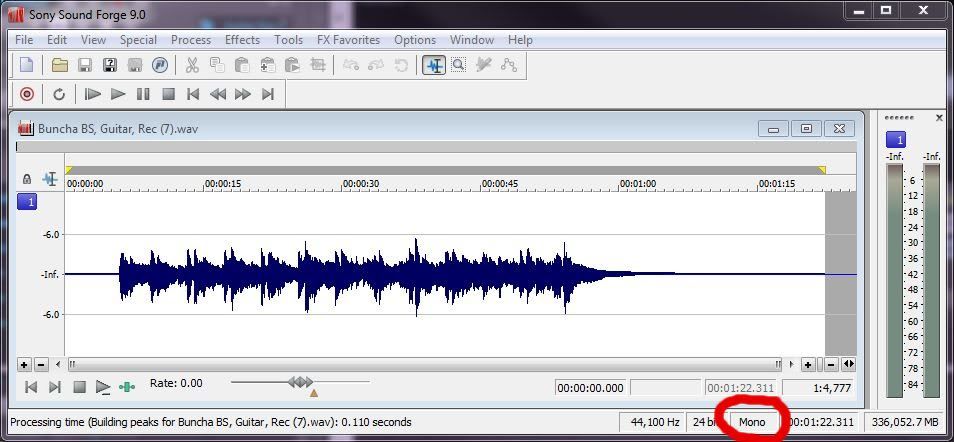
)-|-( HeatherHaze http://heatherhaze.com/ "This will be our reply to violence: to make music more intensely, more beautifully, more devotedly than ever before." ~ Leonard Bernstein Cakewalk by Bandlab Studio One 3.5, Cubase 9.5 Intel Core i7 8700, 32Gb RAM Focusrite Scarlett 18i20 V-Studio VS-700 Slate Raven MTi2 Windows 10 Professional 64-bit ...and a whole bunch of other stuff.
|
Bub
Max Output Level: -3.5 dBFS
- Total Posts : 7196
- Joined: 2010/10/25 10:22:13
- Location: Sneaking up behind you!
- Status: offline
Re:Mono v Stereo
2012/06/11 17:50:38
(permalink)
konradh
I don't know what to say. I create a track and Stereo is the default. I change the input to one input on the V-Studio and click interleave=mono (turn the blue icon off) and I get one-sided stereo. Maybe it is a V-Studio quirk. Or maybe I have a screwed-up driver.
Stereo would be OK if I were laying down stereo effects or reverb, but that is seldom the case.
The fact that you are going in and are changing Interleave from Stereo to Mono after you set your Input, means that your Input setting is actually Stereo. Remember, Interleave changes automatically when you select an Input. If you select a Mono Input, Interleave automatically sets itself to Mono. If you select a Stereo Input, Interleave automatically sets itself to Stereo. So ... based off the fact that you say you are setting your Input to Mono, and are going in and changing your Interleave setting to Mono, from Stereo, that means you are mistaken, or, if this in fact happening, something is corrupted and you need to start by completely removing the V-Studio drivers and reinstalling them, then Sonar next if that doesn't fix it. It's impossible as far as I know to select an Input and not have Interleave match it. If I'm wrong, someone please correct me. I've never run in to a scenario where that happens that I can recall.
"I pulled the head off Elvis, filled Fred up to his pelvis, yaba daba do, the King is gone, and so are you."
|
HeatherHaze
Max Output Level: -84 dBFS
- Total Posts : 334
- Joined: 2005/07/05 09:35:40
- Location: Washington DC
- Status: offline
Re:Mono v Stereo
2012/06/11 20:23:11
(permalink)
Konradh: Maybe you could walk us through the process you use from start to finish? I'm using the VS-700 and never had this trouble. From what you describe, it sounds like you are recording in stereo but only getting one channel of audio, that's why when you hit the interleave button you hear only one side. In other words, you're getting a stereo waveform but with sound on only one channel. Here's my process. 1. I create a new audio track by right-clicking an empty space in the Track View and selecting Insert Audio Track. The track defaults to stereo interleave, and that's fine. I leave it alone. 2. In the new track, I click on the Input dropdown box and select "VS-700 (12 in, 12 out)" -> "Left VS-700 IN 1-2". In the Track Inspector, I see the Interleave button automatically turn gray, indicating it is now in mono mode. [If I select stereo inputs instead, like "Stereo VS-700 IN 1-2", the button turns light blue indicating it's in stereo mode.] If you don't see the same options in your input dropdown menu (as I've mentioned here and in my prior screenshot)--ones that explicitly say "left" or right"--you might need to reinstall the VS-700 driver, as others have mentioned. They should be there. 3. I arm the track and hit record. I see a single waveform record in the data area of Track View. [If I'm recording in stereo, I see a stereo dual waveform, instead.] 4. When done recording, I can either leave the interleave at mono, or set it to stereo so any effects I add will be in stereo (even though the original waveform remains mono). The original mono source material sounds the same either way. Not sure if all this is helping or not, but I hope you get it worked out.
post edited by HeatherHaze - 2012/06/12 05:26:09
)-|-( HeatherHaze http://heatherhaze.com/ "This will be our reply to violence: to make music more intensely, more beautifully, more devotedly than ever before." ~ Leonard Bernstein Cakewalk by Bandlab Studio One 3.5, Cubase 9.5 Intel Core i7 8700, 32Gb RAM Focusrite Scarlett 18i20 V-Studio VS-700 Slate Raven MTi2 Windows 10 Professional 64-bit ...and a whole bunch of other stuff.
|
californiamusic
Max Output Level: -86 dBFS

- Total Posts : 223
- Joined: 2005/08/07 10:06:46
- Location: Chicago, IL
- Status: offline
Re:Mono v Stereo
2012/06/11 21:04:35
(permalink)
Can we go back to how CJ and Konradh were obviously separated at birth?! ; )
Intel i7-4770 - 3.9GHZ DDR3 - 32GB RAM Sonar PlatinumPresonus Studio 192 Motu 2408 MK3 Waves v9 Spectrasonics Omnisphere, Stylus RMX, Trilion Novation V-Station, Gladiator, ReFX Nexus, Lounge Lizard, Alchemy www.soundcloud.com/glenntolliver
|
bobguitkillerleft
Max Output Level: -72 dBFS

- Total Posts : 944
- Joined: 2011/05/17 17:28:58
- Location: Adelaide Australia
- Status: offline
Re:Mono v Stereo
2012/06/12 04:37:30
(permalink)
Iv'e learn't lots from this thread[as embarrassing as that maybe?] THANKS ALL!
Bob P.S. Yes CJ/Konradh you two guys do look incredibly similar,it's almost like same guy different moments[and shades]
https://soundcloud.com/rks26https://en.wikipedia.org/wiki/The_Hitmen Lenovo W540 Factoryrefurb SONAR PLATINUM,Ozone 7 N.I. KA6 Komplete 9 SSD4 Platinum Epi L/H LP Custom Headstock broken twice and fixed.Gibson L/H Les Paul 2010 Wine Red Studio stupid Right Hand Vol.Tone for Left Hand?LH84Ibanez RS135 gen.FloydRose JB Marshall 100w 2203 4x25w Celestion Green backs "You are what you is"-Frank Zappa "But I'm gonna wave my freak flag high"-Jimi Hendrix
|
John
Forum Host
- Total Posts : 30467
- Joined: 2003/11/06 11:53:17
- Status: offline
Re:Mono v Stereo
2012/06/12 04:48:05
(permalink)
Lol all you had to do was ask, Bob. 
|
mudgel
Max Output Level: 0 dBFS
- Total Posts : 12010
- Joined: 2004/08/13 00:56:05
- Location: Linton Victoria (Near Ballarat)
- Status: offline
Re:Mono v Stereo
2012/06/12 05:10:11
(permalink)
In your case konradh:
Channel 8 is Input 7-8 Right then you will get interleave set to Mono automatically
Mike V. (MUDGEL) STUDIO: Win 10 Pro x64, SPlat & CbB x64, PC: ASUS Z370-A, INTEL i7 8700k, 32GIG DDR4 2400, OC 4.7Ghz. Storage: 7 TB SATA III, 750GiG SSD & Samsung 500 Gig 960 EVO NVMe M.2. Monitors: Adam A7X, JBL 10” Sub. Audio I/O & DSP Server: DIGIGRID IOS & IOX. Screen: Raven MTi + 43" HD 4K TV Monitor. Keyboard Controller: Native Instruments Komplete Kontrol S88.
|
Skyline_UK
Max Output Level: -54 dBFS

- Total Posts : 2133
- Joined: 2004/04/15 17:55:09
- Location: Midlands, UK
- Status: offline
Re:Mono v Stereo
2012/06/12 05:18:36
(permalink)
This thread may be boring to the pros and those who believe these things are self-obvious, but I for one am gleaning a lot of information from it, thanks.
I neglected to say in my earlier post that I use a mixing desk and the two main outs are connected to the two inputs on my RME AIO soundcard. I keep the two outputs from the of the desk panned L and R. My mic is permanently plugged into channel 16 of the desk which is panned centre. So from reading the above it looks like I should instead be panning that channel hard left (e.g.) and using the L signal from my soundcard into my vocal track in Sonar instead of the stereo one. Does that make sense?
My stuff Intel Sandy Bridge i7 2600 @ 3.4GHz, 4 cores, 8 threads, 16GB RAM.OS & Programs drive: 240GB SSD
Data drives: 1 x 1TB drive RAID mirrored, plus extra 1TB data drive
Windows 10 Home 64 bit
Cakewalk by BandLab 64 bit, Studio One 3, Band In A Box 2016, Ozone 8+ too many other pluginsBandLab page
|
Bristol_Jonesey
Max Output Level: 0 dBFS
- Total Posts : 16775
- Joined: 2007/10/08 15:41:17
- Location: Bristol, UK
- Status: offline
Re:Mono v Stereo
2012/06/12 05:59:33
(permalink)
Makes sense John - that's what I do when I'm forced to record via my desk
CbB, Platinum, 64 bit throughoutCustom built i7 3930, 32Gb RAM, 2 x 1Tb Internal HDD, 1 x 1TB system SSD (Win 7), 1 x 500Gb system SSD (Win 10), 2 x 1Tb External HDD's, Dual boot Win 7 & Win 10 64 Bit, Saffire Pro 26, ISA One, Adam P11A,
|
Guitarhacker
Max Output Level: 0 dBFS
- Total Posts : 24398
- Joined: 2007/12/07 12:51:18
- Location: NC
- Status: offline
Re:Mono v Stereo
2012/06/12 07:48:03
(permalink)
Bristol_Jonesey
Bub
Bristol_Jonesey
..... All I'm saying is, Sonar has no control over the track being Stereo or Mono during recording. That decision is made by our Audio Card Driver. The Input choices we have are not determined or controlled by Sonar, they are determined and controlled by our Audio Card Driver.
Yes - Sonar will only show those inputs exposed by the Card, but as I've said, 99.9% of the time (and I've yet to see the other 0.1%) this can be quite a range if inputs, including different flavours of Digital, as many Analog inputs as your interface allows.
Yes.... correct..... I believe the inputs shown will correspond to the inputs that the computer can see based on the driver mode being used. In ASIO mode, which I use, I only see the Saffire inputs. The factory sound card isn't in the list because it prefers MME and ASIO doesn't let it be seen in the list.
My website & music: www.herbhartley.com MC4/5/6/X1e.c, on a Custom DAW Focusrite Firewire Saffire Interface BMI/NSAI "Just as the blade chooses the warrior, so too, the song chooses the writer "
|
konradh
Max Output Level: -42 dBFS
- Total Posts : 3325
- Joined: 2006/01/16 16:07:06
- Status: offline
Re:Mono v Stereo
2012/06/12 09:28:23
(permalink)
While I appreciate the time people are taking to reply, I think everyone is missing what I am saying. I have a single-mono-one cable-no stereo mic plugged into one single input #8, also called Right 7-8 and Right 7-8 is selected as the track input. The track records as stereo with one side blank even after I manually change Interleave=Stereo. If this works for other people with V-Studios, then something is set up wrong in my drivers or something.
And while I ask a lot of questions and am not the world's leading expert, I have been doing studio work for many years and do understand the difference in mono and stereo. This is a technical issue with Sonar.
Thanks again.
|
CJaysMusic
Max Output Level: 0 dBFS
- Total Posts : 30423
- Joined: 2006/10/28 01:51:41
- Location: Miami - Fort Lauderdale - Davie
- Status: offline
Re:Mono v Stereo
2012/06/12 12:36:12
(permalink)
We all know what your saying, but all you need to do is select the correct "Mono" input and youll record a mono track.
Dont keep repeating the same thing over and over. Change your track input so it only reocrds a mono input.
Cj
|
frankandfree
Max Output Level: -82 dBFS

- Total Posts : 447
- Joined: 2008/04/26 11:56:32
- Location: Norddeutschland
- Status: offline
Re:Mono v Stereo
2012/06/12 12:55:29
(permalink)
We all know what your saying, but all you need to do is select the correct "Mono" input and youll record a mono track.
Dont keep repeating the same thing over and over. Change your track input so it only reocrds a mono input.
Cj
From what I understand Konradh does " select the correct "Mono" input" but still doesn't record a mono track for some reason. konradh post #57 I have a single-mono-one cable-no stereo mic plugged into one single input #8, also called Right 7-8 and Right 7-8 is selected as the track input.
(emphasis mine) Konradh, at this point I'd probably post a screenshot of your track input setting, so that people stop going in circles
|
konradh
Max Output Level: -42 dBFS
- Total Posts : 3325
- Joined: 2006/01/16 16:07:06
- Status: offline
Re:Mono v Stereo
2012/06/12 13:08:35
(permalink)
Sorry for costing everyone so much time and I do appreciate the help. The Sweetwater tech thinks there is a ghost in my machine because I see a number of weird behaviors no one else does (among them: track input assignments resetting themselves, audio going away, etc.). We think there is some driver issue somewhere related to the IO. Since it is just now a theory under test, I won't confuse things with more detail yet, but we are considering testing the V-Studio console and X1 with a different interface.
Once again, thanks for everyone who replied. This forum is a great group of people.
|