JohnEgan
Max Output Level: -80 dBFS

- Total Posts : 543
- Joined: 2014/10/21 10:03:57
- Location: Ottawa, Ontario, Canada
- Status: offline
SIGNAL FLOW
Good Day,
If someone could please explain, I'm a little uncertain about signal flow between ProChannel and the FXBIN (having viewed diagram in help doc),
As I understand, signal flow is through FX Bin first if any effects are inserted, then through Pro-channel effects, if no FX Bin fx is used, signal flows through ProChannel when activated.
So my question is
Are there pro/cons, or specific reasons to using FX Bin shown in track/console strips (before ProChannel), as opposed to simply accessing it in ProChannel FX Chain module?
By using FX Chain in ProChannel, the FX can inserted either as first in line, (as would be), or last, or between any ProChannel FX modules, as well as in multiple instances between any of ProChannel FX being used? (so multiple send/return points in single flow)
John Egan Sonar Platinum (2017-10),RME-UFX, PC-CPU - i7-5820, 3.3 GHz, 6 core, ASUS X99-AII, 16GB ram, GTX 960, 500 GB SSD, 2TB HDD x 2, Win7 Pro x64, O8N2 Advanced, Melodyne Studio,.... (2 cats :(, in the yard).
|
meh
Max Output Level: -82 dBFS

- Total Posts : 431
- Joined: 2005/06/11 13:01:57
- Location: Tempe, Az
- Status: offline

Re: SIGNAL FLOW
2016/07/17 09:47:55
(permalink)
☄ Helpfulby PilotGav 2016/07/17 10:53:42
ProChannelThe ProChannel is an analog mixer chock full pro effects embedded right into the Console View. It’s a powerful tool so it’s important to know how to use it within your signal flow. When activated, audio passes through your ProChannel first and then hits the FX Bin – where other effects can be inserted. Between the ProChannel and the FX Bin you can make some pretty serious signal chains for all kinds of different scenarios. A great way of changing the tone and sound of your chain is to switch the order of effects. SONAR allows you to quickly rearrange the ProChannel and FX Bin with the added “POST” button. Your signal flow follows this arrangement when the “Post” button is in it’s default state. Input > Trim > ProCh > FXWhen activating the “Post” button your signal flow changes to the following: Input > Trim > FX > ProCh Rafone
post edited by meh - 2016/07/17 10:33:27
SONAR Version 2017.09
HP Z-420 Workstation
Intel Xeon W3680 @3.50ghz
32g memory 2tb disk space
Win2008 Server R2 Standard 64-bit
TASCAM US-1641 interface
|
JohnEgan
Max Output Level: -80 dBFS
- Total Posts : 543
- Joined: 2014/10/21 10:03:57
- Location: Ottawa, Ontario, Canada
- Status: offline
Re: SIGNAL FLOW
2016/07/17 13:59:41
(permalink)
Thanks Rafone,
So activating "post" in ProChannel only places it after the FX Bin, not after the fader, which I thought it did? So then I guess then my question may still be, or more so, why not just use ProChannel strip exclusively for all FX?, (also post fader FX Buses), i.e., isn't the FX Bin then somewhat redundant, with the ProChannel FX Chain module available?
John Egan Sonar Platinum (2017-10),RME-UFX, PC-CPU - i7-5820, 3.3 GHz, 6 core, ASUS X99-AII, 16GB ram, GTX 960, 500 GB SSD, 2TB HDD x 2, Win7 Pro x64, O8N2 Advanced, Melodyne Studio,.... (2 cats :(, in the yard).
|
chuckebaby
Max Output Level: 0 dBFS

- Total Posts : 13146
- Joined: 2011/01/04 14:55:28
- Status: offline
Re: SIGNAL FLOW
2016/07/17 15:24:31
(permalink)
As you can see in the diagram, PC and FX bin are essentially tied in at the same point. (*See Track) By default, the ProChannel signal is routed prior to the channel’s effects bin though. but are still tapped, before the track volume control (on pre selection). There for... the Pro channels FX bin is for convince. 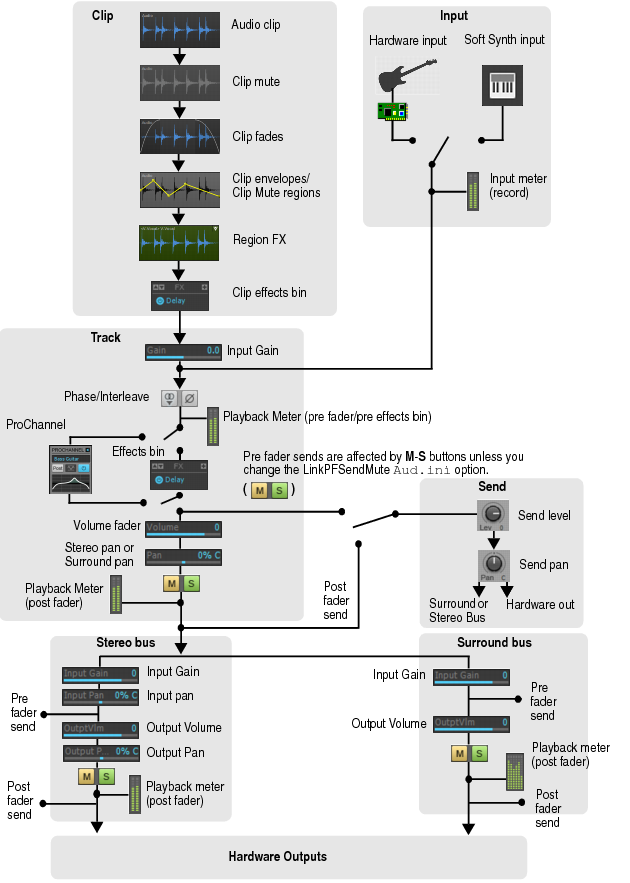
Windows 8.1 X64 Sonar Platinum x64 Custom built: Asrock z97 1150 - Intel I7 4790k - 16GB corsair DDR3 1600 - PNY SSD 220GBFocusrite Saffire 18I8 - Mackie Control
|
Sanderxpander
Max Output Level: -36.5 dBFS

- Total Posts : 3873
- Joined: 2013/09/30 10:08:24
- Status: offline
Re: SIGNAL FLOW
2016/07/17 17:38:04
(permalink)
Using an FX chain inside the ProChannel is identical to using the bin, with the added routing benefits you listed. The difference is merely esthetic/workflow related. Personally I like to have my fx bin and its effects on the track header and my inspector showing the main fader and sends. There aren't really many PC modules I prefer over my other stuff so I use the bin. If you like and use the PC, it's probably easiest to use FX chains.
post edited by Sanderxpander - 2016/07/18 03:19:06
|
olemon
Max Output Level: -75 dBFS

- Total Posts : 768
- Joined: 2011/10/27 05:35:19
- Status: offline
Re: SIGNAL FLOW
2016/07/18 06:44:39
(permalink)
☄ Helpfulby glennstanton 2016/07/18 17:04:07
Sanderxpander
Using an FX chain inside the ProChannel is identical to using the bin, with the added routing benefits you listed.
+1 This was made clear for me when I was considering how to put the PC Console Emulator last in a track's Fx. (There are threads on that.) The PC Fx Chain is basically another PC Module, but it's just an Fx Bin. It is an elegant and powerful feature. You may already know this, but as an example, consider a vocal track that I want to EQ with the Quad Curve, DeEss with the Nomad Factory plugin, compress with the PC76 and finally add the Console Emulator module, which I want to be last. The Pre-Fader Pro Channel would be: QuadCurve Fx Chain (to which I add the DeEsser) PC76 Console Emulator You can add more than one Fx Chain module too, so if I wanted another EQ after that PC76, that's easily done also.
https://www.reverbnation.com/scottholson Platinum, Studio One 3 Pro, Win 10 (x64), AMD FX-8350, ASUS M5A97 R2.0, 16GB, RME UCX, Digimax DP88, Faderport 8, Revive Audio Mod Studio Channel, Vintage Audio M72, Summit Audio TLA-50, KRK Rokit 5 G2 Monitors, Guitars "If you wait till the last minute, it only takes a minute."
|
JohnEgan
Max Output Level: -80 dBFS
- Total Posts : 543
- Joined: 2014/10/21 10:03:57
- Location: Ottawa, Ontario, Canada
- Status: offline
Re: SIGNAL FLOW
2016/07/18 07:43:50
(permalink)
Thanks Oleman,
That's basically how I would use FX chain module in ProChannel also, as well as in FX buses, though I can see why some would like to see FX Bin in Console/track strips.
I guess my ultimate question/answer is its an optional preference which one uses, and there are no audio or computer performance advantages in using either.
In regards to Console Emulator module, Id always been putting it first in FX list, in thinking in a real console it would be first as input meters, do you find its more audibly effective placing in last in chain?
Cheers
John Egan Sonar Platinum (2017-10),RME-UFX, PC-CPU - i7-5820, 3.3 GHz, 6 core, ASUS X99-AII, 16GB ram, GTX 960, 500 GB SSD, 2TB HDD x 2, Win7 Pro x64, O8N2 Advanced, Melodyne Studio,.... (2 cats :(, in the yard).
|
chuckebaby
Max Output Level: 0 dBFS
- Total Posts : 13146
- Joined: 2011/01/04 14:55:28
- Status: offline
Re: SIGNAL FLOW
2016/07/18 15:43:37
(permalink)
JohnEgan
Thanks Oleman,
I guess my ultimate question/answer is its an optional preference which one uses, and there are no audio or computer performance advantages in using either.
Cheers
did you see the pic I posted ? they are tied in at the same exact spot before fader. im not sure how performance could be better.
Windows 8.1 X64 Sonar Platinum x64 Custom built: Asrock z97 1150 - Intel I7 4790k - 16GB corsair DDR3 1600 - PNY SSD 220GBFocusrite Saffire 18I8 - Mackie Control
|
olemon
Max Output Level: -75 dBFS
- Total Posts : 768
- Joined: 2011/10/27 05:35:19
- Status: offline
Re: SIGNAL FLOW
2016/07/18 21:50:28
(permalink)
https://www.reverbnation.com/scottholson Platinum, Studio One 3 Pro, Win 10 (x64), AMD FX-8350, ASUS M5A97 R2.0, 16GB, RME UCX, Digimax DP88, Faderport 8, Revive Audio Mod Studio Channel, Vintage Audio M72, Summit Audio TLA-50, KRK Rokit 5 G2 Monitors, Guitars "If you wait till the last minute, it only takes a minute."
|
olemon
Max Output Level: -75 dBFS
- Total Posts : 768
- Joined: 2011/10/27 05:35:19
- Status: offline
Re: SIGNAL FLOW
2016/07/18 21:51:44
(permalink)
chuckebaby
did you see the pic I posted ? Yes. Excellent.
https://www.reverbnation.com/scottholson Platinum, Studio One 3 Pro, Win 10 (x64), AMD FX-8350, ASUS M5A97 R2.0, 16GB, RME UCX, Digimax DP88, Faderport 8, Revive Audio Mod Studio Channel, Vintage Audio M72, Summit Audio TLA-50, KRK Rokit 5 G2 Monitors, Guitars "If you wait till the last minute, it only takes a minute."
|
chuckebaby
Max Output Level: 0 dBFS
- Total Posts : 13146
- Joined: 2011/01/04 14:55:28
- Status: offline
Re: SIGNAL FLOW
2016/07/18 22:11:06
(permalink)
olemon
chuckebaby
did you see the pic I posted ?
Yes. Excellent.
I do understand his question though. and it is a good one. hope all is well 
post edited by chuckebaby - 2016/07/19 09:39:08
Windows 8.1 X64 Sonar Platinum x64 Custom built: Asrock z97 1150 - Intel I7 4790k - 16GB corsair DDR3 1600 - PNY SSD 220GBFocusrite Saffire 18I8 - Mackie Control
|
JohnEgan
Max Output Level: -80 dBFS
- Total Posts : 543
- Joined: 2014/10/21 10:03:57
- Location: Ottawa, Ontario, Canada
- Status: offline
Re: SIGNAL FLOW
2016/07/19 09:03:54
(permalink)
Yes thanks I saw pic, (and in manual/blog), I understand where "post" places ProCh now, apparently there's no operational system performance differences (e.g. latency) using one or the other.
Some ProChannel advantages, - ProChannel FX Modules; any other FX can be used and in one or multiple ProChannel FX Chain modules, ProChannel can be displayed along side of track in console. (FX Bin can be removed from console view, shortening console footprint, FX can be drag and dropped from FXbin into PC FX Chain, maintaining settings).
Apparently some issues may be mapping some PC module/controls to midi controllers.
Thanks for help from everyone.
John Egan Sonar Platinum (2017-10),RME-UFX, PC-CPU - i7-5820, 3.3 GHz, 6 core, ASUS X99-AII, 16GB ram, GTX 960, 500 GB SSD, 2TB HDD x 2, Win7 Pro x64, O8N2 Advanced, Melodyne Studio,.... (2 cats :(, in the yard).
|