jshep0102
Max Output Level: -71 dBFS

- Total Posts : 984
- Joined: 2006/02/21 22:44:35
- Status: offline
SOLVED: Volume Differences at unity .cwp added
I'm not sure how I arrived at this gain staging, maybe someone can point to me what I have set wrong. I have all trims and faders set at unity, from track to bus to master to my hardware. No plugins inserted anywhere. The track shows output of -0.2, in the console view the track shows-0.0, the bus shows -3.0, the master and hardware shows -6.0. I have pan law at default (0db center, sin/cos taper, constant power. I can't find another setting that reduces level by 3db not once, but twice. Hopefully you can use the percent zoom in your browser to see pic detail. Thanks, Shep here's a link, too..... <a href=" http://s156.photobucket.com/user/jshep0102/media/Meter%20Differences%20at%20Unity.png.html" target="_blank"> click on the magnifying glass for full size 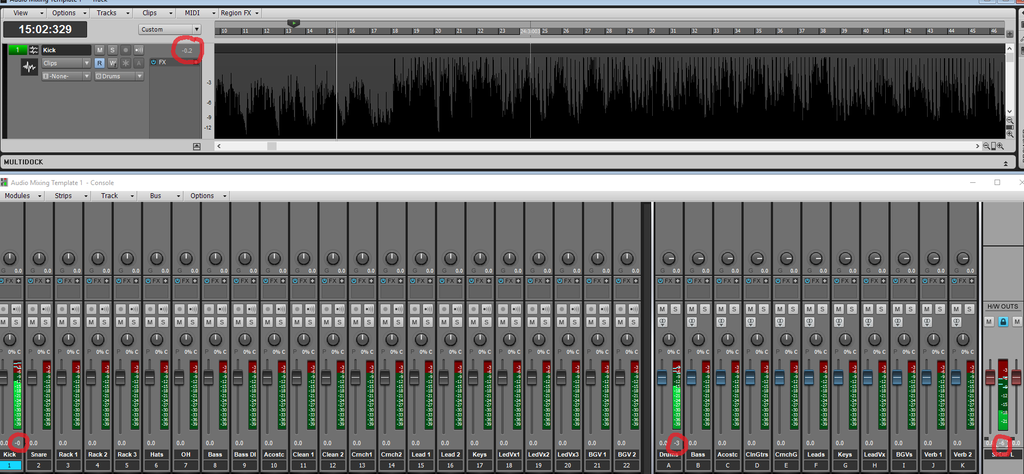 " />
post edited by jshep0102 - 2015/12/28 22:35:38
SHEP-ASRock Z97 Pro4 - i7 4790K 4.0ghz - 16 GB DDR3 - Windows 10 Home - Apollo Twin USB Duo - UAD2 Duo - Digimax FS - Focal CMS50 - Raven MTi2 - Slate VMS 1 - Bluebird - Yamaha MOXF8 - Axe Fx Ultra - SPLAT 2017.2
|
brundlefly
Max Output Level: 0 dBFS

- Total Posts : 14250
- Joined: 2007/09/14 14:57:59
- Location: Manitou Spgs, Colorado
- Status: offline

Re: Volume Differences at unity
2015/12/28 03:51:31
(permalink)
jshep0102
The track shows output of -0.2, in the console view the track shows-0.0, the bus shows -3.0, the master and hardware shows -6.0.
The console strips are not showing tenths of a dB that the track is because there isn't room with narrow strips, so that accounts for the -0.2 vs. 0 (not 0.0) on the track. The bus differences could be due to having a volume reduced in Offset mode. Otherwise I don't know what could cause that. Click the Offset/Envelope mode button in the Mix module to check the buses.
SONAR Platinum x64, 2x MOTU 2408/PCIe-424 (24-bit, 48kHz) Win10, I7-6700K @ 4.0GHz, 24GB DDR4, 2TB HDD, 32GB SSD Cache, GeForce GTX 750Ti, 2x 24" 16:10 IPS Monitors
|
Bristol_Jonesey
Max Output Level: 0 dBFS
- Total Posts : 16775
- Joined: 2007/10/08 15:41:17
- Location: Bristol, UK
- Status: offline
Re: Volume Differences at unity
2015/12/28 04:10:56
(permalink)
It would be useful if your screenshot were to show the In / Out module
CbB, Platinum, 64 bit throughoutCustom built i7 3930, 32Gb RAM, 2 x 1Tb Internal HDD, 1 x 1TB system SSD (Win 7), 1 x 500Gb system SSD (Win 10), 2 x 1Tb External HDD's, Dual boot Win 7 & Win 10 64 Bit, Saffire Pro 26, ISA One, Adam P11A,
|
Sanderxpander
Max Output Level: -36.5 dBFS

- Total Posts : 3873
- Joined: 2013/09/30 10:08:24
- Status: offline
Re: Volume Differences at unity
2015/12/28 06:40:50
(permalink)
Any PC modules active?
I could also imagine a bus auto attenuating by a few dB since it's practically always used for summing, but I don't recall reading about this anywhere.
|
jshep0102
Max Output Level: -71 dBFS
- Total Posts : 984
- Joined: 2006/02/21 22:44:35
- Status: offline
Re: Volume Differences at unity
2015/12/28 17:17:48
(permalink)
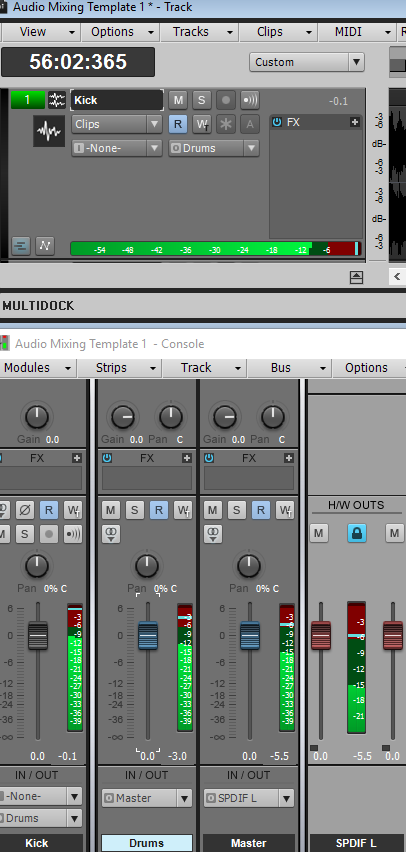 One clip playing (-0.1 peak) from track marked Kick. Kick out to Drums bus, Drums bus out to Master, Master out to SPDIF. I never use PC. No offset. So weird. This is a demo mastered to -.01. RMS still down -5.4db at final output. EDIT - I sent the track straight to SPDIF. Exact level as track. I'm losing relatively 3db per bus. Good thing I don't go through 5 busses... Can't find why.
post edited by jshep0102 - 2015/12/28 17:37:48
SHEP-ASRock Z97 Pro4 - i7 4790K 4.0ghz - 16 GB DDR3 - Windows 10 Home - Apollo Twin USB Duo - UAD2 Duo - Digimax FS - Focal CMS50 - Raven MTi2 - Slate VMS 1 - Bluebird - Yamaha MOXF8 - Axe Fx Ultra - SPLAT 2017.2
|
John
Forum Host

- Total Posts : 30467
- Joined: 2003/11/06 11:53:17
- Status: offline
Re: Volume Differences at unity
2015/12/28 17:29:02
(permalink)
I have never seen that without something in the signal path causing it.
|
jshep0102
Max Output Level: -71 dBFS
- Total Posts : 984
- Joined: 2006/02/21 22:44:35
- Status: offline
Re: Volume Differences at unity
2015/12/28 17:34:50
(permalink)
I started this project from scratch. There are no plugins installed at all. The earlier picture shows all tracks and busses. Only going to 2 busses, then out. No sends, no automation. at all. I'm stymied where to look, John.
SHEP-ASRock Z97 Pro4 - i7 4790K 4.0ghz - 16 GB DDR3 - Windows 10 Home - Apollo Twin USB Duo - UAD2 Duo - Digimax FS - Focal CMS50 - Raven MTi2 - Slate VMS 1 - Bluebird - Yamaha MOXF8 - Axe Fx Ultra - SPLAT 2017.2
|
jshep0102
Max Output Level: -71 dBFS
- Total Posts : 984
- Joined: 2006/02/21 22:44:35
- Status: offline
Re: Volume Differences at unity
2015/12/28 17:50:45
(permalink)
I deleted everything but the 1 track, 2 busses and SPDIF. When I put the bus outs to prefader, the Drums bus matched the track (but that's not showing what it outputs), but the Master bus does not because it doesn't come in as hot. When I bump the trim on the master 5.4 db, it is equal. If there is nothing on a bus including automation and fader is at unity, why would it matter if I use pre or post?
post edited by jshep0102 - 2015/12/28 18:08:39
SHEP-ASRock Z97 Pro4 - i7 4790K 4.0ghz - 16 GB DDR3 - Windows 10 Home - Apollo Twin USB Duo - UAD2 Duo - Digimax FS - Focal CMS50 - Raven MTi2 - Slate VMS 1 - Bluebird - Yamaha MOXF8 - Axe Fx Ultra - SPLAT 2017.2
|
John
Forum Host
- Total Posts : 30467
- Joined: 2003/11/06 11:53:17
- Status: offline
Re: Volume Differences at unity
2015/12/28 17:56:45
(permalink)
Does your RME 9632-Digimax have mixing software that could have some impact on levels? What version of Sonar are you using? On the Buses you have FX on. You appear not to have FX inserted but try turning the FX off.
post edited by John - 2015/12/28 18:12:23
|
jshep0102
Max Output Level: -71 dBFS
- Total Posts : 984
- Joined: 2006/02/21 22:44:35
- Status: offline
Re: Volume Differences at unity
2015/12/28 18:07:00
(permalink)
I'm on Lexington. The signal only goes to the RME after the master. I use no outboard gear. The RME feeds the Central Station. The RME shows the same level as the Master bus and Hardware out meters in SPLAT. I saved the project and restarted Sonar. The levels are all the same with prefader selection on Busses now - which feels very good. Oddly, when I changed the bus meters back to post, only the Drums bus level lowered, while the Master bus still output fully... Can this be a bug? After save and restart: 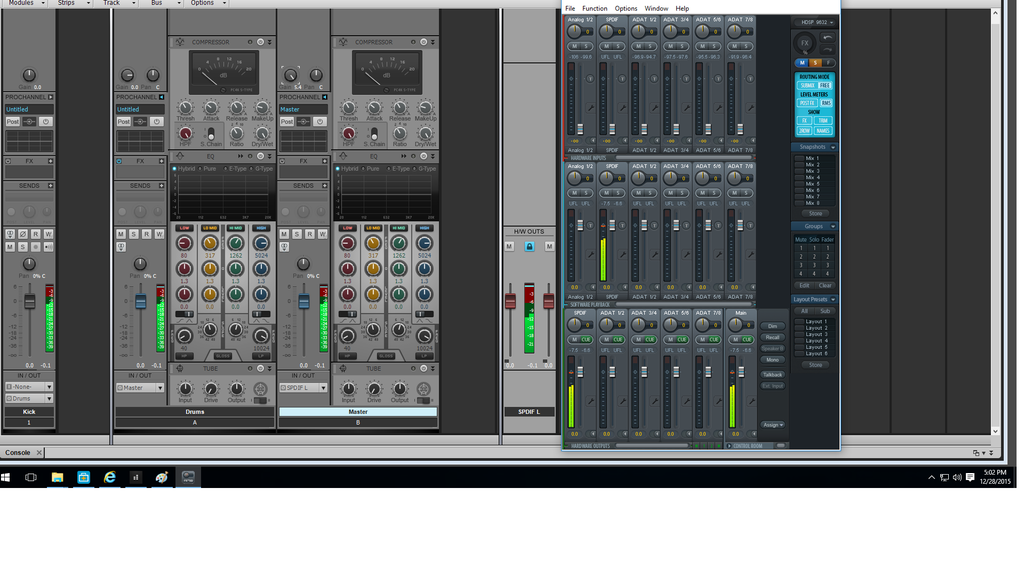 After changing to post fader, the drums bus level lowers, yet doesn't affect the master level: 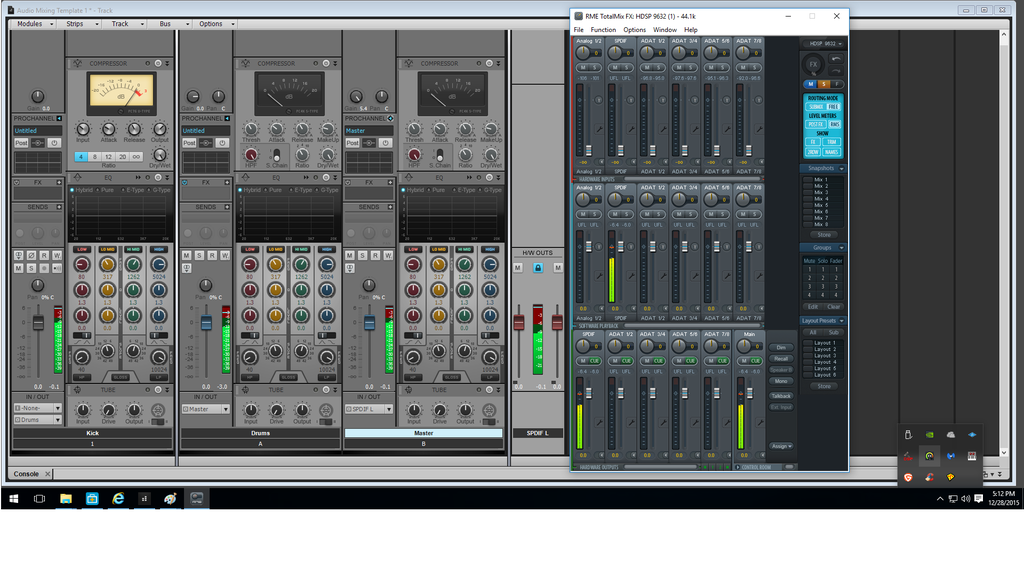
post edited by jshep0102 - 2015/12/28 18:36:00
SHEP-ASRock Z97 Pro4 - i7 4790K 4.0ghz - 16 GB DDR3 - Windows 10 Home - Apollo Twin USB Duo - UAD2 Duo - Digimax FS - Focal CMS50 - Raven MTi2 - Slate VMS 1 - Bluebird - Yamaha MOXF8 - Axe Fx Ultra - SPLAT 2017.2
|
John
Forum Host
- Total Posts : 30467
- Joined: 2003/11/06 11:53:17
- Status: offline
Re: Volume Differences at unity
2015/12/28 18:41:27
(permalink)
Is it possible that you have set the meters differently? The buss vs the tracks?
|
PeterMc
Max Output Level: -80 dBFS

- Total Posts : 504
- Joined: 2003/11/12 23:46:34
- Location: Tasmania
- Status: offline
Re: Volume Differences at unity
2015/12/28 18:54:47
(permalink)
Can you post the project somewhere so we can download and test it? I mean the *.cwp file. It won't have your wav file attached, but it's easy enough to insert any wav file. This shouldn't make a difference.
Cheers, Peter.
i5 6500, H170M, Intel HD 530, 16GB, Focusrite Scarlett 8i6, Win 10 Pro (1803) (64 bit), Cakewalk by Bandlab
|
PeterMc
Max Output Level: -80 dBFS
- Total Posts : 504
- Joined: 2003/11/12 23:46:34
- Location: Tasmania
- Status: offline
Re: Volume Differences at unity
2015/12/28 19:24:47
(permalink)
John
Is it possible that you have set the meters differently? The buss vs the tracks?
I wondered that too. But AFAICS the numbers are always peak values regardless of how the meters are set. Cheers, Peter.
i5 6500, H170M, Intel HD 530, 16GB, Focusrite Scarlett 8i6, Win 10 Pro (1803) (64 bit), Cakewalk by Bandlab
|
jshep0102
Max Output Level: -71 dBFS
- Total Posts : 984
- Joined: 2006/02/21 22:44:35
- Status: offline
Re: Volume Differences at unity
2015/12/28 19:25:55
(permalink)
Both track and bus are set to prefader and working correctly. Bus fader on drums changes when I set to post fader. All are set to peak + rms. I have to ask - if all are unity gain and unchanging in level, why would it matter which? I ask because I may not understand the inner workings. Thanks
post edited by jshep0102 - 2015/12/28 19:40:48
SHEP-ASRock Z97 Pro4 - i7 4790K 4.0ghz - 16 GB DDR3 - Windows 10 Home - Apollo Twin USB Duo - UAD2 Duo - Digimax FS - Focal CMS50 - Raven MTi2 - Slate VMS 1 - Bluebird - Yamaha MOXF8 - Axe Fx Ultra - SPLAT 2017.2
|
John
Forum Host
- Total Posts : 30467
- Joined: 2003/11/06 11:53:17
- Status: offline
Re: Volume Differences at unity
2015/12/28 19:39:02
(permalink)
OK that may be the problem Set everything to post fader. See what happens.
|
jshep0102
Max Output Level: -71 dBFS
- Total Posts : 984
- Joined: 2006/02/21 22:44:35
- Status: offline
Re: Volume Differences at unity
2015/12/28 20:22:03
(permalink)
All post fader setting drops level 6db by the time it outputs. Saved all prefader options. Restarted Sonar - project loads post fader settings. With all prefader settings, only Master bus is less than full output. Here's the .cwp file. I appreciate everyone's assistance very much. https://www.dropbox.com/s/djl8f3j4fup2adt/Audio%20Mixing%20Template.cwp?dl=0
post edited by jshep0102 - 2015/12/28 20:45:42
SHEP-ASRock Z97 Pro4 - i7 4790K 4.0ghz - 16 GB DDR3 - Windows 10 Home - Apollo Twin USB Duo - UAD2 Duo - Digimax FS - Focal CMS50 - Raven MTi2 - Slate VMS 1 - Bluebird - Yamaha MOXF8 - Axe Fx Ultra - SPLAT 2017.2
|
John
Forum Host
- Total Posts : 30467
- Joined: 2003/11/06 11:53:17
- Status: offline
Re: Volume Differences at unity
2015/12/28 20:56:09
(permalink)
Just what I suspected you have the meters set to different settings. Right click on the meters and set them to the same value. The level is the same on all three. The range is different. I would set them to 60dB. BTW you have been a very good poster here. You have answered all our questions and went so far to supply a project. I wish all posters where as conscientious as you.
post edited by John - 2015/12/28 21:11:17
|
jshep0102
Max Output Level: -71 dBFS
- Total Posts : 984
- Joined: 2006/02/21 22:44:35
- Status: offline
Re: Volume Differences at unity
2015/12/28 21:51:27
(permalink)
I appreciate your help (and quite a few others) very much, John. You have been here for us a very long time. Kudos for a level of patience and troubleshooting I can't fathom. Regarding your 1st sentence, Craig Anderton uses different range meters in his projects, I've seen him speak to metering here. As well, no one seems to be able to say why a pre or post setting would change anything if unity is 100% and levels never automate. I'm totally perplexed by that.
post edited by jshep0102 - 2015/12/28 22:04:21
SHEP-ASRock Z97 Pro4 - i7 4790K 4.0ghz - 16 GB DDR3 - Windows 10 Home - Apollo Twin USB Duo - UAD2 Duo - Digimax FS - Focal CMS50 - Raven MTi2 - Slate VMS 1 - Bluebird - Yamaha MOXF8 - Axe Fx Ultra - SPLAT 2017.2
|
PeterMc
Max Output Level: -80 dBFS
- Total Posts : 504
- Joined: 2003/11/12 23:46:34
- Location: Tasmania
- Status: offline
Re: Volume Differences at unity
2015/12/28 21:57:49
(permalink)
Ooh, I love a good mystery. I downloaded Shep's template, inserted an audio file, and sure enough the volume drops about 3dB each time the signal goes to another bus. So then I created a new project from the Basic template and set it up the same way. No problems at all. There's something screwy going on here. Setting the track and bus meters to pre-fader fixes the Drums bus problem, but doesn't change the Master bus output being nearly 6dB down. Que?
Cheers, Peter.
i5 6500, H170M, Intel HD 530, 16GB, Focusrite Scarlett 8i6, Win 10 Pro (1803) (64 bit), Cakewalk by Bandlab
|
jshep0102
Max Output Level: -71 dBFS
- Total Posts : 984
- Joined: 2006/02/21 22:44:35
- Status: offline
Re: Volume Differences at unity
2015/12/28 22:03:01
(permalink)
Thanks much for looking at that, Peter. I have scoured every last place I can think to look. I find no thing that could be causing it. Maybe I need to send it to Cake and let the masters of all things SPLAT have a go. EDIT - I just did what you did, and that works. I had made my new project from blank, just added tracks and busses. I changed every meter to 42db range. saved project and restarted SPLAT. Still screwed up. If in fact the difference in meter ranges or pre/post fader at perfect unity causes this, I'd have to consider that a bit buggy. Confounded outta my ever lovin' mind.
post edited by jshep0102 - 2015/12/28 22:28:26
SHEP-ASRock Z97 Pro4 - i7 4790K 4.0ghz - 16 GB DDR3 - Windows 10 Home - Apollo Twin USB Duo - UAD2 Duo - Digimax FS - Focal CMS50 - Raven MTi2 - Slate VMS 1 - Bluebird - Yamaha MOXF8 - Axe Fx Ultra - SPLAT 2017.2
|
PeterMc
Max Output Level: -80 dBFS
- Total Posts : 504
- Joined: 2003/11/12 23:46:34
- Location: Tasmania
- Status: offline
Re: Volume Differences at unity
2015/12/28 22:08:29
(permalink)
Try inserting a new Drums bus and a new Master bus (call them Drums2 and Master2), then re-routing to use those instead of the old ones. That fixed it for me. There's something definitely weird here. It would be good to send your template to Cake and report the problem.
Cheers, Peter.
i5 6500, H170M, Intel HD 530, 16GB, Focusrite Scarlett 8i6, Win 10 Pro (1803) (64 bit), Cakewalk by Bandlab
|
John
Forum Host
- Total Posts : 30467
- Joined: 2003/11/06 11:53:17
- Status: offline
Re: Volume Differences at unity
2015/12/28 22:15:36
(permalink)
Its not what you think. The levels are the same because you have all the faders at unity. (thats what really matters) What is different is the readout of the meters because they are using different scales. You had a scale that was not using the full range of the meter readout on the buss. Thus it seemed to be lower when it wasn't. Setting the meters to the same scale will use the same range and they will readout the same. Keep in mind that when I loaded an audio file into your project I got the same results with the same differences that you did. I then checked the scales and when I made them all the same all the meters agreed. Its confusing if you are looking at meters that are using different scales. Sonar also lets one change the ballistics too. Its best to keep everything the same and the default unless you have a very good reason to change them.
From the manual page 2088
Meters. Use the submenu to specify various options for track, bus and mains meters. The submenu contains
the following options:
Track Record Meters. Show/hide track record meters.
Track Playback Meters. Show/hide track playback meters.
Bus Meters. Show/hide bus meters.
Mains Meters. Show/hide mains meters.
Reset All Meters. Clear any clipping indicators from all meters.
Record Meter Options. Meter mode (Peak, RMS, or Peak+RMS), meter range (-12 dB to -90 dB), Show
Labels, Hold Peaks, and Lock Peaks.
Track Meter Options. Meter mode (Peak, RMS, or Peak+RMS), meter location (pre fader or post fader),
meter range (-12 dB to -90 dB), Show Labels, Hold Peaks, and Lock Peaks.
Bus Meter Options. Meter mode (Peak, RMS, or Peak+RMS), meter location (pre fader, post fader, or
pre fader post effects), meter range (-12 dB to -90 dB), Show Labels, Hold Peaks, and Lock Peaks.
Mains Meter Options. Meter mode (Peak, RMS, or Peak+RMS), meter range (-12 dB to -90 dB), Hold
Peaks, and Lock Peaks.
See:
“Using the Console view” on page 2093
“The Console view interface” on page 2066
“Customizing the Console view” on page 2089
“Console view” on page 2064
Note: Additional audio meter options are available in Edit > Preferences > Customization - Audio Meters.
The default meter range is from 0 dB to -60 dB. To change the range, right-click on the meter and choose a new
range from the menu.
|
John
Forum Host
- Total Posts : 30467
- Joined: 2003/11/06 11:53:17
- Status: offline
Re: Volume Differences at unity
2015/12/28 22:20:31
(permalink)
PeterMc
Try inserting a new Drums bus and a new Master bus (call them Drums2 and Master2), then re-routing to use those instead of the old ones. That fixed it for me. There's something definitely weird here. It would be good to send your template to Cake and report the problem.
Cheers, Peter.
Did you check the meter scale?
|
jshep0102
Max Output Level: -71 dBFS
- Total Posts : 984
- Joined: 2006/02/21 22:44:35
- Status: offline
Re: Volume Differences at unity
2015/12/28 22:20:39
(permalink)
Good stuff, sir. I just revised my post above you. The metering aside, the readout of peak in each bus is different. I'm going to try what Peter suggested, resave the template to a new name, and bury this one so deep it won't register a scent to a bloodhound. Awesome sleuthing, gents. High praise for you all indeed.
SHEP-ASRock Z97 Pro4 - i7 4790K 4.0ghz - 16 GB DDR3 - Windows 10 Home - Apollo Twin USB Duo - UAD2 Duo - Digimax FS - Focal CMS50 - Raven MTi2 - Slate VMS 1 - Bluebird - Yamaha MOXF8 - Axe Fx Ultra - SPLAT 2017.2
|
jshep0102
Max Output Level: -71 dBFS
- Total Posts : 984
- Joined: 2006/02/21 22:44:35
- Status: offline
Re: Volume Differences at unity
2015/12/28 22:23:06
(permalink)
It totally worked. Thank you, peter. I will put this one as solved, then straight to bed.
SHEP-ASRock Z97 Pro4 - i7 4790K 4.0ghz - 16 GB DDR3 - Windows 10 Home - Apollo Twin USB Duo - UAD2 Duo - Digimax FS - Focal CMS50 - Raven MTi2 - Slate VMS 1 - Bluebird - Yamaha MOXF8 - Axe Fx Ultra - SPLAT 2017.2
|
PeterMc
Max Output Level: -80 dBFS
- Total Posts : 504
- Joined: 2003/11/12 23:46:34
- Location: Tasmania
- Status: offline
Re: Volume Differences at unity
2015/12/28 22:32:44
(permalink)
Yep, all meters set the same. I don't think this is a meter scale issue (except the roundoff in narrow strips). Also, pre or post fader confuses things. I think the buses in that project are dropping the volume by nearly 3dB, almost like a volume envelope got stuck (I did add a volume envelope then delete it to check this, but it didn't help). Pre fader will therefore see a higher signal than post fader, but that's not causing the volume drop, simply either displaying it pre or post the bus volume drop.
Cheers, Peter.
i5 6500, H170M, Intel HD 530, 16GB, Focusrite Scarlett 8i6, Win 10 Pro (1803) (64 bit), Cakewalk by Bandlab
|
jshep0102
Max Output Level: -71 dBFS
- Total Posts : 984
- Joined: 2006/02/21 22:44:35
- Status: offline
Re: Volume Differences at unity
2015/12/28 22:39:55
(permalink)
SHEP-ASRock Z97 Pro4 - i7 4790K 4.0ghz - 16 GB DDR3 - Windows 10 Home - Apollo Twin USB Duo - UAD2 Duo - Digimax FS - Focal CMS50 - Raven MTi2 - Slate VMS 1 - Bluebird - Yamaha MOXF8 - Axe Fx Ultra - SPLAT 2017.2
|
brundlefly
Max Output Level: 0 dBFS
- Total Posts : 14250
- Joined: 2007/09/14 14:57:59
- Location: Manitou Spgs, Colorado
- Status: offline
Re: Volume Differences at unity
2015/12/29 03:39:53
(permalink)
I checked the project and found:
1. Drum bus has Volume set to -2.9dB in Offset mode.
2. Master bus has Input Gain set to -2.5dB in Offset mode.
Resetting those to 0dB solved the problem.
Incidentally, the Verb2 bus also has Volume at -17.8dB in Offset mode, and the Leads bus is outputting directly to Main Outs.
SONAR Platinum x64, 2x MOTU 2408/PCIe-424 (24-bit, 48kHz) Win10, I7-6700K @ 4.0GHz, 24GB DDR4, 2TB HDD, 32GB SSD Cache, GeForce GTX 750Ti, 2x 24" 16:10 IPS Monitors
|
Sanderxpander
Max Output Level: -36.5 dBFS
- Total Posts : 3873
- Joined: 2013/09/30 10:08:24
- Status: offline
Re: Volume Differences at unity
2015/12/29 05:56:59
(permalink)
In other words, your initial reply and the first one to the OP was correct but never checked, haha :)
Well I learned a lot about possible causes and solutions in the meanwhile!
|
PeterMc
Max Output Level: -80 dBFS
- Total Posts : 504
- Joined: 2003/11/12 23:46:34
- Location: Tasmania
- Status: offline
Re: Volume Differences at unity
2015/12/29 06:03:21
(permalink)
Good catch brundlefly - you did suggest this earlier but the OP thought there was no offset. I've never used this mode so didn't think to check. I've learnt something (again!)
Offset mode seems dangerous because the effects are hidden, and presumably could be set accidentally. Didn't there use to be a visual indication that an offset was set? Maybe a small + or similar? Perhaps the control could be colored differently (e.g. red) if an offset is active.
Cheers, Peter.
i5 6500, H170M, Intel HD 530, 16GB, Focusrite Scarlett 8i6, Win 10 Pro (1803) (64 bit), Cakewalk by Bandlab
|