stickman393
Max Output Level: -60 dBFS

- Total Posts : 1528
- Joined: 2003/11/07 18:35:26
- Status: offline
Sonar X1 Color Scheme: work in progress
There's not a lot you can customize in the first X1 release, so here it is: 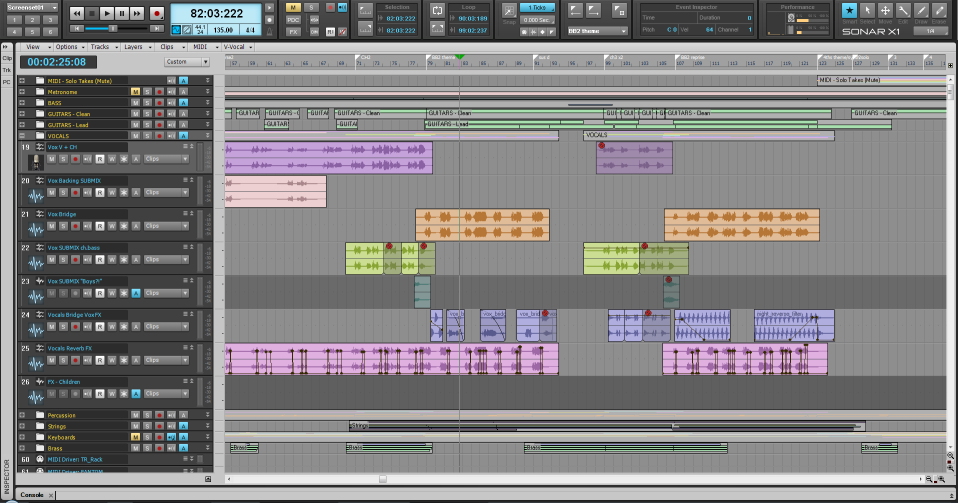 UPDATE: The .clr preset is available here: X1_Light.clr.txt (just rename the file to X1_Light.clr once it is downloaded.) My particular bug-bear is being able to clearly see the track/clip automation envelopes. Since we are limited to almost-black for the envelope color (edit mode excepted), the only option is to go light for the clip colors. I've ended up with this, which I rather like, although I think it may be reminiscent of Logic 8? It's not my intention to copy Logic, I just don't think I have an alternative that I'm happy with. About the only other thing is that I find that using an obvious different color for the Folder Names helps with the lack of indentation, so I chose a light orange-yellow to contrast with the blue for normal tracks. Comments welcome.
post edited by stickman393 - 2011/04/04 13:09:29
|
DeveryH
Max Output Level: -75 dBFS

- Total Posts : 780
- Joined: 2004/12/01 21:27:43
- Status: offline

Re:Sonar X1 Color Scheme: work in progress
2010/12/18 21:14:59
(permalink)
|
SongCraft
Max Output Level: -36 dBFS

- Total Posts : 3902
- Joined: 2007/09/19 17:54:46
- Status: offline
Re:Sonar X1 Color Scheme: work in progress
2010/12/18 21:20:09
(permalink)
I like the color difference for folder names, certainly makes them stand out.
I think in the update (X1a) for most of those color customization will be returned, particularly for envelopes which IMO is a must.
|
thegeek
Max Output Level: -78 dBFS

- Total Posts : 631
- Joined: 2008/10/02 14:28:00
- Location: Athens,Greece
- Status: offline
Re:Sonar X1 Color Scheme: work in progress
2010/12/19 03:32:53
(permalink)
|
ba_midi
Max Output Level: 0 dBFS

- Total Posts : 14061
- Joined: 2003/11/05 16:58:18
- Location: NYC
- Status: offline
Re:Sonar X1 Color Scheme: work in progress
2010/12/19 06:06:37
(permalink)
Nice one Stickman.
I've done some work on my setup too. It does make a difference - and yours looks great.
|
sven450
Max Output Level: -72 dBFS

- Total Posts : 945
- Joined: 2004/03/16 08:11:49
- Status: offline
Re:Sonar X1 Color Scheme: work in progress
2010/12/19 08:40:33
(permalink)
Nice work. I tried to change the background of my parent folder tracks and could not get it to work. Is there some secret I'm not aware of?
|
stickman393
Max Output Level: -60 dBFS
- Total Posts : 1528
- Joined: 2003/11/07 18:35:26
- Status: offline
Re:Sonar X1 Color Scheme: work in progress
2010/12/19 15:25:49
(permalink)
@sven450 -
I think that is one of the color preferences that is not currently working, but may be enabled in a future patch. I did not change the background of folder strips.
|
pianodano
Max Output Level: -67 dBFS

- Total Posts : 1160
- Joined: 2004/01/11 18:54:38
- Location: Va Beach Virginia
- Status: offline
Re:Sonar X1 Color Scheme: work in progress
2011/04/02 11:41:16
(permalink)
That GUI you have done looks nice. I like nothing about the "new" look of XI. I also find the control bar setup and PRV hud awful for for my multiple monitor set up also. I want good old, intunitive, easy to see and use Sonar back. In fact I have it already. Sonar 6. So that's now 2 upgrades (8.5 and XI) I should not have made. Fool me once, shame on me. Fool me twice, shame on them. In retrospect, this awful new CW forum software should have been a dead giveaway that big changes were coming.
|
Zo
Max Output Level: -25 dBFS

- Total Posts : 5036
- Joined: 2008/01/25 20:49:55
- Status: offline
Re:Sonar X1 Color Scheme: work in progress
2011/04/02 11:54:06
(permalink)
that look like logic kind of ....
For sale (PM me) : transfert ilok includedEventide Ultrachannel make offersSoftube Summit EQIK Neve 1081 , Neve precision Comp/LimEastWest GoshtwriterSoundforge Pro 12
|
Keni
Max Output Level: -17.5 dBFS

- Total Posts : 5769
- Joined: 2003/11/04 10:42:15
- Location: Willits, CA USA
- Status: offline
Re:Sonar X1 Color Scheme: work in progress
2011/04/02 16:32:02
(permalink)
I've found that many changes no longer apply themselves until after re-opening Sonar... Even tho they're not marked as such....
So now, everytime I try a color change in the settings... If I don't see it applied immediately, I re-start Sonar and I'm frequently surprised....
Keni
|
groove
Max Output Level: -85 dBFS

- Total Posts : 270
- Joined: 2003/12/19 05:09:48
- Location: Poughkeepsie, NY
- Status: offline
Re:Sonar X1 Color Scheme: work in progress
2011/04/02 16:53:20
(permalink)
I think having to restart to see every single color change rather than it being reflected as you move about the color picker is a REAL drag. It makes customization so tedious that I don't even want to bother. Too bad the defaults are so far from my tastes.
|
Keni
Max Output Level: -17.5 dBFS
- Total Posts : 5769
- Joined: 2003/11/04 10:42:15
- Location: Willits, CA USA
- Status: offline
Re:Sonar X1 Color Scheme: work in progress
2011/04/02 20:14:15
(permalink)
Yes... I agree that it's daunting... and still not satisfying even after all that work... So I've opted to use one of Panup's Mods (skins) that is working very nicely for me for the moment... He even changed a few extra items for me when I asked... For example... My record arm button is now the old R (including it's color states) and my Automation Record is once again RD... Even tho I know the red dot is very popular common since back in the tape days (or before???), I've gotten too use to the MSR phrasing.... I'm using his mod called Orfeus II... It's his darkest (black console)... He has a number of other mods both dark and light that you may find interesting... Sonar X1 mods Downloads Keni
|
puculose
Max Output Level: -90 dBFS

- Total Posts : 3
- Joined: 2009/03/03 11:47:45
- Status: offline
Re:Sonar X1 Color Scheme: work in progress
2011/04/04 04:04:16
(permalink)
can u upload this for us?
post edited by puculose - 2011/04/04 04:06:58
|
Keni
Max Output Level: -17.5 dBFS
- Total Posts : 5769
- Joined: 2003/11/04 10:42:15
- Location: Willits, CA USA
- Status: offline
Re:Sonar X1 Color Scheme: work in progress
2011/04/04 10:29:11
(permalink)
These are Mods (skins) and do things that the color control will not let you do. they are done by replacing graphic pieces of Sonar....
they cause no harm and can easily be returned to normal. Just make sure to save your backup copy of ttres90.dll
Go to the link I provided and you can see screenshots as well as download any of the wonderful skins Panu continues to make...
Keni
|
riojazz
Max Output Level: -64 dBFS

- Total Posts : 1337
- Joined: 2004/02/26 13:23:02
- Location: Mid-Hudson Valley, NY
- Status: offline
Re:Sonar X1 Color Scheme: work in progress
2011/04/04 11:18:07
(permalink)
Software: Cakewalk by Bandlab; Adobe Audition; Band-in-A-Box audiophile; Izotope Ozone; Encore; Melodyne; Win 10 Pro, 64-bit. Hardware: Focusrite Scarlett 18i20 2nd; Roland Integra-7; TCE Finalizer; Presonus Central Station, Behringer X-Touch. Home built i7 with 16 GB RAM, SSDs.
|
stickman393
Max Output Level: -60 dBFS
- Total Posts : 1528
- Joined: 2003/11/07 18:35:26
- Status: offline
Re:Sonar X1 Color Scheme: work in progress
2011/04/04 13:11:31
(permalink)
I apologize. I forgot that my web host doesn't serve up any old extension :). I've renamed the file to have a .txt extension, and this seems to work. Please try again, or use this link: X1_Light.clr.txt
|
riojazz
Max Output Level: -64 dBFS
- Total Posts : 1337
- Joined: 2004/02/26 13:23:02
- Location: Mid-Hudson Valley, NY
- Status: offline
Re:Sonar X1 Color Scheme: work in progress
2011/04/04 13:42:53
(permalink)
Thanks. Got it and just installed it!
Software: Cakewalk by Bandlab; Adobe Audition; Band-in-A-Box audiophile; Izotope Ozone; Encore; Melodyne; Win 10 Pro, 64-bit. Hardware: Focusrite Scarlett 18i20 2nd; Roland Integra-7; TCE Finalizer; Presonus Central Station, Behringer X-Touch. Home built i7 with 16 GB RAM, SSDs.
|
meh
Max Output Level: -82 dBFS

- Total Posts : 431
- Joined: 2005/06/11 13:01:57
- Location: Tempe, Az
- Status: offline
Re:Sonar X1 Color Scheme: work in progress
2011/04/04 16:11:33
(permalink)
Stupid question I am sure....where do the clr files reside....I have 3 files that are there by default but because Cakewalk chose to use a clr extension those file's in particular are hard to find.
thanks in advance
SONAR Version 2017.09
HP Z-420 Workstation
Intel Xeon W3680 @3.50ghz
32g memory 2tb disk space
Win2008 Server R2 Standard 64-bit
TASCAM US-1641 interface
|
riojazz
Max Output Level: -64 dBFS
- Total Posts : 1337
- Joined: 2004/02/26 13:23:02
- Location: Mid-Hudson Valley, NY
- Status: offline
Re:Sonar X1 Color Scheme: work in progress
2011/04/04 16:18:47
(permalink)
Not stupid at all. Took me a minute to find it.
In Windows 7, I put it here:
C:\Users\myname\AppData\Roaming\Cakewalk\SONAR X1 Producer\
and it worked. The file extension has to be .clr There are no other .clr files in that folder, including the three built-in choices, but the new one also shows up as a choice.
Software: Cakewalk by Bandlab; Adobe Audition; Band-in-A-Box audiophile; Izotope Ozone; Encore; Melodyne; Win 10 Pro, 64-bit. Hardware: Focusrite Scarlett 18i20 2nd; Roland Integra-7; TCE Finalizer; Presonus Central Station, Behringer X-Touch. Home built i7 with 16 GB RAM, SSDs.
|
chuckebaby
Max Output Level: 0 dBFS
- Total Posts : 13146
- Joined: 2011/01/04 14:55:28
- Status: offline
Re:Sonar X1 Color Scheme: work in progress
2011/04/04 16:24:29
(permalink)
Keni
These are Mods (skins) and do things that the color control will not let you do. they are done by replacing graphic pieces of Sonar....
they cause no harm and can easily be returned to normal. Just make sure to save your backup copy of ttres90.dll
Go to the link I provided and you can see screenshots as well as download any of the wonderful skins Panu continues to make...
Keni
i think you have to join as a member to see the mods.i could be wrong but a friend of mine said he couldnt access the site unless you join the mod group. ...EDIT..whoops..sorry my bad..i was wrong
Windows 8.1 X64 Sonar Platinum x64 Custom built: Asrock z97 1150 - Intel I7 4790k - 16GB corsair DDR3 1600 - PNY SSD 220GBFocusrite Saffire 18I8 - Mackie Control
|
kjs00333
Max Output Level: -85 dBFS
- Total Posts : 292
- Joined: 2008/02/22 15:50:49
- Status: offline
Re:Sonar X1 Color Scheme: work in progress
2011/04/19 12:31:59
(permalink)
stickman393
There's not a lot you can customize in the first X1 release, so here it is:
UPDATE: The .clr preset is available here: X1_Light.clr.txt (just rename the file to X1_Light.clr once it is downloaded.)
My particular bug-bear is being able to clearly see the track/clip automation envelopes. Since we are limited to almost-black for the envelope color (edit mode excepted), the only option is to go light for the clip colors. I've ended up with this, which I rather like, although I think it may be reminiscent of Logic 8? It's not my intention to copy Logic, I just don't think I have an alternative that I'm happy with.
About the only other thing is that I find that using an obvious different color for the Folder Names helps with the lack of indentation, so I chose a light orange-yellow to contrast with the blue for normal tracks.
Comments welcome
*nevermind, found the location for clr :)
post edited by kjs00333 - 2011/04/19 12:38:05
|
Mesh
Max Output Level: 0 dBFS
- Total Posts : 27360
- Joined: 2009/11/27 14:08:08
- Location: Online right here!
- Status: offline
Re:Sonar X1 Color Scheme: work in progress
2011/04/19 12:55:08
(permalink)
Look at post # 19 
Platinum Gaming DAW: AsRock Z77 Overclock FormulaI7 3770k @ 4.5GHz : 16GB RAM G.Skill Ripjaws X 250GB OS SSD : 3TB HDD : 1TB Sample HDDWin 10 Pro x 64 : NH-D14 CPU Cooler HIS IceQ 2GB HD 7870Focusrite Scarlett 2i4The_Forum_Monkeys
|
don4777
Max Output Level: -85 dBFS
- Total Posts : 264
- Joined: 2004/06/06 17:21:38
- Status: offline
Re:Sonar X1 Color Scheme: work in progress
2011/04/20 09:33:02
(permalink)
riojazz
In Windows 7, I put it here:
C:\Users\myname\AppData\Roaming\Cakewalk\SONAR X1 Producer\
and it worked.
How about for those using Windows XP. I searched the entire drive and found no files with a .clr extension. I tried creating a new color scheme and svaing it from within the dialog box and it didn't appear to result in the creation of a file with a .clr extension. The only place I can find that this information is stored is in the Registry. Is there someplace that X1 will look for the 'clr files in XP? Thanks, Don
|
Skyline_UK
Max Output Level: -54 dBFS

- Total Posts : 2133
- Joined: 2004/04/15 17:55:09
- Location: Midlands, UK
- Status: offline
Re:Sonar X1 Color Scheme: work in progress
2011/04/20 12:23:30
(permalink)
riojazz
Not stupid at all. Took me a minute to find it.
In Windows 7, I put it here:
C:\Users\myname\AppData\Roaming\Cakewalk\SONAR X1 Producer\
and it worked. The file extension has to be .clr There are no other .clr files in that folder, including the three built-in choices, but the new one also shows up as a choice.
Matt I put the file there but it doesn't show as a load option in Preferences/Colours/Presets. Am I missing something here? John
My stuff Intel Sandy Bridge i7 2600 @ 3.4GHz, 4 cores, 8 threads, 16GB RAM.OS & Programs drive: 240GB SSD
Data drives: 1 x 1TB drive RAID mirrored, plus extra 1TB data drive
Windows 10 Home 64 bit
Cakewalk by BandLab 64 bit, Studio One 3, Band In A Box 2016, Ozone 8+ too many other pluginsBandLab page
|
riojazz
Max Output Level: -64 dBFS
- Total Posts : 1337
- Joined: 2004/02/26 13:23:02
- Location: Mid-Hudson Valley, NY
- Status: offline
Re:Sonar X1 Color Scheme: work in progress
2011/04/20 12:25:57
(permalink)
I really don't know, John; sorry. You have the same OS I have.
Software: Cakewalk by Bandlab; Adobe Audition; Band-in-A-Box audiophile; Izotope Ozone; Encore; Melodyne; Win 10 Pro, 64-bit. Hardware: Focusrite Scarlett 18i20 2nd; Roland Integra-7; TCE Finalizer; Presonus Central Station, Behringer X-Touch. Home built i7 with 16 GB RAM, SSDs.
|
stickman393
Max Output Level: -60 dBFS
- Total Posts : 1528
- Joined: 2003/11/07 18:35:26
- Status: offline
Re:Sonar X1 Color Scheme: work in progress
2011/04/20 12:27:03
(permalink)
I think you have to import it. Use the IMPORT COLORS button on the Preferences > Colors pane.
|
Jitterbug_Boy
Max Output Level: -90 dBFS
- Total Posts : 14
- Joined: 2010/07/13 17:13:43
- Status: offline
Re:Sonar X1 Color Scheme: work in progress
2011/07/11 18:44:39
(permalink)
Thanks Stickman - that is much easier on the eye (I was finding the darkness of X1 was doing my head in - as was trying to set my own scheme!)
Jitterbug Boy ---------------------------- Sonar X1 Producer
Novation SL
Yamaha DX7
DSI Tetra
Mackie 1220i
Windows NT
|
ramscapri
Max Output Level: -84 dBFS

- Total Posts : 316
- Joined: 2008/03/23 06:02:59
- Status: offline
Re:Sonar X1 Color Scheme: work in progress
2012/06/27 01:16:45
(permalink)
don4777
riojazz
In Windows 7, I put it here:
C:\Users\myname\AppData\Roaming\Cakewalk\SONAR X1 Producer\
and it worked.
How about for those using Windows XP. I searched the entire drive and found no files with a .clr extension. I tried creating a new color scheme and svaing it from within the dialog box and it didn't appear to result in the creation of a file with a .clr extension. The only place I can find that this information is stored is in the Registry. Is there someplace that X1 will look for the 'clr files in XP?
Thanks,
Don
How to locate and open the registry ? Where does it appear under the root C: drive ?
|
chuckebaby
Max Output Level: 0 dBFS
- Total Posts : 13146
- Joined: 2011/01/04 14:55:28
- Status: offline
Re:Sonar X1 Color Scheme: work in progress
2012/06/27 01:39:05
(permalink)
there are alot more colors you can change then that.
the track backround can also be changed to any color,mine is currently blue.
the VU meters in track view and console view can be changed those are in yellow here.
Windows 8.1 X64 Sonar Platinum x64 Custom built: Asrock z97 1150 - Intel I7 4790k - 16GB corsair DDR3 1600 - PNY SSD 220GBFocusrite Saffire 18I8 - Mackie Control
|
Bristol_Jonesey
Max Output Level: 0 dBFS
- Total Posts : 16775
- Joined: 2007/10/08 15:41:17
- Location: Bristol, UK
- Status: offline
Re:Sonar X1 Color Scheme: work in progress
2012/06/27 04:24:23
(permalink)
ramscapri
don4777
riojazz
In Windows 7, I put it here:
C:\Users\myname\AppData\Roaming\Cakewalk\SONAR X1 Producer\
and it worked.
How about for those using Windows XP. I searched the entire drive and found no files with a .clr extension. I tried creating a new color scheme and svaing it from within the dialog box and it didn't appear to result in the creation of a file with a .clr extension. The only place I can find that this information is stored is in the Registry. Is there someplace that X1 will look for the 'clr files in XP?
Thanks,
Don
How to locate and open the registry ? Where does it appear under the root C: drive ?
If you are not familiar with editing registry entries I advise to to proceed with extreme caution. You could quite easily make your machine totally unbootable so BE WARNED You access it by typing in regedit in the search box. MAKE SURE THE FIRST THING YOU DO IS TO EXPORT YOUR CURRENT REGISTRY Please, make sure you do some research on regedit before you start messing around with it
CbB, Platinum, 64 bit throughoutCustom built i7 3930, 32Gb RAM, 2 x 1Tb Internal HDD, 1 x 1TB system SSD (Win 7), 1 x 500Gb system SSD (Win 10), 2 x 1Tb External HDD's, Dual boot Win 7 & Win 10 64 Bit, Saffire Pro 26, ISA One, Adam P11A,
|