stickman393
Max Output Level: -60 dBFS

- Total Posts : 1528
- Joined: 2003/11/07 18:35:26
- Status: offline
Take Lanes surprise me yet again (not an apocalypse)
Sweet Jesus, please bring back rebuild layers for take lanes: 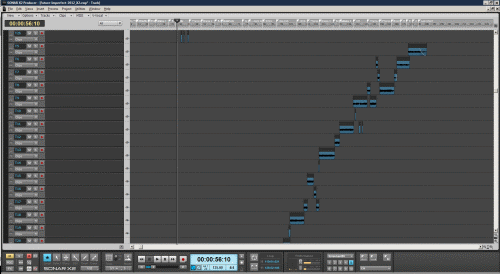 I've got 27 of the unmanageable things, and I'm scared to try and manually consolidate them. Why do I care? That's my entire 6 minute project. If I'm currently zoomed in at bar 33, and I expand the take lanes, I don't see sh*t. God forbid I'm trying to synch something up with some other track of audio...
post edited by stickman393 - 2013/02/16 20:24:09
|
SteveStrummerUK
Max Output Level: 0 dBFS

- Total Posts : 31112
- Joined: 2006/10/28 10:53:48
- Location: Worcester, England.
- Status: offline

Re:Take Lane Apocalypse
2013/02/16 13:48:03
(permalink)
I am in 100% agreement with you on this Colin, and for much the same reasons.
I used the Rebuild feature a lot when comping, now everything has to be done one lane at a time - what a right royal PITA. I might as well have recorded each take to a separate track in the first place for all the good lanes are to me.
|
miguelito
Max Output Level: -83 dBFS

- Total Posts : 391
- Joined: 2009/12/19 09:18:15
- Location: Bellingham, WA
- Status: offline
Re:Take Lane Apocalypse
2013/02/16 14:22:05
(permalink)
At first, and using my normal recording techniques, I was okay with take lanes though I did think they took up too much real estate.
Then I was trying create a guitar tutorial for a student and I ended up with something similar to stickman. I was screaming for relief within seconds.
I'm unsure what Cakewalk was trying to do here but I sure hope they are listening to what the users are saying because, as is, they can take their lanes and, well you get the idea...
Regards,
Mike A Roseberry racer w/ Win7 Pro (64) fully loaded RME UFX Fireface; Sonar X2; Guitars and amps. Axon 100 MKII, M-Audio Keystation Pro 88, Komplete All software latest revision
|
ltb
Max Output Level: -48 dBFS

- Total Posts : 2707
- Joined: 2005/06/19 13:34:08
- Status: offline
Re:Take Lane Apocalypse
2013/02/16 14:24:50
(permalink)
This is exactly one reason why I prefer Layers over Lanes.
|
bitman
Max Output Level: -34 dBFS

- Total Posts : 4105
- Joined: 2003/11/06 14:11:54
- Location: Keystone Colorado
- Status: offline
Re:Take Lane Apocalypse
2013/02/16 14:33:07
(permalink)
|
Beepster
Max Output Level: 0 dBFS
- Total Posts : 18001
- Joined: 2012/05/11 19:11:24
- Status: offline
Re:Take Lane Apocalypse
2013/02/16 15:06:45
(permalink)
uh... with Layers you couldn't even scroll or manipulate the data with that many takes. I hated that and the rebuild layers option made things even crazier. I'd say looking at that pic just do a Save As to get back to where you are if need be and drag the non overlapping clips into a single lane and delete the empty ones. What's going on there anyway? That's all over the place. Alternatively select all the non overlapping clips and Bounce to clips. It's not gonna make the thing blow up and if it does that's what the Save As is for. Another option would be to drag the actual take lanes in the left hand section of the track view like you would with a track so they appear how you want. Seriously I'd listen back to all that, see what I want to keep, make notes, clone the track and anything that overlaps stays in the second track while the rest gets deleted. It looks like you've got multiple parts in the same track. Overlapping material that you intend to keep in your project should be on a separate track.
IDK... that's just a mess. I'd freak out if I let a track get that crazy. Sorry... I don't mean to be harsh but this is a workflow problem... and I'm a little drunk. Wheeee!
Seriously though. Drag the entire take lanes so they show up sequentially on the timeline, if they overlap and you aren't sure which take you want to use for that track those takes go in the lanes directly above/below each other. Any takes that are meant to be a different part go in a new track (don't use two different parts in the same track at the same time). Do your editing and if you want to only deal with one take lane bounce to clips. It's a different workflow for sure but layers were a bloody nightmare compare to what you can do with lanes.
I have no idea if that made any sense to you but man... lookign at that I want to reach into your project and clean that up. What a mess. lol
|
Beepster
Max Output Level: 0 dBFS
- Total Posts : 18001
- Joined: 2012/05/11 19:11:24
- Status: offline
Re:Take Lane Apocalypse
2013/02/16 15:08:26
(permalink)
Actually... how did you even manage to do that? Did you record the ending parts first? That's crazy. lol
Yup... I'm a little drunk.
|
ltb
Max Output Level: -48 dBFS
- Total Posts : 2707
- Joined: 2005/06/19 13:34:08
- Status: offline
Re:Take Lane Apocalypse
2013/02/16 15:18:44
(permalink)
Beepster
uh... with Layers you couldn't even scroll or manipulate the data with that many takes. I used to edit like this with Layers all the time. Precise & tight, non over-lapping clips then used the 'remove empty layer' function. Doing similar with Lanes was is futile.
|
Beepster
Max Output Level: 0 dBFS
- Total Posts : 18001
- Joined: 2012/05/11 19:11:24
- Status: offline
Re:Take Lane Apocalypse
2013/02/16 15:34:52
(permalink)
carl
Beepster
uh... with Layers you couldn't even scroll or manipulate the data with that many takes. I used to edit like this with Layers all the time.
Precise tight, non over-lapping clips then used the 'remove empty layer' function.
Doing similar with Lanes was futile.
I wouldn't be opposed to a similar feature but with this many takes layers became unusable. The point is this is not an "apocalypse". Lanes are a much cleaner method once you get the hang of them. This thread title is hyperbolic and the picture is showing a sloppy workflow and I hate say something that harsh but people aren't taking the time to figure out how Lanes work. I thought layers were the bees knees at first but very quickly they became the bain of my existence. I'll be really annoyed if the next version goes back to that method. This is one of the few topics you'll see me get upset about. X1 projects open perfectly in X2. If the lanes are truly that unusable to the layers advocates then just do your tracking in X1 then open them in X2 for editing. But seriously if you sit down and mess with lanes for a while and learn to drag the buggers around, use the new mute tool editing, use bounce to clips, use the notes, use their full power you will see... they make FAR more sense than layers did. That said the only real problem I have with them are some of the bugs but I am sure those will get fixed as we move along. So yeah... I'm sorry but I'm starting to get a little ornery about the lanes thing. I love. I use them daily. I could not imagine going back and if I was forced to I would probably find another DAW. I know it's weird for the folks who are used to the old way but man... layers were ridiculous. /end rant
|
ltb
Max Output Level: -48 dBFS
- Total Posts : 2707
- Joined: 2005/06/19 13:34:08
- Status: offline
Re:Take Lane Apocalypse
2013/02/16 15:44:38
(permalink)
Layers were very usable & 'the old way' wasn't very old.
Trying to use the 'new' Lanes in a similar manner or fashion is dysfunctional at best.
|
Funkybot
Max Output Level: -75 dBFS

- Total Posts : 796
- Joined: 2003/11/06 16:32:13
- Status: offline
Re:Take Lane Apocalypse
2013/02/16 15:46:10
(permalink)
I'm with Beepster on this one. Looking at that project, I can't for the life of me figure out what the OP was going for there.
1. Why are there so many takes? 27? What is this project that you have so many takes of a single track?
2. Where are the rest of the takes? The beginnings and endings? Were these deleted? Why not use the Ctrl+Mute tool to promote only the sections you need?
3. In this scenario wouldn't auto-punching as needed have worked better?
4. Another option might be to use separate tracks if you know you're going to need this many
5. If I were working with an artist, including myself, that needed that many takes, I'd advise them to spend a week or two practicing, then come back when they were ready
I really think lanes are designed to work in scenarios where you have a few takes (lets say vocals/guitars) and you're trying to comp together the best bits of each. I honestly don't think the Cakewalk folks were thinking of 27 takes, and I don't blame them.
You have to code to most common scenarios, not the oddball ones. At work we call it the 99 to 1 rule. If 99 people need something done a certain way, but 1 needs something done differently, you code to the 99.
Intel i7 4790k, ASUS Z97-A mobo, 16GB Kingston DDR3 RAM, Windows 10 x64, UAD2 Duo, RME Fireface 800, Sonar X1/X2 Producer
|
Bub 
Max Output Level: -3.5 dBFS

- Total Posts : 7196
- Joined: 2010/10/25 10:22:13
- Location: Sneaking up behind you!
- Status: offline
Re:Take Lane Apocalypse
2013/02/16 16:07:41
(permalink)
Seems simple to me .... he started out with one take, kept doing takes and deleting or resizing the parts in the take lanes that he didn't want, and ended up with the original part of the take being at the end.
I don't like Take Lanes at all ... so for me ... my workflow has been made a 1,000 times harder because I have to use individual tracks now for every take and piece it together that way without the benefit of rebuilding layers.
Not to mention the bugs. It's one of those features where, when you have a bug, there's no way to turn it off or uninstall it. Like the Pro Channel.
But I'm a hater ... don't listen to me.
"I pulled the head off Elvis, filled Fred up to his pelvis, yaba daba do, the King is gone, and so are you."
|
bapu
Max Output Level: 0 dBFS

- Total Posts : 86000
- Joined: 2006/11/25 21:23:28
- Location: Thousand Oaks, CA
- Status: offline
Re:Take Lane Apocalypse
2013/02/16 16:16:37
(permalink)
Maybe I'm a dolt, but if that OP situation was mine and I wanted all those takes combined into a concise single track I'd just bounce that 'laned' track to another track. And delete the 'laned' track.
Actually that's how I do it.
/POST
|
SteveStrummerUK
Max Output Level: 0 dBFS
- Total Posts : 31112
- Joined: 2006/10/28 10:53:48
- Location: Worcester, England.
- Status: offline
Re:Take Lane Apocalypse
2013/02/16 16:38:31
(permalink)
But he could accomplish exactly what he wanted to do before with Remove Empty Layers/Rebuild Layers. And now he can't. Same for me 
|
BluerecordingStudios
Max Output Level: -72 dBFS

- Total Posts : 916
- Joined: 2005/05/22 07:19:10
- Location: Nitra, SLOVAKIA
- Status: offline
Re:Take Lane Apocalypse
2013/02/16 16:43:19
(permalink)
REBUILD feature also missing here!!!!!!!!
|
ltb
Max Output Level: -48 dBFS
- Total Posts : 2707
- Joined: 2005/06/19 13:34:08
- Status: offline
Re:Take Lane Apocalypse
2013/02/16 16:44:32
(permalink)
SteveStrummerUK
But he could accomplish exactly what he wanted to do before with Remove Empty Layers/Rebuild Layers.
And now he can't. Same for me
Exactly & in one click.
|
jb101
Max Output Level: -46 dBFS

- Total Posts : 2946
- Joined: 2011/12/04 05:26:10
- Status: offline
Re:Take Lane Apocalypse
2013/02/16 16:48:11
(permalink)
I'm with Beepster.
I far prefer lanes. Once I took the time to learn how to use them they improved my workflow considerably.
|
Beepster
Max Output Level: 0 dBFS
- Total Posts : 18001
- Joined: 2012/05/11 19:11:24
- Status: offline
Re:Take Lane Apocalypse
2013/02/16 16:48:51
(permalink)
But I'm a hater ... don't listen to me. Please don't do that, bro. Not with me. If they could code layers back in as an alternate option they should but really... lanes are working FAR better here so I'm gonna be selfish and say keep the friggen' lanes. They make sense to me. They work better. I can edit them no matter how many I create. Etc... That's what I don't get about this thread post. At the amount of layers the OP is talking about I couldn't even get the cursor the select them anymore to do ANYTHING. I make tons of takes so I have a huge pool to select from for the final product. They just did not work for me. Rebuild layers is a great idea but the way it threw stuff all over the place ruined it. It was totally random. I can't work like that. I need order.
|
bapu
Max Output Level: 0 dBFS
- Total Posts : 86000
- Joined: 2006/11/25 21:23:28
- Location: Thousand Oaks, CA
- Status: offline
|
Beepster
Max Output Level: 0 dBFS
- Total Posts : 18001
- Joined: 2012/05/11 19:11:24
- Status: offline
Re:Take Lane Apocalypse
2013/02/16 16:55:53
(permalink)
And everyone who has used layers will have X1 or another earlier version of Sonar at their disposal. If they bothered me THAT much I would just use X1 for my tracking then open the project in X2 for mixing. I just don't get it.
Ugh... if digging lanes makes me an arsehole then so be it. I like them. Lanes rule. LONG LIVE LANES!!!
|
ltb
Max Output Level: -48 dBFS
- Total Posts : 2707
- Joined: 2005/06/19 13:34:08
- Status: offline
Re:Take Lane Apocalypse
2013/02/16 17:03:27
(permalink)
Beepster
And everyone who has used layers will have X1 or another earlier version of Sonar at their disposal. If they bothered me THAT much I would just use X1 for my tracking then open the project in X2 for mixing. I just don't get it.
Ugh... if digging lanes makes me an arsehole then so be it. I like them. Lanes rule. LONG LIVE LANES!!!
You keep implying those that prefer or miss Layers want to do away with Lanes entirely, why? No need to rant. There are good arguments for both, nothing is written in stone code wise. Why not have both if possible or an option to use either one?
|
backwoods
Max Output Level: -49.5 dBFS

- Total Posts : 2571
- Joined: 2011/03/23 17:24:50
- Location: South Pacific
- Status: offline
Re:Take Lane Apocalypse
2013/02/16 17:05:55
(permalink)
With 27 Lanes I think I would struggle with my method.
my method.
1. Record takes
2. Open take lanes
3. select all take lanes
4. cut where transition is to take place
5. any more transitions required? y-goto 3, n-goto6
6. use ctl mute to select best parts (or erase unwanted parts)
7. close take lanes
8. effect crossfades
9. QED
works a charm and if you might need unused bits use selective mute instead of erase. But with 27 takes I would struggel, normally at most I have maybe 6 takes.
|
Beepster
Max Output Level: 0 dBFS
- Total Posts : 18001
- Joined: 2012/05/11 19:11:24
- Status: offline
Re:Take Lane Apocalypse
2013/02/16 17:09:21
(permalink)
You keep implying those that prefer or miss Layers want to do away with Lanes entirely, why? No need to rant. There are good arguments for both, nothing is written in stone code wise. Why not have both if possible or an option to use either one? Because I've seen a LOT of serious ripping on them saying they should be removed. I would like to see both implemented not for my own needs but because I like to see others be able to work the way they like. I'm also writing which digs up all my darkness. So ya'll are getting little slice of that. Sorry. I should probably just go away while I do this. Cheers.
|
stevec
Max Output Level: 0 dBFS
- Total Posts : 11546
- Joined: 2003/11/04 15:05:54
- Location: Parkesburg, PA
- Status: offline
Re:Take Lane Apocalypse
2013/02/16 17:53:23
(permalink)
But he could accomplish exactly what he wanted to do before with Remove Empty Layers/Rebuild Layers. Hmmm.... I don't see (m)any empty lanes in that picture. It's difficult to tell what type of logic would be needed to consolidate them - something I would like in general - and the result might be a wee bit difficult to gage as far as what was recorded when.
SteveC https://soundcloud.com/steve-cocchi http://www.soundclick.com/bands/pagemusic.cfm?bandID=39163 SONAR Platinum x64, Intel Q9300 (2.5Ghz), Asus P5N-D, Win7 x64 SP1, 8GB RAM, 1TB internal + ESATA + USB Backup HDDs, ATI Radeon HD5450 1GB RAM + dual ViewSonic VA2431wm Monitors; Focusrite 18i6 (ASIO); Komplete 9, Melodyne Studio 4, Ozone 7 Advanced, Rapture Pro, GPO5, Valhalla Plate, MJUC comp, MDynamic EQ, lots of other freebie VST plugins, synths and Kontakt libraries
|
stickman393
Max Output Level: -60 dBFS
- Total Posts : 1528
- Joined: 2003/11/07 18:35:26
- Status: offline
Re:Take Lane Apocalypse
2013/02/16 18:18:31
(permalink)
Funkybot
I'm with Beepster on this one. Looking at that project, I can't for the life of me figure out what the OP was going for there.
1. Why are there so many takes? 27? What is this project that you have so many takes of a single track?
Hey Funky - Here's my workflow - and yes, it may be idiosyncratic: I was laying down the bass in sections. I had a guide track, and I was following along. Very short recording, a few bars at a time. So I have my audio track, record-enabled, and no, I did not expand take lanes. I didn't have any lanes, it was a new audio track. Also, I was working from the end of the project backwards towards the start. So sue me :) When I'd finished, I decided to trim up the beginning and end of each clip, to reduce unwanted noise. I knew I would have to expand the lanes at this point. That's when it looked more or less as the screen shot, except I was zoomed in and could only see grey. I had no idea that each stop-start was creating a fresh take lane. That's insane to me, layers didn't work like that. I realize now that, if I want to record a track in this fashion, I really need to expand take lanes FIRST, add a couple of empty lanes, then record into them, alternating. The only problem with this is, when you do this, you can't hear any existing recorded material in the other lane (even when "Sound on Sound" option is selected in preferences). And if you record into the same lane, you can accidently delete existing, non-playing clips. F*ck that. It's just messy, it doesn't correspond to my workflow. I can't be the only one who records piecemeal on certain instruments. Back to reading the rest of this thread now :)
|
stickman393
Max Output Level: -60 dBFS
- Total Posts : 1528
- Joined: 2003/11/07 18:35:26
- Status: offline
Re:Take Lane Apocalypse
2013/02/16 18:21:08
(permalink)
bapu
Maybe I'm a dolt, but if that OP situation was mine and I wanted all those takes combined into a concise single track I'd just bounce that 'laned' track to another track. And delete the 'laned' track.
Actually that's how I do it.
/POST
That's exactly what I want to do - once I've cleaned up the clip start/end points, which is what I was about to do when I took the screenshot.
|
Beepster
Max Output Level: 0 dBFS
- Total Posts : 18001
- Joined: 2012/05/11 19:11:24
- Status: offline
Re:Take Lane Apocalypse
2013/02/16 19:14:54
(permalink)
Okay... so lemme get this straight. You knew there had been a major change to how takes are handled. You didn't read up on how they work or experiment with them to see what would happen. You recorded into a track blindly with the lanes closed creating a total mess and were shocked when you opened the lanes. Then instead of cleaning it up like you just said you were going to or asking the forum for some advice you take a picture of the mess, start a thread saying it's the apocalypse (which quite literally means the end of the world) and act like this is Cakewalk's problem.
There a lots of people with legit problems... like really bad ones that don't act like the sky is falling. If you want help ask for it. This is completely over the top for no reason. BTW I have no idea what you are talking about as far as not being able to hear previously recorded material. There is a setting that will mute the previous takes automatically. If you want to hear that material you can disable this function in the preferences recording/playback menu or manual right click > Mute/Unmute the take you want to hear. I may be misinterpreting that problem but any take that gets recorded is audible if you make it so. Perhaps the previous take is getting washed out by your input signal. In which case the take you want to play over should be in a different track so you can adjust the playback level to your liking.
Please change this thread title. It is not a freaking apocalypse.
Yeesh.
|
stickman393
Max Output Level: -60 dBFS
- Total Posts : 1528
- Joined: 2003/11/07 18:35:26
- Status: offline
Re:Take Lanes "take" me by surprise
2013/02/16 20:40:21
(permalink)
Beepster wrote:
[..] You didn't read up on how they work or experiment with them to see what would happen. Actually, I have. But this behavior still surprised me. You recorded into a track blindly with the lanes closed creating a total mess and were shocked when you opened the lanes. Yup. I guess I was expecting something more compact. Then instead of cleaning it up like you just said you were going to or asking the forum for some advice you take a picture of the mess, start a thread saying it's the apocalypse (which quite literally means the end of the world) and act like this is Cakewalk's problem. 1) I have been cleaning it up this afternoon. 2) I think I got some advice. 3) I think it's a funny picture. 4) I think it is kinda Cakewalk's problem or at least, I would like to make it so. Please change this thread title. It is not a freaking apocalypse.
Done, because it's easy to do, and being flippantly over-the-top is always dodgy on a forum. I have no idea what you are talking about as far as not being able to hear previously recorded material. See this thread - you actually helped me via proxy on that one. I still think it's a bug, though. I've filed a report.
|
Beepster
Max Output Level: 0 dBFS
- Total Posts : 18001
- Joined: 2012/05/11 19:11:24
- Status: offline
Re:Take Lanes "take" me by surprise
2013/02/16 20:45:14
(permalink)
Okay. Thank you for changing the title. Sorry for flipping out but I'm a little on edge today and the negativity around here has been wearing me out. I'll help you whenever/however I can. All you gotta do is ask. Cheers and again... sorry for flipping out.
BTW there are some new vids in the stickies sectio of this sub forum about X2. I haven't checked them out yet but I'll bet there is some stuff regarding the lanes in there somewhere.
|
Saxon1066
Max Output Level: -78 dBFS

- Total Posts : 619
- Joined: 2004/02/04 01:23:25
- Location: Ohigho
- Status: offline
Re:Take Lane Apocalypse
2013/02/17 03:12:26
(permalink)
Beepster
And everyone who has used layers will have X1 or another earlier version of Sonar at their disposal. If they bothered me THAT much I would just use X1 for my tracking then open the project in X2 for mixing. I just don't get it.
Ugh... if digging lanes makes me an arsehole then so be it. I like them. Lanes rule. LONG LIVE LANES!!!
Not so easy. Open an X1 project in X2a, and I get all the layers I had deleted for each track in X1 back again in X2--as empty lanes. Then I have to manually delete each empty lane. That's just one of the many weird quirks of lanes in X2. To someone else above: what's wrong with 27 takes? I sometimes do 50+ takes of a single guitar part and comp the best ones. Comping was a hell of a lot easier in layers. Lanes have made my way of working (many takes of certain parts) much more difficult. That's why I'm just using X1 indefinitely. DEATH TO LANES!!!!
|