Beeej21
Max Output Level: -88 dBFS

- Total Posts : 115
- Joined: 2007/03/03 02:23:34
- Status: offline

What does Sonar X2 need/use more of, RAM or CPU power?
Hey All,
So this is an age old question, but I'd like some feedback from you guys based on your experience.
I've felt for a long time (more than 3 years) that my system was pretty beefy. Seemed to fly on Sonar 8. But lately, I'm hitting the ceiling faster and more often than before. More plugins, more effects,... whatever the reason, I'm thinking of upgrading a bit now. Is it just me, or does Sonar X2 tax the system more? Overclocking is something I don't like to do too much; it makes me very nervous.
Right now I'm at 12GB RAM, my MB can handle up to 24. But I'm beginning to think the issue is my old i7 chip.
Which upgrade does X2 benefit most from.. a RAM upgrade to 24GB (fairly inexpensive upgrade), or a CPU upgrade (expensive upgrade esp when considering a motherboard-maxing i7 990x)? If the answer is CPU, then do I even bother with upgrading my RAM?
I'm trying to avoid a new motherboard. I currently have the ASUS P6T Deluxe V2 LGA 1366.
Any thoughts and/or advice?
DAW: Sonar Platinum, Windows 10 Ultimate 64bit**Computer: Intel i7 980x HexaCore Extreme 3.33gHz, Kingston HyperX 24GB RAM, ASUS P6T Deluxe V2 MB, 2x 300GB V-Raptor HDD, 4TB RAID-0 VST/Sounds HDD**Hardware: VS 700 System, Kurzweil SP2XS, Akai MPK49** SoundCloud
|
tomixornot
Max Output Level: -58.5 dBFS

- Total Posts : 1674
- Joined: 2011/03/05 11:31:26
- Status: offline
Re:What does Sonar X2 need/use more of, RAM or CPU power?
2013/04/02 04:05:03
(permalink)
Upgrading memory would be easier than a processor swap.
But before doing so, have you checked the Sonar Performance module ? Perhaps load up your heaviest project and see if it's taxing the CPU.. or memory.
From my system, I can see the CPU meter moving, but for my usage it's hardly reaching 30%.
However, I can't make much sense on the memory. I have 16 GB memory and I know I'm not really using that much memory - but the usage shows 17 GB (53%) usage.. perhaps it's taking virtual memory together.. so anything 60% is consider taxing ?? Once this is understood, perhaps it's easier to decide if memory is to be upgraded or not.
Albert i7 2600K @ 3.40GHz / MB Intel DP67BG / 16GB Ram- ADATA 250GB SSD (Boot)- Samsung Spinpoint F1 1TB HDD (Samples)Audio interface : Motu 828 MK ii i7 6700K @ 4.00GHz / MB Asrock Z170 / 16GB Ram- Samsung EVO 850 120GB / 500 GB SSD
Audio interface : Roland Quad Capture Win 10 Pro / Sonar Platinum
|
Kalle Rantaaho
Max Output Level: -5 dBFS

- Total Posts : 7005
- Joined: 2006/01/09 13:07:59
- Location: Finland
- Status: offline
Re:What does Sonar X2 need/use more of, RAM or CPU power?
2013/04/02 04:52:34
(permalink)
Wow. It would be interesting to know how many hundreds of tracks and plugins you're running simultaneously to jam your PC. An upgrade that would signifigantly improve the performance should be quite radical, IMO. A giga more juice in the processor or a few gigas more RAM does not improve the perfomance very many %, I guess. Well, I'm not really aware of how much more actual processing power the CPU's offer when you go up from one like yours.
Whether you're munching more CPU or more RAM can be seen in the task manager. It depends on what kind of plugins and projects you are running. It may well be you never use more than half of the RAM you've installed.
Without knowing about your projects, I'd be looking first in the settings and drivers to find the cause of slowness.
SONAR PE 8.5.3, Asus P5B, 2,4 Ghz Dual Core, 4 Gb RAM, GF 7300, EMU 1820, Bluetube Pre - Kontakt4, Ozone, Addictive Drums, PSP Mixpack2, Melda Creative Pack, Melodyne Plugin etc. The benefit of being a middle aged amateur is the low number of years of frustration ahead of you.
|
Bristol_Jonesey
Max Output Level: 0 dBFS

- Total Posts : 16775
- Joined: 2007/10/08 15:41:17
- Location: Bristol, UK
- Status: offline
Re:What does Sonar X2 need/use more of, RAM or CPU power?
2013/04/02 04:59:54
(permalink)
tomixornot
Upgrading memory would be easier than a processor swap.
But before doing so, have you checked the Sonar Performance module ? Perhaps load up your heaviest project and see if it's taxing the CPU.. or memory.
From my system, I can see the CPU meter moving, but for my usage it's hardly reaching 30%.
However, I can't make much sense on the memory. I have 16 GB memory and I know I'm not really using that much memory - but the usage shows 17 GB (53%) usage.. perhaps it's taking virtual memory together.. so anything 60% is consider taxing ?? Once this is understood, perhaps it's easier to decide if memory is to be upgraded or not.
What sort of project would you be running to consume 17Gb of RAM? Without doubt, my most taxing project is my orchestral template (135 tracks, 5 instances of EWQLSO Play, running EWQLSO Platinum with literally hundreds of keyswitched articulations loaded - this project takes 8 minutes to load all the necessary samples into RAM and this thing only eats 9Gb of RAM)
CbB, Platinum, 64 bit throughoutCustom built i7 3930, 32Gb RAM, 2 x 1Tb Internal HDD, 1 x 1TB system SSD (Win 7), 1 x 500Gb system SSD (Win 10), 2 x 1Tb External HDD's, Dual boot Win 7 & Win 10 64 Bit, Saffire Pro 26, ISA One, Adam P11A,
|
robert_e_bone
Moderator

- Total Posts : 8968
- Joined: 2007/12/26 22:09:28
- Location: Palatine, IL
- Status: offline
Re:What does Sonar X2 need/use more of, RAM or CPU power?
2013/04/02 08:35:13
(permalink)
@Beeej21
Please elaborate on what you mean by 'hitting the ceiling'. If you mean things just running slower, like loading, that's one thing. Latency is another.
An i7 CPU should be plenty fast enough for Sonar, and 12GB of memory should be enough as well. Should you decide to add additional memory, that is a pretty cheap upgrade that would give you more room for holding things in memory, but would not affect anything like initial project loading.
Perhaps you could go through the disk cleanup process and get rid of any temporary files and all of that stuff, and perhaps a defrag (not sure if you are supposed to do those on a solid-state drive).
Also, if your disk rotation is 5400 RPM, you might consider upgrading to either one that spins at 7,200 or perhaps get a solid-state drive.
And, if your sample libraries live on the same drive your programs do, that can slow things down too, so if this is your situation, consider adding an additional drive and then move your projects folder and your sample libraries to that additional drive.
If you are running the base X2, then I recommend you install the X2a update - PLEASE NOTE that you should first bring Windows 7 up to current maintenance levels, as a minimum of SP1 is required for X2a to install.
Bob Bone
Wisdom is a giant accumulation of "DOH!" Sonar: Platinum (x64), X3 (x64) Audio Interfaces: AudioBox 1818VSL, Steinberg UR-22 Computers: 1) i7-2600 k, 32 GB RAM, Windows 8.1 Pro x64 & 2) AMD A-10 7850 32 GB RAM Windows 10 Pro x64 Soft Synths: NI Komplete 8 Ultimate, Arturia V Collection, many others MIDI Controllers: M-Audio Axiom Pro 61, Keystation 88es Settings: 24-Bit, Sample Rate 48k, ASIO Buffer Size 128, Total Round Trip Latency 9.7 ms
|
tomixornot
Max Output Level: -58.5 dBFS
- Total Posts : 1674
- Joined: 2011/03/05 11:31:26
- Status: offline
Re:What does Sonar X2 need/use more of, RAM or CPU power?
2013/04/02 11:24:36
(permalink)
Bristol_Jonesey
tomixornot
Upgrading memory would be easier than a processor swap.
But before doing so, have you checked the Sonar Performance module ? Perhaps load up your heaviest project and see if it's taxing the CPU.. or memory.
From my system, I can see the CPU meter moving, but for my usage it's hardly reaching 30%.
However, I can't make much sense on the memory. I have 16 GB memory and I know I'm not really using that much memory - but the usage shows 17 GB (53%) usage.. perhaps it's taking virtual memory together.. so anything 60% is consider taxing ?? Once this is understood, perhaps it's easier to decide if memory is to be upgraded or not.
What sort of project would you be running to consume 17Gb of RAM?
Without doubt, my most taxing project is my orchestral template (135 tracks, 5 instances of EWQLSO Play, running EWQLSO Platinum with literally hundreds of keyswitched articulations loaded - this project takes 8 minutes to load all the necessary samples into RAM and this thing only eats 9Gb of RAM)
I had scandisk running in the background when I was replying to the OP and opened X2. I couldn't believe it either... 17 GB usage for a simple project. Now scandisk is done, I tried again, and Sonar Performance reading is normal, approx 3 GB, about 10% memory usage. I didn't expect scandisk would have consume so much memory! To the OP, do check the Performance meter for both CPU and memory.
Albert i7 2600K @ 3.40GHz / MB Intel DP67BG / 16GB Ram- ADATA 250GB SSD (Boot)- Samsung Spinpoint F1 1TB HDD (Samples)Audio interface : Motu 828 MK ii i7 6700K @ 4.00GHz / MB Asrock Z170 / 16GB Ram- Samsung EVO 850 120GB / 500 GB SSD
Audio interface : Roland Quad Capture Win 10 Pro / Sonar Platinum
|
Beeej21
Max Output Level: -88 dBFS
- Total Posts : 115
- Joined: 2007/03/03 02:23:34
- Status: offline
Re:What does Sonar X2 need/use more of, RAM or CPU power?
2013/04/02 22:48:34
(permalink)
Thanks All, for your replies and feedback. So, this is what I mean by "hitting the ceiling" in my projects. I don't mind waiting 5+ minutes for a project to load up.. I too have various EWQL PLAY plugins and certain Wave and IK Multimedia plugins are super taxing to load and run. What does bother me tremendously is that after a certain point, my CPU usage monitor in X2 shows the first core slamming up into the red area. What's even worse, is that upon playback the time indicator struggles to make it through the project. I get crackling, skipped sections.. awful playback. Even if I bounce to tracks, using 100% wave files in a project, I can hit that ceiling if I get into the 15 to 25 track projects. I use busses and subs extensively to share common reverbs, compressions, etc, etc. Still very saddening to have to deal with this. I often upgrade my Windows 7 updates. I'm never more than a month behind on those. I make Acronis Disk Images often and will load a new fresh image before starting larger projects. I am on X2a. My OS is super duper clean with no extras running in the service tray or background.. ever. I run a clean disk and defrag each time before I save a new disk image. I make a new image whenever I do a OS update, Sonar patch, even when I install new plugins; and I always load the orig image first, then make my changes and updates before making a new image. My OS harddrive is all by itself on a Velociraptor 10K RPM HDD. Blazing fast, clean and stable. It houses only my OS and program files, nothing more. All my VST and plugins are on a striped RAID HDD set all to themselves. That drive is JUST for plugins. My projects are all yet on another striped RAID HDD setup, and that physical setup is JUST for my projects. My striped RAIDS are blazingly fast. I back them up often however just in case. I've built my setup at an optimal setting for Sonar to live happily, but somehow it seems to want more RAM or CPU very quickly. My sound studio workstation is ONLY ever used for music production, nothing more... not even surfing the web. Aside from Sonar, I will occasionally run other audio programs like Melodyne, Masterwriter, Maschine, CD Architect, SoundForge... but it's 90% only ever Sonar X2. And when I'm running Sonar, it's ONLY Sonar and plugins within X2. I am often saddened when I see how quickly that first core runs into the red area.. but the other cores are all still sleeping.
post edited by Beeej21 - 2013/04/02 22:58:01
DAW: Sonar Platinum, Windows 10 Ultimate 64bit**Computer: Intel i7 980x HexaCore Extreme 3.33gHz, Kingston HyperX 24GB RAM, ASUS P6T Deluxe V2 MB, 2x 300GB V-Raptor HDD, 4TB RAID-0 VST/Sounds HDD**Hardware: VS 700 System, Kurzweil SP2XS, Akai MPK49** SoundCloud
|
tomixornot
Max Output Level: -58.5 dBFS
- Total Posts : 1674
- Joined: 2011/03/05 11:31:26
- Status: offline
Re:What does Sonar X2 need/use more of, RAM or CPU power?
2013/04/03 01:02:48
(permalink)
For cores that do not balance out, have you tried :
->Preference->Configuration file
and set ThreadSchedulingModel to 2 ?
Albert i7 2600K @ 3.40GHz / MB Intel DP67BG / 16GB Ram- ADATA 250GB SSD (Boot)- Samsung Spinpoint F1 1TB HDD (Samples)Audio interface : Motu 828 MK ii i7 6700K @ 4.00GHz / MB Asrock Z170 / 16GB Ram- Samsung EVO 850 120GB / 500 GB SSD
Audio interface : Roland Quad Capture Win 10 Pro / Sonar Platinum
|
chuckebaby
Max Output Level: 0 dBFS
- Total Posts : 13146
- Joined: 2011/01/04 14:55:28
- Status: offline
Re:What does Sonar X2 need/use more of, RAM or CPU power?
2013/04/03 02:28:43
(permalink)
wow, that's a lot of hard drives and everything spread a little don't you think?
synchronizing hard drives for data transfer(because that's what is indeed going on) is taken for granted a lot more than we think.
have you thought about keeping you OS, sonar, VST all on the same disk ?
Windows 8.1 X64 Sonar Platinum x64 Custom built: Asrock z97 1150 - Intel I7 4790k - 16GB corsair DDR3 1600 - PNY SSD 220GBFocusrite Saffire 18I8 - Mackie Control
|
Muziekschuur at home
Max Output Level: -62 dBFS

- Total Posts : 1442
- Joined: 2006/03/01 03:30:22
- Status: offline
Re:What does Sonar X2 need/use more of, RAM or CPU power?
2013/04/03 03:26:36
(permalink)
A SSD as OS disk will probably help out.
Cakewalk Sonar Platinum Windows 7 32bit & 64bit (dualboot) Gigabyte mobo Intel dual quad 9650 & 4GB Ram RME DIGI9636 & Tascam DM24. M-audio Rbus & SI-24 Alesis Pro active 5.1 & Radford 90 transmissionline monitors. Roland RD-150 piano Edirol UM-880 & alesis fireport. Remote recording Alesis HD-24 & Phonic MRS 1-20. P.A. D&R Dayner 29-8-2 & behringer MX8000 (& racks) Rackpc Sonar Platinum with win10 AMD X6 1055T, 16GB Ram Dell inspiron 17R 6gb ram W10 two SSD's Sonar Plat.
|
kristoffer
Max Output Level: -82 dBFS

- Total Posts : 406
- Joined: 2010/08/18 15:25:37
- Location: Bergen, Norway
- Status: offline
Re:What does Sonar X2 need/use more of, RAM or CPU power?
2013/04/03 04:15:34
(permalink)
y OS harddrive is all by itself on a Velociraptor 10K RPM HDD. Blazing fast, clean and stable. It houses only my OS and program files, nothing more. All my VST and plugins If he only has his OS and Sonar program on his Velociraptor (the Velociraptor has up to 120/120MB/s read/write) I dont this his bottleneck would be the Velociraptor. I would have checked the core balance, as "tomixornot" are saying.
SonarPlatinum/X3e ProducerHW:
~Pod HD pro~Pod X3~JTV-69 US~Tascam FW1884~BEYERDYNAMIC DT770 PRO~Røde NTK~MaschineMikro~ADAM ARTist5
W10 - i7 920 - Intel DX58SO2 - Nvidia NVS450 Quad - 12GB OCZ Gold 1600Mhz RAM - Noctua NH-D14 - Corsair TX950w PSU
- Corsair MX200 500GB OS/Programs - OCZ Agility 3 SSD (Audio) - WD Black 1TB
|
wizard71
Max Output Level: -74 dBFS

- Total Posts : 836
- Joined: 2012/02/12 05:45:05
- Location: UK
- Status: offline
Re:What does Sonar X2 need/use more of, RAM or CPU power?
2013/04/03 08:54:39
(permalink)
I have this problem too, 1st core in the red whilst others hover around 20 percent. Use to be fine in X1d win7 64bit but since X2(a) win 8 64 bit its not working well at all. No use me saying this i know, just that you aren't alone. Thread scheduling model setting makes no difference for me, hopefully it will work for you. Will watch this thread with interest. Good Luck Bibs
http://www.youtube.com/SpaceTimeAceshttps://soundcloud.com/space-time-acesSonar Platinum - Win 8.1 x64 - Haswell 4770k - ASrock Z87 pro3 - 32gb ram - Fractal design R4 case - 3x HDD 1 USB 2.0 external 1x cr M4 ssd for samples - Octa-capture - Sontronics Aria - Sontronics STC-1s - BX8 monitors - ARC 2 system - Kawai CA63 piano - Kawai MP6 Stage piano - Fender custom Telecaster FMT - Yamaha LL6 - Fender P bass
|
dan le
Max Output Level: -85 dBFS

- Total Posts : 252
- Joined: 2004/05/02 15:26:12
- Status: offline
Re:What does Sonar X2 need/use more of, RAM or CPU power?
2013/04/03 14:25:01
(permalink)
If anyone has a problem with Core 1 maxing out, there was a thread about it in October of 2011. Pay attention to Post #5, as how to change settings in Power Options. Only after I did this that my cores are more evenly spread out now. Basically it emphasizes the point that we should set . Minimum Processor State: change to 100% . Maximum Processor State: change to 100%. The registry edit never did anything for me as well for others. http://forum.cakewalk.com/tm.aspx?m=2409875 dan le
|
Beeej21
Max Output Level: -88 dBFS
- Total Posts : 115
- Joined: 2007/03/03 02:23:34
- Status: offline
Re:What does Sonar X2 need/use more of, RAM or CPU power?
2013/04/25 18:00:02
(permalink)
Okay Everyone.. time for the update. After trying every step outlined in the above threads to avoid having the Core 1 max out, nothing helped me. I tried it all it seems and my system was still maxing out on the first core long before the others even came close. Finally, I've decided to just bite the bullet and upgrade my RAM and my CPU. And instead of pussy-footing around with incremental changes, I've opted to just max out my motherboard's capabilities. What a freakin' difference!! Now, I do realize that the attached images show 100% MIDI tracks with multiple effects. I am aware I can ease the CPU load by freezing tracks, bouncing down to audio files, using more sub busses, etc, etc. But I am using this example deliberately to get my original CPU to tap out. Fifteen bars into the composition, that Core 1 slams up into the red. 1. This is the original CPU (i7 920 2.66 gHz) with 12GB of RAM. 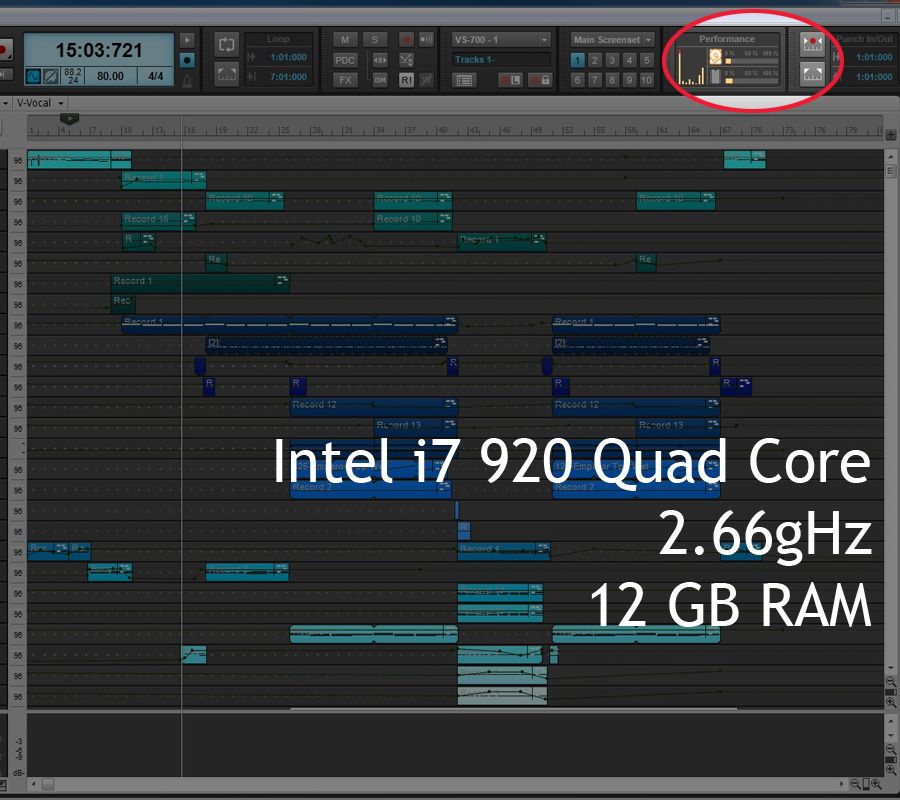 Today I upgraded my CPU and RAM. 2. This is the new CPU (i7 980x Extreme Edition 3.33 gHz) with 24GB of RAM. 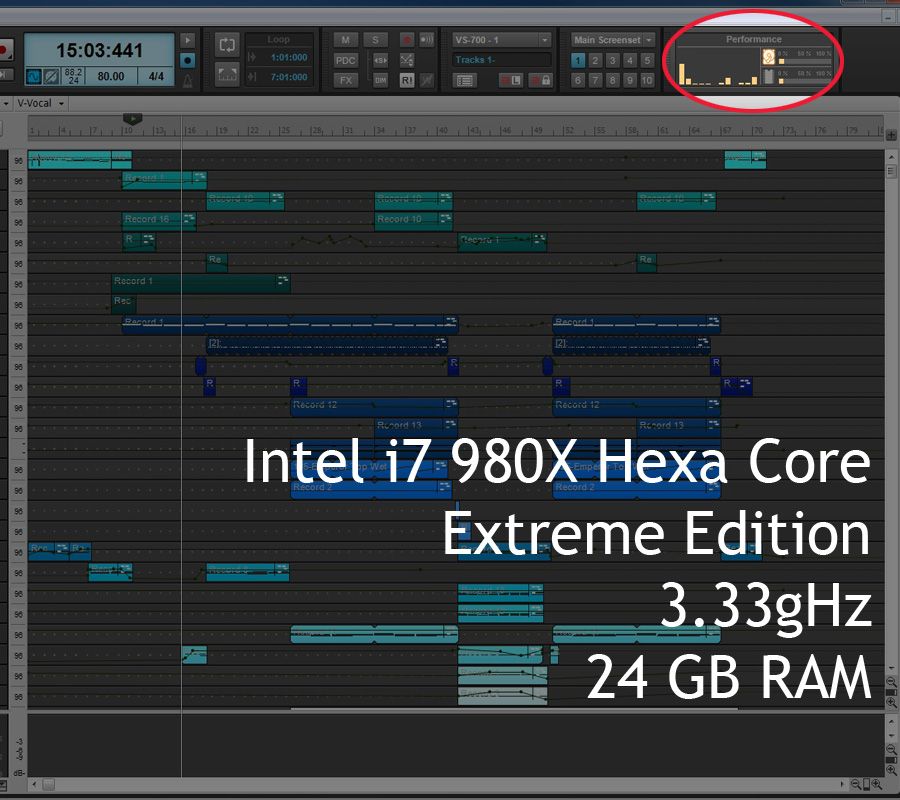 Same project, approximately the same capture on the timeline during playback. Major difference!! Plus, it's so nice to now see 12 virtual cores showing up in the CPU meter in Sonar X2 vs the previous 8. Interesting how Sonar rearranged that top info area to make room for the new CPU and performance meter. So yes, that first core of the new 12 is still taxed more than the others... but I've got plenty of headroom yet to go! Hopefully I'm not going to be slamming up into the red ANYTIME soon now! Thanks everyone for all the input and advice on this subject. 
DAW: Sonar Platinum, Windows 10 Ultimate 64bit**Computer: Intel i7 980x HexaCore Extreme 3.33gHz, Kingston HyperX 24GB RAM, ASUS P6T Deluxe V2 MB, 2x 300GB V-Raptor HDD, 4TB RAID-0 VST/Sounds HDD**Hardware: VS 700 System, Kurzweil SP2XS, Akai MPK49** SoundCloud
|
emwhy
Max Output Level: -62 dBFS
- Total Posts : 1402
- Joined: 2006/01/03 15:09:02
- Status: offline
Re:What does Sonar X2 need/use more of, RAM or CPU power?
2013/04/25 19:43:33
(permalink)
Something else to look into with the i7 is try disabling Speed Step in the BIOS. I had a similar issue with core one maxing out. It got worse after I disabled core parking. Anyway, killing Speed Step (CPUEIST is how it may show) evened things out for me a lot.
|
Beeej21
Max Output Level: -88 dBFS
- Total Posts : 115
- Joined: 2007/03/03 02:23:34
- Status: offline
Re:What does Sonar X2 need/use more of, RAM or CPU power?
2013/04/25 20:13:13
(permalink)
emwhy
Something else to look into with the i7 is try disabling Speed Step in the BIOS. I had a similar issue with core one maxing out. It got worse after I disabled core parking. Anyway, killing Speed Step (CPUEIST is how it may show) evened things out for me a lot.
@emwhy - Where did you go to disable your core parking? I should go check that setting myself. Thanks for the tip about the Speed Step. I'll give that a go too. While I'm really happy with the new upgrades, I'd like to get as much as I can out of it. Thanks for the reply!
DAW: Sonar Platinum, Windows 10 Ultimate 64bit**Computer: Intel i7 980x HexaCore Extreme 3.33gHz, Kingston HyperX 24GB RAM, ASUS P6T Deluxe V2 MB, 2x 300GB V-Raptor HDD, 4TB RAID-0 VST/Sounds HDD**Hardware: VS 700 System, Kurzweil SP2XS, Akai MPK49** SoundCloud
|
emwhy
Max Output Level: -62 dBFS
- Total Posts : 1402
- Joined: 2006/01/03 15:09:02
- Status: offline
Re:What does Sonar X2 need/use more of, RAM or CPU power?
2013/04/25 20:22:41
(permalink)
Core Parking: http://forum.cakewalk.com/tm.aspx?m=1861804 As for Speed Step, it depends on your Mobo manufacturer. I see you have an Asus, so it should be in the BIOS. Some boards don't allow that option (Dells, HP, etc).
|
Beeej21
Max Output Level: -88 dBFS
- Total Posts : 115
- Joined: 2007/03/03 02:23:34
- Status: offline
Re:What does Sonar X2 need/use more of, RAM or CPU power?
2013/04/25 20:26:13
(permalink)
@emwhy - Thank you Good Sir, I shall take a look tonight into this.
DAW: Sonar Platinum, Windows 10 Ultimate 64bit**Computer: Intel i7 980x HexaCore Extreme 3.33gHz, Kingston HyperX 24GB RAM, ASUS P6T Deluxe V2 MB, 2x 300GB V-Raptor HDD, 4TB RAID-0 VST/Sounds HDD**Hardware: VS 700 System, Kurzweil SP2XS, Akai MPK49** SoundCloud
|
Beeej21
Max Output Level: -88 dBFS
- Total Posts : 115
- Joined: 2007/03/03 02:23:34
- Status: offline
Re:What does Sonar X2 need/use more of, RAM or CPU power?
2013/04/25 23:07:25
(permalink)
** it seems as though I made a mistake in terminology earlier, and confused parking with unparking** This is how my post SHOULD have read: So I looked into the parked cores in the OS and SpeedStep settings in the BIOS. It seems I did already unpark my cores earlier when trying to even-out the cores' processing load in Sonar. My SpeedStep was enabled all along. I parked my cores and disabled SpeedStep. My results were worse. I tried mixing and matching between the unparking and the SpeedStep. It seems that unparking my cores is a must for me. The SpeedStep thing didn't seem to net consistent results.. so just I left it enabled since the majority of the time it made a slight difference for the better. Thanks again emwhy for the info.
post edited by Beeej21 - 2013/04/26 02:26:08
DAW: Sonar Platinum, Windows 10 Ultimate 64bit**Computer: Intel i7 980x HexaCore Extreme 3.33gHz, Kingston HyperX 24GB RAM, ASUS P6T Deluxe V2 MB, 2x 300GB V-Raptor HDD, 4TB RAID-0 VST/Sounds HDD**Hardware: VS 700 System, Kurzweil SP2XS, Akai MPK49** SoundCloud
|
Mark D.
Max Output Level: -88 dBFS
- Total Posts : 122
- Joined: 2007/10/23 23:19:37
- Location: Massachusetts
- Status: offline
Re:What does Sonar X2 need/use more of, RAM or CPU power?
2014/02/19 16:21:31
(permalink)
This is an old thread, but I'd enjoy hearing anyone else's thoughts or results with Speed Step enabled / disabled.
|
SIRIS
Max Output Level: -90 dBFS

- Total Posts : 1
- Joined: 2015/07/03 22:34:00
- Status: offline
Re:What does Sonar X2 need/use more of, RAM or CPU power?
2016/10/09 23:08:53
(permalink)
I'm guessing the project is in 24/96K?
Try doing it in standard 16/44.1.
If that helps, try one at 24/48
projects will get titanic In size fast at higher bit rates..
It eventually has to bounce to 16/44.1 anyway to burn to cd.
|
robert_e_bone
Moderator
- Total Posts : 8968
- Joined: 2007/12/26 22:09:28
- Location: Palatine, IL
- Status: offline
Re:What does Sonar X2 need/use more of, RAM or CPU power?
2016/10/10 07:47:34
(permalink)
I run at 24/48k and have NEVER run into performance issues on either a system with an i7 2600k OR a system with an AMD A10 7850 (Both with 32 GB of memory).
I also have one SSD for Windows (Win 10) and all applications, and multiple 7,200 RPM HDD's splitting Cakewalk Projects, Native Instruments and Miscellaneous samples, and EastWest samples.
I run with CPU min/max both set to 100% and my cores are not parked.
Bob Bone
Wisdom is a giant accumulation of "DOH!" Sonar: Platinum (x64), X3 (x64) Audio Interfaces: AudioBox 1818VSL, Steinberg UR-22 Computers: 1) i7-2600 k, 32 GB RAM, Windows 8.1 Pro x64 & 2) AMD A-10 7850 32 GB RAM Windows 10 Pro x64 Soft Synths: NI Komplete 8 Ultimate, Arturia V Collection, many others MIDI Controllers: M-Audio Axiom Pro 61, Keystation 88es Settings: 24-Bit, Sample Rate 48k, ASIO Buffer Size 128, Total Round Trip Latency 9.7 ms
|