cryophonik
Max Output Level: -28 dBFS

- Total Posts : 4724
- Joined: 2006/04/03 17:28:17
- Location: Elk Grove, CA
- Status: offline
iPad users: Neyrinck V-Control Pro now supports X1!
Just got an update that V-Control Pro now supports Sonar. I've been using V-Control Pro for PT and Studio One for a long time and it's an awesome app controller, easily worth the $50 IMO. The recently added V-Window is just awesome. http://www.neyrinck.com/en/products/v-control-pro 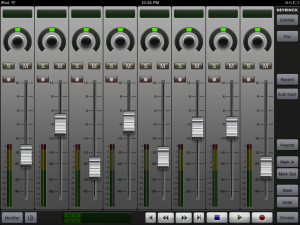
|
inaheartbeat
Max Output Level: -77 dBFS

- Total Posts : 679
- Joined: 2011/08/11 12:19:15
- Location: Nashua, NH USA
- Status: offline

Re:iPad users: Neyrinck V-Control Pro now supports X1!
2012/03/01 17:15:51
(permalink)
How would this be better than AC-7 which works with Sonar and costs $5?
Ken
PC Audio Labs mobile i7 MC, 3.46 Ghz i7 990X, 12 Gb RAM, 3 750 Gb 7200 RPM drives, 3 USB2, 2 USB 3 ports, firewire, Windows 7 64 bit Pro, Sonar X3e Producer 64 bit,
|
cryophonik
Max Output Level: -28 dBFS
- Total Posts : 4724
- Joined: 2006/04/03 17:28:17
- Location: Elk Grove, CA
- Status: offline
Re:iPad users: Neyrinck V-Control Pro now supports X1!
2012/03/01 17:24:12
(permalink)
|
Scott Lee
Max Output Level: -68 dBFS

- Total Posts : 1120
- Joined: 2003/11/13 23:13:38
- Location: Hollywood, California
- Status: offline
Re:iPad users: Neyrinck V-Control Pro now supports X1!
2012/03/01 17:34:53
(permalink)
Hi Cryophonik-
I posted about this a month ago.. had talked with neyrinck about supporting Sonar..Seth immediately moved my post. Wish the mods were a bit less hung up on software that supports X1 a lot of these types of add ons we use in our X1 studios.
Anyways, back to your post.. I also own Control Pro and its freaking amazing... Wanted to share my findings with others here as well. Use it constantly ;)
|
BenMMusTech
Max Output Level: -49 dBFS

- Total Posts : 2606
- Joined: 2011/05/23 16:59:57
- Location: Warragul, Victoria-Australia
- Status: offline
Re:iPad users: Neyrinck V-Control Pro now supports X1!
2012/03/01 19:38:33
(permalink)
Hey Scott or anybody, I'm trying to get the free version of this running, I have downloaded the wifi midi port. The app sees the network, the V-Window works and I have set the control surface to Makie control. I think this is a Sonar problem, Sonar just says connecting in the control window. It does this with the AC7 Core but Core has a reset button which makes the whole program work. Any ideas??
And for those of you who haven't use this app, from the two seconds I have looked at it and the premise behind it, it's going to be exciting.
Peace Ben
|
Zo
Max Output Level: -25 dBFS

- Total Posts : 5036
- Joined: 2008/01/25 20:49:55
- Status: offline
Re:iPad users: Neyrinck V-Control Pro now supports X1!
2012/03/01 20:02:28
(permalink)
ipad +wifi on the computer : DPC latency ? any number ?
For sale (PM me) : transfert ilok includedEventide Ultrachannel make offersSoftube Summit EQIK Neve 1081 , Neve precision Comp/LimEastWest GoshtwriterSoundforge Pro 12
|
Zo
Max Output Level: -25 dBFS
- Total Posts : 5036
- Joined: 2008/01/25 20:49:55
- Status: offline
Re:iPad users: Neyrinck V-Control Pro now supports X1!
2012/03/01 20:05:14
(permalink)
and cakewalk , any apps ? like presonus did ?
For sale (PM me) : transfert ilok includedEventide Ultrachannel make offersSoftube Summit EQIK Neve 1081 , Neve precision Comp/LimEastWest GoshtwriterSoundforge Pro 12
|
BenMMusTech
Max Output Level: -49 dBFS
- Total Posts : 2606
- Joined: 2011/05/23 16:59:57
- Location: Warragul, Victoria-Australia
- Status: offline
Re:iPad users: Neyrinck V-Control Pro now supports X1!
2012/03/01 20:46:39
(permalink)
Zo when I use AC7 Core, I get anywhere up to 60ms of latency but it's not noticable also I am not using the fatest Wifi network.
Peace Ben
|
cryophonik
Max Output Level: -28 dBFS
- Total Posts : 4724
- Joined: 2006/04/03 17:28:17
- Location: Elk Grove, CA
- Status: offline
Re:iPad users: Neyrinck V-Control Pro now supports X1!
2012/03/01 20:51:57
(permalink)
BenMMusTech
Hey Scott or anybody, I'm trying to get the free version of this running, I have downloaded the wifi midi port. The app sees the network, the V-Window works and I have set the control surface to Makie control. I think this is a Sonar problem, Sonar just says connecting in the control window. It does this with the AC7 Core but Core has a reset button which makes the whole program work. Any ideas??
Did you select Sonar as the DAW on the V-Control app itself (sun-shaped icon in the lower LH corner)? Scott Lee
Hi Cryophonik-
I posted about this a month ago.. had talked with neyrinck about supporting Sonar..Seth immediately moved my post. Wish the mods were a bit less hung up on software that supports X1 a lot of these types of add ons we use in our X1 studios.
Hmmm...that's unfortunate, but I guess I won't be surprised when this thread gets moved. Whatever. Hopefully some X1 users will find it useful. 
|
inaheartbeat
Max Output Level: -77 dBFS
- Total Posts : 679
- Joined: 2011/08/11 12:19:15
- Location: Nashua, NH USA
- Status: offline
Re:iPad users: Neyrinck V-Control Pro now supports X1!
2012/03/02 08:49:07
(permalink)
OK I checked out the YouTube videos and I have to say I am impressed based on what seems to be going on. Am I correct in assuming I can use this program on my iPad to control my VSTs like FabFilter Pro-Q and my softsynths like Z3Ta 2 remotely on the iPad? If so I am getting it immediately cause that is something that is not trivial with AC-7.
Also, for those that use this software, is there a way to get access to a virtual iPad keyboard in this app for direct entry of values if needed?
Ken
PC Audio Labs mobile i7 MC, 3.46 Ghz i7 990X, 12 Gb RAM, 3 750 Gb 7200 RPM drives, 3 USB2, 2 USB 3 ports, firewire, Windows 7 64 bit Pro, Sonar X3e Producer 64 bit,
|
cryophonik
Max Output Level: -28 dBFS
- Total Posts : 4724
- Joined: 2006/04/03 17:28:17
- Location: Elk Grove, CA
- Status: offline
Re:iPad users: Neyrinck V-Control Pro now supports X1!
2012/03/02 11:19:06
(permalink)
inaheartbeat
Am I correct in assuming I can use this program on my iPad to control my VSTs like FabFilter Pro-Q and my softsynths like Z3Ta 2 remotely on the iPad? If so I am getting it immediately cause that is something that is not trivial with AC-7.
Also, for those that use this software, is there a way to get access to a virtual iPad keyboard in this app for direct entry of values if needed?
Yes, the V-Window is essentially a remote desktop app that is integrated into V-Control Pro (Pro version only, not the free version). You can select any window that is open on your desktop and control it with touch. For instance, you can open your console view, touch the Pro-Q insert on your iPad to open its GUI (on your monitor as well as your iPad), then edit away from your iPad. Yes, it's that cool! AFAIK there is no way to directly enter any values, unfortunately.
|
auricle
Max Output Level: -81 dBFS

- Total Posts : 492
- Joined: 2007/02/25 09:36:32
- Location: English expat in Moscow/Russia
- Status: offline
Re:iPad users: Neyrinck V-Control Pro now supports X1!
2012/03/02 11:23:55
(permalink)
I have it too, it's an amazing piece of software! Do your level meters work in it, though?
|
bitfodder
Max Output Level: -90 dBFS

- Total Posts : 30
- Joined: 2008/08/22 15:08:25
- Status: offline
Re:iPad users: Neyrinck V-Control Pro now supports X1!
2012/03/03 15:17:11
(permalink)
I'm using gigbit ethernet with a Euphonics/Avid Artist Control and the V-Control... No meters here.
They play nicely together except no meters on the v-control. I've got the free version for testing, thought that was why.
Anyone have meters working at all?
HW8400 Dual Quads, 16Gig Ram, MOTU 828 MKII, Sonar X1, Avid Artist Control, UA LA-610 Mk II, Ensoniq KT88, Samplitude 10, Pianoteq, Izotope Ozone, SD Trigger, Yellow Tools Independance, SampleTank, AAS suite, etc...
|
inaheartbeat
Max Output Level: -77 dBFS
- Total Posts : 679
- Joined: 2011/08/11 12:19:15
- Location: Nashua, NH USA
- Status: offline
Re:iPad users: Neyrinck V-Control Pro now supports X1!
2012/03/03 15:21:58
(permalink)
When you say the level meters are not working what does that actually mean? Are you saying there is no realtime feedback of the values of the track/bus level meters?
Ken
PC Audio Labs mobile i7 MC, 3.46 Ghz i7 990X, 12 Gb RAM, 3 750 Gb 7200 RPM drives, 3 USB2, 2 USB 3 ports, firewire, Windows 7 64 bit Pro, Sonar X3e Producer 64 bit,
|
bitfodder
Max Output Level: -90 dBFS
- Total Posts : 30
- Joined: 2008/08/22 15:08:25
- Status: offline
Re:iPad users: Neyrinck V-Control Pro now supports X1!
2012/03/03 17:56:43
(permalink)
Right, no meters appear next to the fader. There are meters in the YouTube videos for other hosts.
HW8400 Dual Quads, 16Gig Ram, MOTU 828 MKII, Sonar X1, Avid Artist Control, UA LA-610 Mk II, Ensoniq KT88, Samplitude 10, Pianoteq, Izotope Ozone, SD Trigger, Yellow Tools Independance, SampleTank, AAS suite, etc...
|
VariousArtist
Max Output Level: -63 dBFS

- Total Posts : 1397
- Joined: 2003/11/07 15:03:09
- Location: London, UK & California, USA
- Status: offline
Re:iPad users: Neyrinck V-Control Pro now supports X1!
2012/03/03 19:57:31
(permalink)
Cool. I was waiting for this app to include Sonar support directly. I think these are promising developments between DAW controllers and the iPad.
|
BenMMusTech
Max Output Level: -49 dBFS
- Total Posts : 2606
- Joined: 2011/05/23 16:59:57
- Location: Warragul, Victoria-Australia
- Status: offline
Re:iPad users: Neyrinck V-Control Pro now supports X1!
2012/03/03 20:16:05
(permalink)
Ok I have got tis app to work now, my mistake, didn't change the midi in out to VControl.
I'm just using the free version at the moment, I like the slick GUI and with the extra goddies that come with paid version it is a must have. My only stickler is the price at $50, I think it is a little too high.
I also just downloaded Splashtop which is a Windows/Mac controller much like the VContol window included with VControl, if this app is $5 at the moment and AC7 Core is around the same, I don't see how an app company can charge $50 but that is just my opinion and in the near future will have to shell out for this app.
Unless Sonar have something like this up their sleeves in the near future and it would be good to know if Cakewalk are thinking abou developing an app in the near future but on thinking about it the whole Apple thing might get in the way.
Great app and the future really does look bright.
Peace Ben
|
garrigus
Max Output Level: 0 dBFS

- Total Posts : 8599
- Joined: 2003/11/05 17:23:21
- Location: www.garrigus.com
- Status: offline
Re:iPad users: Neyrinck V-Control Pro now supports X1!
2012/03/03 20:43:10
(permalink)
|
VariousArtist
Max Output Level: -63 dBFS
- Total Posts : 1397
- Joined: 2003/11/07 15:03:09
- Location: London, UK & California, USA
- Status: offline
Re:iPad users: Neyrinck V-Control Pro now supports X1!
2012/03/04 01:10:33
(permalink)
Works very well with Sonar. I'm currently using the free version and you can do a lot of useful functions with that alone. It's pretty easy to set up, butimportant that you follow these steps: - Download and install to your PC the Ney-Fi utility and make sure it is running http://www.neyrinck.com/en/downloads/v-control-pro
- Download and install the V-Control app to your iPad http://bit.ly/en_vcpro_buynow
- Startup Sonar and enable the new MIDI device for V-Control (under preferences)
- Within Sonar still, add a Controller (I just selected Mackie Controller) and map that to the V-Control midi device you just enabled
- Now launch the app on your iPad and select your PC listed in the cofig section
- With any luck you should now be controlling Sonar from your iPad! (start/stop, volume/pan, etc, etc)
Note that I can see the track names on my iPad along with volume LEDs and solo/mute etc. I found that observing the recommendation of disabling Bluetooth on your iPad helps latency to the point that it's not an issue. It's pretty neat for a free app and I still consider these early days in the development of such tools. Very promising. Interested to see what the extra $50 buys me for the pro version, but in all honesty it's a pretty decent bang-for-the-buck setup. Good luck!
|
bitfodder
Max Output Level: -90 dBFS
- Total Posts : 30
- Joined: 2008/08/22 15:08:25
- Status: offline
Re:iPad users: Neyrinck V-Control Pro now supports X1!
2012/03/05 21:00:45
(permalink)
HW8400 Dual Quads, 16Gig Ram, MOTU 828 MKII, Sonar X1, Avid Artist Control, UA LA-610 Mk II, Ensoniq KT88, Samplitude 10, Pianoteq, Izotope Ozone, SD Trigger, Yellow Tools Independance, SampleTank, AAS suite, etc...
|
Scott Lee
Max Output Level: -68 dBFS
- Total Posts : 1120
- Joined: 2003/11/13 23:13:38
- Location: Hollywood, California
- Status: offline
Re:iPad users: Neyrinck V-Control Pro now supports X1!
2012/03/05 21:41:11
(permalink)
One thing Id like to mention. Please support this amazing company! I had recommended an undo/redo, save and other edit functions on their forums for Studio One and 2 weeks later they were implemented. You can see here. http://forum.neyrinck.com/viewforum.php?f=70&sid=f9a00fd207a5f3338f3d344c4ebd1c8b This company really listens and is hungry for a top notch product. Hats off to Neyrinck and the team! Best,
post edited by Scott Lee - 2012/03/05 21:50:45
|
inaheartbeat
Max Output Level: -77 dBFS
- Total Posts : 679
- Joined: 2011/08/11 12:19:15
- Location: Nashua, NH USA
- Status: offline
Re:iPad users: Neyrinck V-Control Pro now supports X1!
2012/03/05 21:50:41
(permalink)
Scott Lee
One thing Id like to mention.
Please support this amazing company! I had recommended an undo/redo, save and other edit functions on their forums for Studio One and 2 weeks later they were implemented. This company really listens and is hungry for a top notch product. Hats off to Neyrinck and the team!
Best,
OK....based on the fact that there is a way to get the meters displayed I am sold. I am going to pick this up some time tomorrow and give it a spin in between all the rest of the stuff I have going on ;-) Ken
PC Audio Labs mobile i7 MC, 3.46 Ghz i7 990X, 12 Gb RAM, 3 750 Gb 7200 RPM drives, 3 USB2, 2 USB 3 ports, firewire, Windows 7 64 bit Pro, Sonar X3e Producer 64 bit,
|
Scott Lee
Max Output Level: -68 dBFS
- Total Posts : 1120
- Joined: 2003/11/13 23:13:38
- Location: Hollywood, California
- Status: offline
Re:iPad users: Neyrinck V-Control Pro now supports X1!
2012/03/05 21:57:17
(permalink)
BenMMusTech
Ok I have got tis app to work now, my mistake, didn't change the midi in out to VControl.
I'm just using the free version at the moment, I like the slick GUI and with the extra goddies that come with paid version it is a must have. My only stickler is the price at $50, I think it is a little too high.
I also just downloaded Splashtop which is a Windows/Mac controller much like the VContol window included with VControl, if this app is $5 at the moment and AC7 Core is around the same, I don't see how an app company can charge $50 but that is just my opinion and in the near future will have to shell out for this app.
Unless Sonar have something like this up their sleeves in the near future and it would be good to know if Cakewalk are thinking abou developing an app in the near future but on thinking about it the whole Apple thing might get in the way.
Great app and the future really does look bright.
Peace Ben
Ben, I also have splash top.. While it is good, it doesn't compare to how v-control works via controlling the vsts and onscreen buttons. The way you mentioned you were heading is how I use to use my iPad as a control device. As you can see in my studio picture thread, I started out using "splash top" on the iPad. while the closeup shot was with v control pro what I use now. http://forum.cakewalk.com/tm.aspx?&m=2484421&mpage=1 V-control pro is in a league of its own when it comes to feedback response and daw control.
post edited by Scott Lee - 2012/03/05 22:04:33
|
cecelius2
Max Output Level: -61 dBFS

- Total Posts : 1494
- Joined: 2009/11/06 16:12:11
- Location: Pacific Northwest
- Status: offline
Re:iPad users: Neyrinck V-Control Pro now supports X1!
2012/03/06 00:59:11
(permalink)
I have a really "dumb" question as I am an ancient in time but an infant to IPads. Is there anyway to use V-Control directly hard wired from the IPad's usb cable? I saw that on the AC7 site that it could alternatively be used with an IPad camera connection kit and a usb to midi converter. Is such possible with the V-Control Pro? I have heard too many horror stories about wifi in the Studio.
Thanks
Cecelius2
|
mugician41
Max Output Level: -90 dBFS
- Total Posts : 26
- Joined: 2010/09/25 17:58:13
- Location: Branson, MO USA
- Status: offline
Re:iPad users: Neyrinck V-Control Pro now supports X1!
2012/03/08 11:45:00
(permalink)
Been using AC-7, but just bought V-Control Pro. So far I'm loving it. Selected my channel and hit compressor and I can control the compressor in Pro Channel! very nice.
Can't wait till next week when I have some more time to learn some more about V-Control. Definitely worth 50 bucks.
|
iamnemo
Max Output Level: -90 dBFS
- Total Posts : 13
- Joined: 2012/02/24 15:24:56
- Status: offline
Re:iPad users: Neyrinck V-Control Pro now supports X1!
2012/03/08 12:42:37
(permalink)
Just pre-ordered myself a brand new iPad or is it iPad HD or iPad 3? to use with VC-Pro
|
auricle
Max Output Level: -81 dBFS
- Total Posts : 492
- Joined: 2007/02/25 09:36:32
- Location: English expat in Moscow/Russia
- Status: offline
Re:iPad users: Neyrinck V-Control Pro now supports X1!
2012/03/08 13:05:43
(permalink)
Hi cecelius, No, it's wifi only, I'm afraid. It uses a different protocol to Midi to transmit to keep the latency down.
cecelius2
I have a really "dumb" question as I am an ancient in time but an infant to IPads. Is there anyway to use V-Control directly hard wired from the IPad's usb cable? I saw that on the AC7 site that it could alternatively be used with an IPad camera connection kit and a usb to midi converter. Is such possible with the V-Control Pro? I have heard too many horror stories about wifi in the Studio.
Thanks
Cecelius2
|
bobr
Max Output Level: -76 dBFS

- Total Posts : 709
- Joined: 2003/12/10 09:48:17
- Status: offline
Re:iPad users: Neyrinck V-Control Pro now supports X1!
2012/03/12 13:24:58
(permalink)
I have a really "dumb" question as I am an ancient in time but an infant to IPads. Is there anyway to use V-Control directly hard wired from the IPad's usb cable? I saw that on the AC7 site that it could alternatively be used with an IPad camera connection kit and a usb to midi converter. Is such possible with the V-Control Pro? I have heard too many horror stories about wifi in the Studio. Thanks Cecelius2 cecelius2
Cecelius2,
The recommended way to use this is to simply connect your DAW computer via ethernet to a wireless router. Then the iPad connects to your DAW computer via the wireless router. That way you do not actually have any wireless devices running on your DAW. I will be testing this further this evening as I just found out that I need to download and install Bonjour for Windows on my computer to enable the iPad to see it. If that works with the free version, I'll easily opt for the Pro version.
Take care,
Bob
|
bobr
Max Output Level: -76 dBFS
- Total Posts : 709
- Joined: 2003/12/10 09:48:17
- Status: offline
Re:iPad users: Neyrinck V-Control Pro now supports X1!
2012/03/13 10:36:55
(permalink)
bobr
Cecelius2,
The recommended way to use this is to simply connect your DAW computer via ethernet to a wireless router. Then the iPad connects to your DAW computer via the wireless router. That way you do not actually have any wireless devices running on your DAW. I will be testing this further this evening as I just found out that I need to download and install Bonjour for Windows on my computer to enable the iPad to see it. If that works with the free version, I'll easily opt for the Pro version.
Take care,
Bob
After installing Bonjour for Windows, this worked wonderfully. Downloaded the Pro version and had it up and running in no time. Great for controlling SONAR, Plugins and even the CueMix FX console for my MOTU interface. Well worth it!
|
cecelius2
Max Output Level: -61 dBFS
- Total Posts : 1494
- Joined: 2009/11/06 16:12:11
- Location: Pacific Northwest
- Status: offline
Re:iPad users: Neyrinck V-Control Pro now supports X1!
2012/03/13 19:51:46
(permalink)
☄ Helpfulby chefmike8888 2013/08/23 09:34:26
bobr
The recommended way to use this is to simply connect your DAW computer via ethernet to a wireless router. Then the iPad connects to your DAW computer via the wireless router. That way you do not actually have any wireless devices running on your DAW. I will be testing this further this evening as I just found out that I need to download and install Bonjour for Windows on my computer to enable the iPad to see it. If that works with the free version, I'll easily opt for the Pro version. Take care,
Bob
Thanks for this info Bobr! BTW, nice Rick!
|