• SONAR
  • Sonar X2a, Multiple Instances of Microtonic, Memory & Cold-Quits (SOLVED)
2013/08/16 10:00:47
2:43AM
Stay positive, 2:43AM...stay positive...
 
I really try, but sometimes it's hard. However, instead of stewing in my own juices, I reach out for help. Well, the walls of my pit are quite muddy and slick, but perhaps I will eventually be able to climb out.
 
Latest problem: Running multiple instances of Microtonic (v3.1, 64-bit) causes MAJOR crashes. It does not matter if I load the VST into the FX Bin, or load it as an "Instrument," either Simple or Multi-Out. After playing anywhere between 10-40 seconds, Sonar X2a crashes and crashes hard. Crashes range from Memory Errors (see below), WSOD's, Unexpected Stops, or complete-quits (i.e. clean crashes to desktop, no report, nothing in Event Viewer). Any crash seems random.
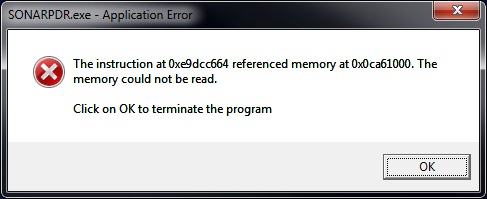


I reached out to Sonic Charge, and the original developer was extremely kind and helpful. He demonstrated in a video that he quickly put together that running up to four copies of Microtonic proved to be successful with no errors/crashes. I mimicked his techniques, but I still experienced the crashes.
 
So I decided to do a little troubleshooting of my own.  Here are my tests and results (test project files have nothing in them except for what is required for the test--audio tracks and Microtonic; no other plugins):
 
1. Increase ASIO buffer latency in MixControl from 128 to 512, thereby increasing round-trip from 7.9ms to 23.6ms!
RESULT: Crash - WSOD.
2. Restart computer; start fresh.
RESULT: Crash - WSOD; unexpected Stop. Event Viewer reports crash of sonarprd.exe.
3. Disable the 64-Bit Precision thing in Preferences.
RESULT: Crash to desktop.
4. Noticed Mr. Lidström had 44.1/16 displayed in the Sonar transport module screen. This gave me the idea to jump out of ASIO and run WDM/KS mode as I am locked into 48kHz and 24-bit due to the Alesis Ai3 (ADAT). So disabled MixControl ASIO driver and re-enabled my onboard soundcard drivers (Realtek). Restart. Ran Sonar. Ran Wave Profiler. Verified 44.1 with drop down to 16-bit.
RESULT: Crash to desktops and memory crashes.
5. Made bootable USB to run MemTest in BIOS. Performed physical memory check for 1.5 hours.
RESULT: No errors. Assume good memory.
6. Back again after restart and tested Sonar and Microtonic again.
RESULT: Unexpected stop. Event Viewer reports crash of ntdll.dll.
 
So I think I may have exhausted all I can do for testing purposes. I am out of ideas, except for one little, tiny clue. Whether or not it's relevant is beyond me...
 
Despite the Sonar Preference indicating that bit depth is 16-bit, the Transport Module still shows (44.1) 24.  For some reason, Sonar is not bumping the "reported" bit depth down to 16. What's interesting to note is that even if I try to set the pref to 24, and then hit apply, I receive an error dialog box saying that 24-bit is not supported, and the setting has been reset to 44100 Hz (16 bit), as suggested by the driver. Result? Still shows 24 in the Transport Module. Is this a valid clue? Perhaps Sonar is getting confused in bit ranges? If so, then why is it still crashing when I am in ASIO mode?
 
I'm an effort to clean up ASIO mode, I've ordered a SIIG PCIe Firewire card. I hope it helps, but I have my doubts.
 
Can anyone help me please? Does anyone have Microtonic that can also perform the tests, running multiple instances of the VST at once? Anything else I should try? Is the installation of Sonar corrupt? Do I honestly need to reinstall yet again? (sigh).
2013/08/16 14:16:54
robert_e_bone
I want to make sure I am up to speed on your settings.  I am not familiar with this Alesis device.
 
Using your Alesis AI3, which per its documentation runs at 48k Sample Rate, at 24-bit depth, what do you have the ASIO Buffer Size set to for the interface?
 
Also, what Sample Rate is set in Sonar?  (48k?)
 
To set the record bit-depth, you change that in Preferences>File>Audio Data Record Bit Depth (24).
 
How does the interface connect to the computer?  USB?  If so, are you plugged into a USB 2 port or are you using a USB 3 port?  If you are currently in a USB 3 port, try moving it to a USB 2 port - you may have to install the drivers again.
 
Lastly, are you able to playback any audio, such as a plain old MP3/WMA song file?  Or, is it any specific project(s) that are causing these crashes?
 
Just trying to get up to speed and on the same page as you, 
 
Bob Bone


2013/08/16 14:17:33
robert_e_bone
I forgot to add that for my above post to go back to ASIO mode.
 
Bob Bone
 
 
2013/08/16 14:49:49
daveny5
I'd run a full memory test. Could be a bad chip. 
2013/08/16 15:39:59
robert_e_bone
He indicated he had run a memory test for an hour and a half - that was sort of buried in the middle of the post.
 
Bob Bone


2013/08/16 17:32:10
lawp
Is microtonic sending midi out?
2013/08/16 21:38:42
2:43AM
Whoa. Thanks for the responses so far guys. I appreciate it. I will try to answer your questions...
 
From Robert_e_bone:
What do you have the ASIO Buffer Size set to for the interface?
ASIO Buffer is normally set to 128 in Focusrite's MixControl v3.2
Also, what Sample Rate is set in Sonar?  (48k?)
48000
To set the record bit-depth, you change that in Preferences>File>Audio Data Record Bit Depth (24).
Audio Driver Bit Depth is 24 (and grayed out, i.e. not adjustable) with 64-bit Double Precision Engine checked. Record bit depth is 24, Render depth is 32 and Import is "Original."
How does the interface connect to the computer?
Firewire port on the mobo.
Lastly, are you able to playback any audio, such as a plain old MP3/WMA song file?  Or, is it any specific project(s) that are causing these crashes?
Generally, I am crash free. I can use Sonar relatively pain-free except for the occasional crash. I can get audio to playback just fine as well as record. The computer is pretty solid overall. And Sonar is relatively solid.  One Microtonic can run all day long. However, multiple Microtonics break its back!
 
From daveny:
I'd run a full memory test. Could be a bad chip.
Yes. I ran a memory test.  The program ran for 1-1/2 hours in BIOS and reported no errors.
 
From lawp:
Is microtonic sending midi out?
Not that I know of. I can receive MIDI but not send it out.

2013/08/16 22:53:31
Brando
2:43AM
Can anyone help me please? Does anyone have Microtonic that can also perform the tests, running multiple instances of the VST at once? Anything else I should try? Is the installation of Sonar corrupt? Do I honestly need to reinstall yet again? (sigh).


I have Microtonic. Never tried to run multiple instances honestly. I love it and it is really solid here. But I'll be happy to give this a try this weekend. When you say "multiple" - do you always get a crash when you have 2 instances, or 3 instances, etc.?
2013/08/16 23:18:31
2:43AM
Brando
I have Microtonic. Never tried to run multiple instances honestly. I love it and it is really solid here. But I'll be happy to give this a try this weekend. When you say "multiple" - do you always get a crash when you have 2 instances, or 3 instances, etc.?


Brando...much appreciated for the tests when you get a chance. If two or more instances of Microtonic are playing at the same time, then Sonar just completely calls it quits on life of its existence in ones and zeros!
 
One thing to mention is that I am attempting to run 2+ copies of the 64-bit edition, version 3.1.
2013/08/17 03:51:01
robert_e_bone
I did some poking around - here is a thread that has a reported issue on crashes on a 2nd instance of Microtonic:
 
http://forum.cakewalk.com/Sonar-producer-x2crashes-when-opening-projectswhen-closing-projectsmany-other-problems-m2824295.aspx
 
Does your computer sleep?  That was discussed in the above thread.
 
Bob Bone
 
© 2026 APG vNext Commercial Version 5.1

Use My Existing Forum Account

Use My Social Media Account