Bus Routing - technique
Here's a technique of how I have my buses set up. Sonar X2 works great with this, even with loads of tracks in a song. I use the ProChannel a lot, both on tracks and on buses. This is to show how I have buses set up overall and also how I handle common effects that span multiple tracks.
I'm posting to suggest it as an idea for some, and for me to hear of ideas from others.
Inspired by this Coffee House post - how do I post images? (Now I can post images too!)...
http://forum.cakewalk.com...-In-Post-m2053970.aspx And inspired by this thread: How To Turn off Effects?
http://forum.cakewalk.com...ecording-m2869987.aspx And inspired by the techniques of setting up buses from this Groove3 video on Mixing in Sonar X1
http://www.store.cakewalk.com/b2cus/ProductInfo.aspx?productid=30-G3MX1.00-20E I have a starter/template file, so this is set up already when I start a new file.
Bus Mains - all routed to the Master. The outputs from the tracks for each of these categories all route to these mains:
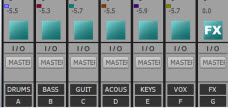 FX Mains
 - all routed to the FX bus. The FX bus is routed to the Master (as shown above)
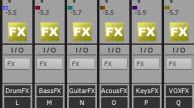
In the image above, note the little Grouping dots. I have Groupings for each on the Mute, Solo, and Volume.
If I mute the main GUIT bus it also mutes the GuitarFX bus. Or similarly, if I drag the volume down on one of the Main buses, it will drag an equal volume down from the corresponding FX bus. For example, the main GUIT bus shows a volume of -5.5 and the GuitarFX volume also shows -5.5 because the volume sliders are grouped between the two.
Note, if I mute the FX main bus (blue color) it mutes all of the effects that are flowing through the FX mains (the yellow FX buses).
FX Sub buses - all routed to their corresponding FX main bus (such as DrumsFX, KeysFX - the yellow ones)
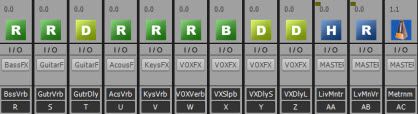
All above stay at 100% volume. The muting, volume, etc. is taken care of at the corresponding FX main bus.
Each of the FX sub buses have some specialized purpose. Multiple FX sub buses for a category, like guitars, all route to the same GuitarFX main bus. I add extra FX sub buses as needed depending on a song, but these are some starting ones. Each of the FX sub buses, let's say GuitarVerb, have some effect on them in their FX bin - like Breverb at 100% wet etc.
Spelling out what is condensed in the buses W-Z shown above, I have a VoxVerb, VoxSlapback, VoxDelayShort, VoxDelayLong FX sub buses, each with their own effects in their FX bin. Each of those sub buses route to the VoxFX bus.
Tracks - I use the ProChannel for track specific effects. But on many tracks I also want to use a common effect across all of the like tracks, say Reverb on all of the Guitar tracks. For that I use the Send from the guitar tracks to the GuitarVerb bus.
Here's the overall set of buses. If you're reading this, you might also see in this screen shot that I have drums broken out a bit differently to enable New York compression (mixing clean and compressed).
I adopted that technique from the Seth and Brandon CakeTV Live video on Big Drum sounds.
Console with Buses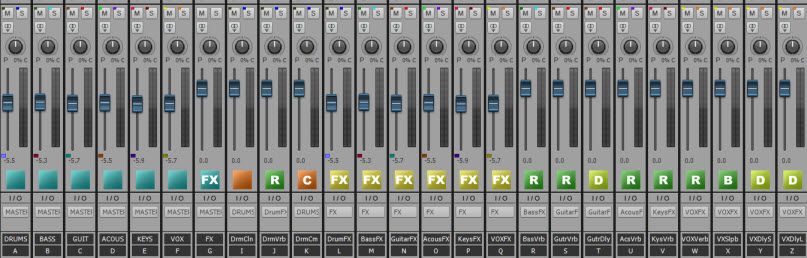
The Console view I use the most is to pull the bus curtain in so that I'm looking at the Main buses only and the tracks.
I only have one track shown below, but the bus curtain only shows the main buses:
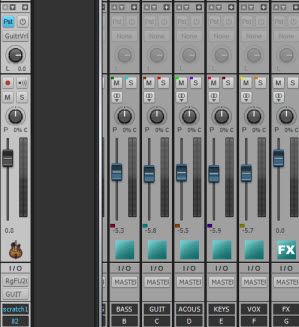
This way, when I show the Console view, I can conveniently mute out any of the categories I don't want to hear at the moment.
To hear just the drums and bass, I would mute the other mains.
This technique also allows me to set relative levels between the main instrument groups by these main buses.
I'm finding it helpful to make overall song adjustments this way, and I've centralized at least some of my effects so that I can easily use one instance of an effect (like one reverb) to work across multiple tracks.
I'll be interested to see comments/critiques if any. I've posted this because the forum has been helpful for me, so just trying to share something back out.
post edited by lawajava - 2013/08/10 19:20:58