• SONAR
  • Delete Marker doesn't work anymore (p.2)
2017/01/20 16:37:02
chuckebaby
all good here but I don't use the synth rack that often. I use the track pane in the prv and TV to utilize synth navigation.
2017/01/20 20:04:57
DeeringAmps
Gary,
you don't have the + and - keys in the upper left hand corner?
The mouse pointer isn't showing, but it was "on" the - sign.
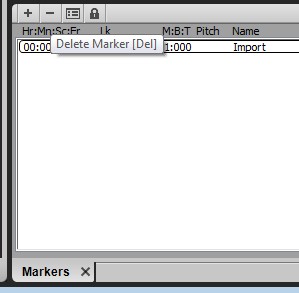
This shot is from 2016.10.
And that's the way the Markers has always been.
I'm not running 12 on either of mys systems.
But help me get one thing straight.
If Synth Rack is docked at the top in the browser, we all have shortcut issues? Or not?
T
2017/01/20 20:48:30
gmp
here's my markers view for 2016.12 below. Why is mine screwed up? Are you using 2016.12 ?
 

2017/01/20 21:36:35
chuckebaby
gmp
here's my markers view for 2016.12 below. Why is mine screwed up? Are you using 2016.12 ?


Im using 12.2016 and I have them.
It looks like you are using a custom theme and changed their color (turned them black along with the Markers header).
You can barely see the +/- arrows in your screenshot. but they are there.
2017/01/20 23:29:45
gmp
Yes you nailed it. I'm using a custom theme. I need to see if I can figure out how to fix that.
 
I may just revert back to 2016.09 because of the multiple problems. 2016.09 is the last version that was problem free for me. This has not been a good winter for Cakewalk. They need to slow down on the bells and whistles and take care of business.
2017/01/21 06:33:29
chuckebaby
cakewalk just released a new version for early release with keyboard shortcut fixes here:
http://forum.cakewalk.com/The-Early-Access-Program-is-Now-Live-for-the-Upcoming-Release-of-SONAR-201701-m3549019.aspx
 
In reply to your comment about cakewalk,
This has been a great winter for Cakewalk. I've seen more fixes in this past 3 months than I think I've ever seen.
Matter of fact there have been no belles and whistles (just bug fixes) in the past 3 releases (besides moving the SR). 
Though you may be experiencing this problem, many others have no idea what your referring to and are running fine (like myself). im simply here trying to help.
So I think what you meant to say is ""This has not been a good winter for me using Cakewalk"".
 
Which is understandable. I've been there. but they cant please everyone. what works fine for some, doesn't work for others. you know what I mean ? They cant test everyone's personal PC. that's why they have the early releases. With Christmas behind us they can now focus on more issues. best of luck.
2017/01/21 13:55:14
gmp
chuckebaby
cakewalk just released a new version for early release with keyboard shortcut fixes here:
http://forum.cakewalk.com/The-Early-Access-Program-is-Now-Live-for-the-Upcoming-Release-of-SONAR-201701-m3549019.aspx
 
In reply to your comment about cakewalk,
This has been a great winter for Cakewalk. I've seen more fixes in this past 3 months than I think I've ever seen.
Matter of fact there have been no belles and whistles (just bug fixes) in the past 3 releases (besides moving the SR). 
Though you may be experiencing this problem, many others have no idea what your referring to and are running fine (like myself). im simply here trying to help.
So I think what you meant to say is ""This has not been a good winter for me using Cakewalk"".
 
Which is understandable. I've been there. but they cant please everyone. what works fine for some, doesn't work for others. you know what I mean ? They cant test everyone's personal PC. that's why they have the early releases. With Christmas behind us they can now focus on more issues. best of luck.


Great news! Thanks for sharing this new release. And thanks for the reality check. You're so right each of us tend to have a myopic view. All we can state is our experience with our systems and it's good to take a good overall view like you have. I'm glad you see this as a good winter for Cakewalk with all the fixes.
 
 I just can't help but being frustrated when such a nuts and bolts issue is buggy and not fixed quickly. I’ve been with Cakewalk for over 20 years using their products and overall they do a fine job considering all the impossible tasks they have trying to please us all all the time.
 
 I know they’ve really had their hands full with this runtime error issue that cropped up around 12/1. I know that took priority.  I’ve seen you around a lot always being helpful. We all thank you for that.
2017/01/21 16:26:09
gmp
The new update has fixed most of the problems and the workarounds are easy for the remaining problems. With the new update I don't have to bind Delete key anymore. I can delete markers in markers view, delete notes in staff view, event list. I don't' have to bind other keys as a workaround either. I can use F11 to insert markers instead of M.
 
There's still some problems with the synth rack docked at top right - can't delete marker with mouse, I get the pop message "delete soft synth?" So we still have the same problem with the synth rack docking where it steals the focus. I can dock the synth rack at the bottom right and everything is fine. I prefer the top, but this certainly is an easy workaround
 
 
If I delete a midi clip with synth rack docked at top right, I get the pop message "delete soft synth?". I can dock the synth rack at the bottom right and I can successfully delete a midi clip. All the other keys that required key binding are fixed now also.
2017/01/21 16:55:31
SquireBum
gmp

There's still some problems with the synth rack docked at top right - can't delete marker with mouse, I get the pop message "delete soft synth?" So we still have the same problem with the synth rack docking where it steals the focus. I can dock the synth rack at the bottom right and everything is fine. I prefer the top, but this certainly is an easy workaround
 
 
If I delete a midi clip with synth rack docked at top right, I get the pop message "delete soft synth?". I can dock the synth rack at the bottom right and I can successfully delete a midi clip. All the other keys that required key binding are fixed now also.


Yes.  Confirmed on my system.
 
Also, Shift-A to Show/Hide Lanes now displays a Synth Rack context menu when the Synth Rack is docked at top right.  I reported it here: http://forum.cakewalk.com/FindPost/3549289.
 
-- Ron
2017/01/21 18:36:36
chuckebaby
gmp
If I delete a midi clip with synth rack docked at top right, I get the pop message "delete soft synth?". I can dock the synth rack at the bottom right and I can successfully delete a midi clip. All the other keys that required key binding are fixed now also.


Let me see (in a little bit I will give it a try) if I can repro this.
now, deleting the Midi clip how ? Clicking on the Midi clip and pressing the delete key ?
© 2026 APG vNext Commercial Version 5.1

Use My Existing Forum Account

Use My Social Media Account