eratu
Max Output Level: -46.5 dBFS

- Total Posts : 2856
- Joined: 2007/01/27 22:08:32
- Status: offline

Re:New DAW build for Sonar 8.5 x64 and Win 7 x64 - work in progress
2009/10/25 20:45:01
(permalink)
Jose: No time to look at that issue right now, way too many problems with this DAW... but I will if I can get things working.
mudgel: Thanks, man... the mystery deepens with Dim Pro. Will be looking into it more hopefully soon...
|
Jose7822
Max Output Level: 0 dBFS

- Total Posts : 10031
- Joined: 2005/11/07 18:59:54
- Location: United States
- Status: offline
Re:New DAW build for Sonar 8.5 x64 and Win 7 x64 - work in progress
2009/10/25 20:46:52
(permalink)
It's cool bro, don't worry about it.
Intel Q9400 2.66 GHz 8 GB of RAM @ 800 Mhz ATI Radeon HD 3650 Windows 7 Professional (SP1) x64 Cubase 6.03 x64 Sonar PE 8.5.3 x64 RME FireFace 400 Frontier Design Alpha Track Studio Logic VMK-188 Plus http://www.youtube.com/user/SonarHD
|
eratu
Max Output Level: -46.5 dBFS
- Total Posts : 2856
- Joined: 2007/01/27 22:08:32
- Status: offline
Re:New DAW build for Sonar 8.5 x64 and Win 7 x64 - work in progress
2009/10/25 20:58:12
(permalink)
UPDATE:
Well, I think I've just about hit the wall. Very disappointed and frustrated. Just about worn out right now on this. Now I can't even open my own Sonar project files... the very test sessions that I am creating with this very installation of Sonar. It says "Could not open file. The file may be damaged or incompatible with this version of Sonar." ... and I had just created it! Happening on all new test files I'm creating with these plugins.
Then, I try to open the file in compatibility mode <shift key> with *all* the plugins selected and it opens. That makes absolutely no sense to me, and it makes me feel zero confidence with this config. Clearly some plugin combination is causing the issue, and it may take me many hours to figure out what combination is doing it. Problem is, I *need* every single plugin I put into the session, so what plugin would I be willing to give up? None of them.
Feeling a bit bleak, and honestly contemplating throwing in the towel right now.
Ironically, I looked at every plugin that was used in that test session, and almost every single plugin was 32-bit running in BitBridge. So why the @#$% am I running x64 for a session like this? <sigh> The reason? Because I need all the RAM when I start adding loads of RAM-hungry plugins. I couldn't even get to that step. But in the end, HAVE to run x64.... if it can't handle what I'm doing to it now, there's no way this will hold up in a production project.
I hate being so transparent and honest here about my emotions, folks, but I'm honestly feeling pretty down about this right now. So much time invested and this just doesn't work the way I was hoping. Disappointment mixed with frustration mixed with latent anger mixed with exasperation. Not sure what I'm going to do at this point. Try to keep going? Or throw in the towel? :(
|
eratu
Max Output Level: -46.5 dBFS
- Total Posts : 2856
- Joined: 2007/01/27 22:08:32
- Status: offline
Re:New DAW build for Sonar 8.5 x64 and Win 7 x64 - work in progress
2009/10/25 21:06:12
(permalink)
Another UPDATE:
So now I moved another plugin in the plugin manager over to JBridge and I can't even get the Sonar file to open at all. Even in compatibility mode!! This is beyond belief. If this isn't a show-stopper I don't know what is. It's looking more and more like I will have to choose between losing one (or two or three or four or a dozen) critical plugins or not working in x64 at all.
Disappointedly yours,
James
|
eratu
Max Output Level: -46.5 dBFS
- Total Posts : 2856
- Joined: 2007/01/27 22:08:32
- Status: offline
Re:New DAW build for Sonar 8.5 x64 and Win 7 x64 - work in progress
2009/10/25 21:20:59
(permalink)
Yet another update:
Still experimenting to see if I can see a pattern. A sane man would give up now, it's like I'm setting myself up for another kick in the face. I'm going to try to move more things off of BitBridge and try more plugins on JBridge, see what happens. I'll also try designating certain BitBridge servers. I think the load order or procedure for plugins when I reload a saved project is different than when I'm building the session. Wondering if there's something to do with the order the plugins are created. This is insane. :(
|
Jose7822
Max Output Level: 0 dBFS
- Total Posts : 10031
- Joined: 2005/11/07 18:59:54
- Location: United States
- Status: offline
Re:New DAW build for Sonar 8.5 x64 and Win 7 x64 - work in progress
2009/10/25 21:43:16
(permalink)
Man, that really sucks bro.
Perhaps moving to 64 bit with Windows 7 was not the best idea?
I wonder if you'd have a different experience in Vista64. Probably not since the issue seems to be with Bitbridge.
However, I'm done with the project so if you want I can test these plugins in my setup. Just tell me how to reproduce the problem or simply send me the project file and tell me what you're using and I'll test it out for ya. As long as there are demo versions of those plugins available of course.
Let me know :-)
Intel Q9400 2.66 GHz 8 GB of RAM @ 800 Mhz ATI Radeon HD 3650 Windows 7 Professional (SP1) x64 Cubase 6.03 x64 Sonar PE 8.5.3 x64 RME FireFace 400 Frontier Design Alpha Track Studio Logic VMK-188 Plus http://www.youtube.com/user/SonarHD
|
eratu
Max Output Level: -46.5 dBFS
- Total Posts : 2856
- Joined: 2007/01/27 22:08:32
- Status: offline
Re:New DAW build for Sonar 8.5 x64 and Win 7 x64 - work in progress
2009/10/25 22:45:44
(permalink)
You're a great guy, Jose! If there's anyone who deserves the award for #1 kick-ass Cakewalk forum user, you would be my vote in a heartbeat.
Right now I feel burned out on the project. Sonar 8.5.1 x64 seems pretty darn good in a vacuum, it's just the combination of plugins that I believe are giving me the problems. I really think that's the key for anyone contemplating the move to x64. They really will have to sit down and do the homework on all their own plugins themselves. Not only that, it seems possible that interactions of some plugins with others might have issues as well. And on top of that, it's a constantly moving target since the developers are changing things quickly.
After what I've experienced so far, if I could wait another year to go to x64, I would. However, I really, really want to see how Kontakt 4 x64 goes... and the other NI plugins before making my final decision, if possible. I just don't know if I can make it that far. These plugins that I'm testing right now are critical too. And I'm just being optimistic that Kontakt 4 x64 will work. :)
Anyway, bottom line is that this whole x64 thing is not nearly as mature as I was hoping. It's better than the last time I tried to move to x64, but there are still some serious teething problems. My optimism got the better of me, and I think I should have just waited. Again. :(
As for your offer, I may take you up on it. :) As far as I know, Arturia does not yet have the Syncrosoft-based versions of their plugins available as trials/demos, for example. You'd be running the older version to test. So that sucks. I will continue testing, but at a slower pace. It's clear that things will have to be very deliberately tested in various real-world plugin combinations before I feel comfortable devoting a hard-core project to it.
As for my latest problem, I think I am narrowing it down to a compatibility with BitBridge and the Arturia plugins. My preliminary feeling is that when the project is loaded from the saved file, it doesn't like the Syncrosoft protection. However, if each plugin is loaded one-by-one (either in safe mode or when originally creating the project) then BitBridge seems okay with Syncrosoft. However, I haven't proven this, or created a repeatable recipe for it yet. And there are some other variables I haven't checked yet.
I hope to update again, but there's hardly any fuel left in me for this. I was way too optimistic when I started, and my mind is already spinning with the urgent need to get back to "normal" work, and get running in 32-bit asap... this has been a costly endeavor and the red flags are waving.
Best, James
|
Jose7822
Max Output Level: 0 dBFS
- Total Posts : 10031
- Joined: 2005/11/07 18:59:54
- Location: United States
- Status: offline
Re:New DAW build for Sonar 8.5 x64 and Win 7 x64 - work in progress
2009/10/25 22:50:19
(permalink)
I'm installing the FabFilter plugins for now. I'll let you kow how that goes in a bit.
Wish me luck :-P
Intel Q9400 2.66 GHz 8 GB of RAM @ 800 Mhz ATI Radeon HD 3650 Windows 7 Professional (SP1) x64 Cubase 6.03 x64 Sonar PE 8.5.3 x64 RME FireFace 400 Frontier Design Alpha Track Studio Logic VMK-188 Plus http://www.youtube.com/user/SonarHD
|
Jose7822
Max Output Level: 0 dBFS
- Total Posts : 10031
- Joined: 2005/11/07 18:59:54
- Location: United States
- Status: offline
Re:New DAW build for Sonar 8.5 x64 and Win 7 x64 - work in progress
2009/10/25 23:05:58
(permalink)
Eratu,
What should I be doing now?
So far I've been able to insert 15 instances of each of the FabFilter Plugins (Simpleton, Timeless 2 and Volcano 2) in a 15 audio track project I created. That's a total of 45 plugins. So what now? How do I make this thing crash or fail? Do I need to insert a synth? I've never used these plugs so I have no idea what to do :-P
Intel Q9400 2.66 GHz 8 GB of RAM @ 800 Mhz ATI Radeon HD 3650 Windows 7 Professional (SP1) x64 Cubase 6.03 x64 Sonar PE 8.5.3 x64 RME FireFace 400 Frontier Design Alpha Track Studio Logic VMK-188 Plus http://www.youtube.com/user/SonarHD
|
Jose7822
Max Output Level: 0 dBFS
- Total Posts : 10031
- Joined: 2005/11/07 18:59:54
- Location: United States
- Status: offline
Re:New DAW build for Sonar 8.5 x64 and Win 7 x64 - work in progress
2009/10/25 23:09:04
(permalink)
Oh wow, these filters are cool :-)
Just tried Volcano 2 with Rapture. Very nice!
Intel Q9400 2.66 GHz 8 GB of RAM @ 800 Mhz ATI Radeon HD 3650 Windows 7 Professional (SP1) x64 Cubase 6.03 x64 Sonar PE 8.5.3 x64 RME FireFace 400 Frontier Design Alpha Track Studio Logic VMK-188 Plus http://www.youtube.com/user/SonarHD
|
eratu
Max Output Level: -46.5 dBFS
- Total Posts : 2856
- Joined: 2007/01/27 22:08:32
- Status: offline
Re:New DAW build for Sonar 8.5 x64 and Win 7 x64 - work in progress
2009/10/25 23:13:23
(permalink)
Hey Jose, Wow, you're fast... thank you, sir, as always! The problem with the FabFilter plugins has to do with issues with BitBridge 2.0. If you get 2-3 different FabFilter plugin types per BitBridge instance, you get the ""The folowing plugin failed to load..." error. Best way to force it is to set up a project in Sonar 8.5.1 x64 with some FabFilter VSTi -- One and Twin 2. Then put several different Simpletons, Timeless 2's and Volcano 2's, and eventually you'll hit the "The folowing plugin failed to load..." error. OR, you can force this situation even more quickly by designating a specific BitBridge server to have more than one type of FabFilter plugin on it. Hope that makes sense. Also note that I'm running Win 7 x64. I have no idea if that is adding to the problem or not. EDIT: for clarity, typos
post edited by eratu - 2009/10/25 23:15:30
|
eratu
Max Output Level: -46.5 dBFS
- Total Posts : 2856
- Joined: 2007/01/27 22:08:32
- Status: offline
Re:New DAW build for Sonar 8.5 x64 and Win 7 x64 - work in progress
2009/10/25 23:16:14
(permalink)
Jose7822
Oh wow, these filters are cool :-)
Just tried Volcano 2 with Rapture. Very nice!
Yes, they are. "Told ya so..." ;) Worth every penny. Must-haves for me now.
|
Jose7822
Max Output Level: 0 dBFS
- Total Posts : 10031
- Joined: 2005/11/07 18:59:54
- Location: United States
- Status: offline
Re:New DAW build for Sonar 8.5 x64 and Win 7 x64 - work in progress
2009/10/25 23:18:27
(permalink)
Eratu,
What I did was put one of each kind into each track. But I'll try your suggestion.
BRB
Intel Q9400 2.66 GHz 8 GB of RAM @ 800 Mhz ATI Radeon HD 3650 Windows 7 Professional (SP1) x64 Cubase 6.03 x64 Sonar PE 8.5.3 x64 RME FireFace 400 Frontier Design Alpha Track Studio Logic VMK-188 Plus http://www.youtube.com/user/SonarHD
|
eratu
Max Output Level: -46.5 dBFS
- Total Posts : 2856
- Joined: 2007/01/27 22:08:32
- Status: offline
Re:New DAW build for Sonar 8.5 x64 and Win 7 x64 - work in progress
2009/10/25 23:19:37
(permalink)
Jose: BTW, I can repeat the failure here every time. If you missed my prior updates, I've been in touch with FabFilter, Cakewalk and JBridge, and I now even have a custom version of JBridge that does seem to be working with the FabFilter plugins. (still testing) But if we can get FabFilter working with BitBridge 2.0 as well, that would be fantastic.
|
eratu
Max Output Level: -46.5 dBFS
- Total Posts : 2856
- Joined: 2007/01/27 22:08:32
- Status: offline
Re:New DAW build for Sonar 8.5 x64 and Win 7 x64 - work in progress
2009/10/25 23:32:06
(permalink)
Hey Jose, I'm calling it quits for the night, but let's catch up tomorrow, maybe even chat. :) Take care, my friend.
|
Jose7822
Max Output Level: 0 dBFS
- Total Posts : 10031
- Joined: 2005/11/07 18:59:54
- Location: United States
- Status: offline
Re:New DAW build for Sonar 8.5 x64 and Win 7 x64 - work in progress
2009/10/25 23:35:13
(permalink)
Eratu, I just finished adding another 15 tracks of audio to this project. I set the Bitbridge server to the first one and started loading one of each of the 3 FabFilter plugins into each audio track. I now have over 90 FabFilter plugins in this project, if you count the 3 extra ones that I inserted in the Rature track. IOW, I have a total of 31 audio tracks, 93 FabFilter plugins (one of each type per track), the last 45 all inserted into Bitbridge server 1 (excluding what was already in there). And I still haven't gotten anything to happen yet. This is all at 64 samples. EDIT: I inserted yet another 15 audio tracks and this time I just went crazy loading all kinds of FabFilters (Side Chain, Mono, Stereo, you name it). I still haven't changed servers, so they have been loading into the same one since track 16. The project now has 46 tracks and 170 of all types of FabFilters plugs. I upped the buffer size to 96 sample just to be safe. Still no message so I guess it's safe to assume that this is a Windows 7 issue? I'm using the VST 2 version of these plugins by the way. Well, have a good night my friend. We'll tackle this issue some more tomorrow. Take care!
post edited by Jose7822 - 2009/10/26 00:00:24
Intel Q9400 2.66 GHz 8 GB of RAM @ 800 Mhz ATI Radeon HD 3650 Windows 7 Professional (SP1) x64 Cubase 6.03 x64 Sonar PE 8.5.3 x64 RME FireFace 400 Frontier Design Alpha Track Studio Logic VMK-188 Plus http://www.youtube.com/user/SonarHD
|
eratu
Max Output Level: -46.5 dBFS
- Total Posts : 2856
- Joined: 2007/01/27 22:08:32
- Status: offline
Re:New DAW build for Sonar 8.5 x64 and Win 7 x64 - work in progress
2009/10/26 08:43:36
(permalink)
That's great to hear, Jose! So what are the differences between our systems/configs?
1 - Windows 7 x64 vs. Vista SP2 x64
2 - Did you install the FabFilter VSTi as well? Try that, and putting the plugins on one VSTi.
3 - Other plugin conflicts?
4 - You're running the demo versions (I don't think this is the problem since I believe they are the same)
5 - Anything else?
Maybe we should talk, and/or exchange a session file. Any chance you're upgrading to Windows 7 sometime soon. :) I get the error every time. :(
|
tyacko
Max Output Level: -67 dBFS

- Total Posts : 1190
- Joined: 2007/01/06 07:20:16
- Location: Pittsburgh, PA
- Status: offline
Re:New DAW build for Sonar 8.5 x64 and Win 7 x64 - work in progress
2009/10/26 09:14:10
(permalink)
Wow! I'm surprised at how much trouble you are having. I responded in another thread that I upgraded on Thursday (dual boot) to Windows 7 64-bit and Sonar 8.5.1. I had to use jBridge for the obvious plugs (SD2 and Melodyne). Beyond that it has been working great for me.
I don't have the "filter" plug you refer to though so it could be something with that.
But take heart, I was able to actually reduce my latency (from 2.7 to 1.3 ms) with the latest project we are working on and have everything working pretty well in Win 7 and 64-bit Sonar.
Tom
Our SoundClick page ASUS P9X79 PRO, Intel i7 3930K, 32gig RAM G.SKILL Ripjaws, RME Babyface USB, GeForce GTX 550 Ti, UAD-2, Intel 510 120gig SSD Drive, Win7 64-bit, Sonar X1E 64-bit, Studio One V2
|
mudgel
Max Output Level: 0 dBFS
- Total Posts : 12010
- Joined: 2004/08/13 00:56:05
- Location: Linton Victoria (Near Ballarat)
- Status: offline
Re:New DAW build for Sonar 8.5 x64 and Win 7 x64 - work in progress
2009/10/26 09:27:09
(permalink)
James (eratu),
What MOBO and Graphics card are you running?
Mike V. (MUDGEL) STUDIO: Win 10 Pro x64, SPlat & CbB x64, PC: ASUS Z370-A, INTEL i7 8700k, 32GIG DDR4 2400, OC 4.7Ghz. Storage: 7 TB SATA III, 750GiG SSD & Samsung 500 Gig 960 EVO NVMe M.2. Monitors: Adam A7X, JBL 10” Sub. Audio I/O & DSP Server: DIGIGRID IOS & IOX. Screen: Raven MTi + 43" HD 4K TV Monitor. Keyboard Controller: Native Instruments Komplete Kontrol S88.
|
eratu
Max Output Level: -46.5 dBFS
- Total Posts : 2856
- Joined: 2007/01/27 22:08:32
- Status: offline
Re:New DAW build for Sonar 8.5 x64 and Win 7 x64 - work in progress
2009/10/26 10:02:27
(permalink)
tyacko
Wow! I'm surprised at how much trouble you are having. I responded in another thread that I upgraded on Thursday (dual boot) to Windows 7 64-bit and Sonar 8.5.1. I had to use jBridge for the obvious plugs (SD2 and Melodyne). Beyond that it has been working great for me.
I don't have the "filter" plug you refer to though so it could be something with that.
But take heart, I was able to actually reduce my latency (from 2.7 to 1.3 ms) with the latest project we are working on and have everything working pretty well in Win 7 and 64-bit Sonar.
Tom
Hi Tom, Yeah, I'm surprised too, I was expecting things to have been much more sorted out by now. I think it boils down to the specific combination of plugins someone has. If I exclude the plugin issue, Sonar 8.5.1 x64 on Win 7 x64 is very impressive indeed. But a number of plugins continue to plague me. FabFilter and Arturia for starters. I've been testing more and more, and JBridge has definitely been helpful.
|
eratu
Max Output Level: -46.5 dBFS
- Total Posts : 2856
- Joined: 2007/01/27 22:08:32
- Status: offline
Re:New DAW build for Sonar 8.5 x64 and Win 7 x64 - work in progress
2009/10/26 10:03:40
(permalink)
mudgel
James (eratu),
What MOBO and Graphics card are you running?
Asus P6T and nVidia Quadro FX570, working great together.
|
mudgel
Max Output Level: 0 dBFS
- Total Posts : 12010
- Joined: 2004/08/13 00:56:05
- Location: Linton Victoria (Near Ballarat)
- Status: offline
Re:New DAW build for Sonar 8.5 x64 and Win 7 x64 - work in progress
2009/10/26 10:29:57
(permalink)
Just wondering what contribution the combination of MOBO and Graphics card may have on your plugin problems.
Maybe others with this combination could chime in if they're running SONAR on an x64 system.
Mike V. (MUDGEL) STUDIO: Win 10 Pro x64, SPlat & CbB x64, PC: ASUS Z370-A, INTEL i7 8700k, 32GIG DDR4 2400, OC 4.7Ghz. Storage: 7 TB SATA III, 750GiG SSD & Samsung 500 Gig 960 EVO NVMe M.2. Monitors: Adam A7X, JBL 10” Sub. Audio I/O & DSP Server: DIGIGRID IOS & IOX. Screen: Raven MTi + 43" HD 4K TV Monitor. Keyboard Controller: Native Instruments Komplete Kontrol S88.
|
eratu
Max Output Level: -46.5 dBFS
- Total Posts : 2856
- Joined: 2007/01/27 22:08:32
- Status: offline
Re:New DAW build for Sonar 8.5 x64 and Win 7 x64 - work in progress
2009/10/26 10:48:27
(permalink)
I doubt there's a problem in that area, but who knows? I use the same graphics card in another DAW and it's fantastic on XP -- even tested it with Vista x64, plus everything else with Sonar on this system seems to run great. Even running at 32-sample latency... as long as I don't use the plugins in question. I think it's more likely a BitBridge/JBridge/specific-plugin/Win 7 issue.
|
Phoenix
Max Output Level: -56.5 dBFS

- Total Posts : 1886
- Joined: 2003/11/07 18:25:33
- Location: Long Island, New York
- Status: offline
Re:New DAW build for Sonar 8.5 x64 and Win 7 x64 - work in progress
2009/10/26 12:24:07
(permalink)
eratu--
did you ever get Dim Pro x64 sorted out?
Also, what are those FabFilter plugs used for?
I think mudgel may have a point about the graphics card/mobo thing, unless the combination of both on your other DAW is the same too...is it?
|
eratu
Max Output Level: -46.5 dBFS
- Total Posts : 2856
- Joined: 2007/01/27 22:08:32
- Status: offline
Re:New DAW build for Sonar 8.5 x64 and Win 7 x64 - work in progress
2009/10/26 12:49:32
(permalink)
I'm 99.5% certain it has nothing to do with the graphics card in this case. This would have shown up in other areas that are working fine. Keep in mind I've now tested a decent session at 32 samples on this specific machine, not to mention another DAW. On this machine I've tested just fine as long as I avoid using these plugins. I use the Quadro cards because the drivers/stability is so good. They are workstation cards -- not consumer cards. So I'm almost 100% certain it has to do with the plugins -- which by the way seem to be working better with JBridge. Dim Pro x64? Haven't gotten it sorted yet, but I have a lot of good ideas to try thanks to the responses in this thread. (thanks again, guys!) The FabFilter plugins -- check them out at www.fabfilter.com -- they are KILLER plugins that I use all the time... essential tools for my work, and if they don't work in Sonar, then I don't work in Sonar. Fortunately, I have them working with JBridge, although I haven't pushed them really hard yet so the case is still open. FabFilter is also aware of the issues. They have many uses... FabFilter Twin 2 is a wonderful, extremely powerful pseudo modular synth with a great interface and high-end sound. Love it. FabFilter Volcano 2 is one of the coolest filter plugins I own with awesome modulation features... and Timeless 2, well, there, my friend, is one of the most inspirational, bad-ass sound design plugins of all time. They can all be used for sound design, production, effects, etc.
post edited by eratu - 2009/10/26 12:50:58
|
Freddie H
Max Output Level: -39 dBFS

- Total Posts : 3617
- Joined: 2007/09/21 06:07:40
- Status: offline
Re:New DAW build for Sonar 8.5 x64 and Win 7 x64 - work in progress
2009/10/26 13:21:12
(permalink)
I will try to help you James as best I can hold your horses! Help is on its way!  
-Highly developed spirits often encounter resistance from mediocre minds. -It really matters!
|
eratu
Max Output Level: -46.5 dBFS
- Total Posts : 2856
- Joined: 2007/01/27 22:08:32
- Status: offline
Re:New DAW build for Sonar 8.5 x64 and Win 7 x64 - work in progress
2009/10/26 13:29:06
(permalink)
LOL! Very funny, Freddie! Thanks, man. :) At the very minimum, you made me laugh. :)
|
eratu
Max Output Level: -46.5 dBFS
- Total Posts : 2856
- Joined: 2007/01/27 22:08:32
- Status: offline
Re:New DAW build for Sonar 8.5 x64 and Win 7 x64 - work in progress
2009/10/26 13:37:11
(permalink)
Notes to self:
Okay, here's what I need to figure out:
1) I have to get FabFilter plugins working really well. Fortunately, JBridge SEEMS to be doing the job, but I still have to test more. FabFilter is aware of the issue, and with Jose's help it looks like it might be a Windows 7 issue.
2) I have to get the Syncrosoft-based Arturia plugins working really well. Right now there is some bizarre loading behavior with BitBridge. Again, JBridge is showing some promise.
3) I have to make sure there are no more saving/re-loading or stability problems with projects that contain the above plugins, or any frankly new plugins. This is very time-consuming to test.
4) I have to get Dimension Pro x64 working (lower priority since I have the 32-bit version working fine)
5) Critical: I have to install Kontakt 3.5 x64 and Kontakt 4.0x x64 and see if they work. Otherwise, what's the point of x64 if these don't work? They're my workhorses.
6) More plugins to test and install and test some more.
7) Am I missing anything else?
|
Freddie H
Max Output Level: -39 dBFS
- Total Posts : 3617
- Joined: 2007/09/21 06:07:40
- Status: offline
Re:New DAW build for Sonar 8.5 x64 and Win 7 x64 - work in progress
2009/10/26 13:43:16
(permalink)
eratu
LOL! Very funny, Freddie! Thanks, man. :) At the very minimum, you made me laugh. :)
Great! 
-Highly developed spirits often encounter resistance from mediocre minds. -It really matters!
|
Freddie H
Max Output Level: -39 dBFS
- Total Posts : 3617
- Joined: 2007/09/21 06:07:40
- Status: offline
Re:New DAW build for Sonar 8.5 x64 and Win 7 x64 - work in progress
2009/10/26 13:52:32
(permalink)
NVIDIA Quadro FX cards James They are workstation cards -- not consumer cards. Guarantee 100 % Working!!! Windows 7 For Professionals enjoy a Premium Windows 7 Experience with Quadro Professional Graphics Solutions
Windows 7 marks a dramatic improvement in the way the Windows operating system takes advantage of the graphics processor, using it across the desktop, 3D graphics, and compute languages including the Microsoft DirectCompute API. This enables a more visual and interactive desktop experiences while providing a productive environment. Whether you're a designer developing the latest automobile, a 3D artist working on the next blockbuster film, or a financial trader on Wall Street, NVIDIA Quadro solutions deliver unmatched power and performance from a rock-solid stable platform. 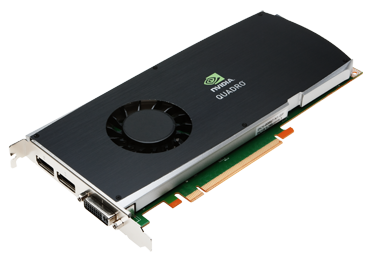
-Highly developed spirits often encounter resistance from mediocre minds. -It really matters!
|