maximumpower
Max Output Level: -76 dBFS

- Total Posts : 731
- Joined: 2011/05/13 19:14:34
- Location: Ohio
- Status: offline

Re:Not too happy with X2
2012/10/06 13:52:11
(permalink)
FWIW since reading this thread, I updated my BIOS. I have an ASUS mobo. There were 6 updates from the version I had installed from August of 2011. 3 of those 6 specifically said "fixed stability issues". lol
I wasn't having any known stability issues with my PC but I went ahead and updated since I was so far behind in BIOS versions. There were some windows updates that installed last night too. Ironically, I am seeing some issues with my audio interface and Firefox when playing youtube videos. However, Chrome works fine.
Sonar X2 seems fine with the couple of projects I opened up and played with. Time will tell if I introduced any problems with these updates.
Win 10 (64 bit), i7-2600k 3.4GHz , 8 GB RAM, SATA III (500GB SSD - System, 2TB WD Black - Data), Sonar Platinum x64, m-audio Profire 610
|
timidi
Max Output Level: -21 dBFS

- Total Posts : 5449
- Joined: 2006/04/11 12:55:15
- Location: SE Florida
- Status: offline
Re:Not too happy with X2
2012/10/06 14:02:58
(permalink)
Hi Max P. You just updated using the latest BIOS patch? correct?
In other words, did you do 6 updates or just one?
"Issues with your audio interface" doesn't sound too promising.
|
robert_e_bone
Moderator

- Total Posts : 8968
- Joined: 2007/12/26 22:09:28
- Location: Palatine, IL
- Status: offline
Re:Not too happy with X2
2012/10/06 14:08:04
(permalink)
We are all still waiting for Timidi to respond with some kind of idea as to what he did or did not do. It's been about 18 hours since he last posted on this thread.
I will circle back once in a while at this point to this thread, since he hasn't really participated in the thread for a good chunk of a day.
Bob Bone
Wisdom is a giant accumulation of "DOH!" Sonar: Platinum (x64), X3 (x64) Audio Interfaces: AudioBox 1818VSL, Steinberg UR-22 Computers: 1) i7-2600 k, 32 GB RAM, Windows 8.1 Pro x64 & 2) AMD A-10 7850 32 GB RAM Windows 10 Pro x64 Soft Synths: NI Komplete 8 Ultimate, Arturia V Collection, many others MIDI Controllers: M-Audio Axiom Pro 61, Keystation 88es Settings: 24-Bit, Sample Rate 48k, ASIO Buffer Size 128, Total Round Trip Latency 9.7 ms
|
StarTekh
Max Output Level: -55 dBFS

- Total Posts : 2007
- Joined: 2004/03/09 12:02:20
- Location: Montreal
- Status: offline
Re:Not too happy with X2
2012/10/06 14:34:06
(permalink)
timidi : BIOS (13) you just need the latest bios .. read your manual !! BIOS-Utilities (2) tool
|
StarTekh
Max Output Level: -55 dBFS
- Total Posts : 2007
- Joined: 2004/03/09 12:02:20
- Location: Montreal
- Status: offline
Re:Not too happy with X2
2012/10/06 14:38:49
(permalink)
maxim: ProFire 610 03/24/2011 Installer: 6.0.9 - Driver: 5.10.0.5082 Install M-Audio ProFire 6.0.9.exe ...should run fine i have no issues with the 410
|
maximumpower
Max Output Level: -76 dBFS
- Total Posts : 731
- Joined: 2011/05/13 19:14:34
- Location: Ohio
- Status: offline
Re:Not too happy with X2
2012/10/06 14:52:47
(permalink)
timidi, yes, just the latest version. I programmed the BIOS update from within the BIOS utility itself. That is the safest way.
After doing a search I found that you download the latest .rom file from ASUS for your mobo, put it on a freshly formatted USB stick. Formatted FAT or FAT32. place the downloaded .rom file on the root of the USB stick with an 8.3 name. For example, I named mine, ASUS3402.rom. Plug in the USB stick, reboot the PC, go into your BIOS settings and run the EZ FLASH utility from within the BIOS. It was very easy.
I am overclocking my system and after the BIOS FLASH, it kept my settings :-)
As far as audio interface problems, I believe it had to do with a recent windows update, probably Adobe Flash player.
My audio interface is working fine in Sonar X2 and Chrome and Windows. Seems to be having issues only with Firefox
Win 10 (64 bit), i7-2600k 3.4GHz , 8 GB RAM, SATA III (500GB SSD - System, 2TB WD Black - Data), Sonar Platinum x64, m-audio Profire 610
|
timidi
Max Output Level: -21 dBFS
- Total Posts : 5449
- Joined: 2006/04/11 12:55:15
- Location: SE Florida
- Status: offline
Re:Not too happy with X2
2012/10/06 15:21:12
(permalink)
Thanks everyone.
Bob. Thanks. Are you in a hurry.:) I'm thinking.
Thanks Star
Thanks Max. Great instructions. Appreciate it.
Takes some of the pain away.
|
timidi
Max Output Level: -21 dBFS
- Total Posts : 5449
- Joined: 2006/04/11 12:55:15
- Location: SE Florida
- Status: offline
|
robert_e_bone
Moderator
- Total Posts : 8968
- Joined: 2007/12/26 22:09:28
- Location: Palatine, IL
- Status: offline
Re:Not too happy with X2
2012/10/06 15:58:21
(permalink)
Welcome back
I am not in a hurry at all. There were just a large number of posts since you were last heard from, and things were drifting into multiple issues outside of what the thread was originally about. I said I am here to help, if I can, and kept coming back and remain here to try to assist you in getting past this issue.
Did you get a chance to review the ASUS bios updates for the versions that were released for your motherboard since the version that is/was present at the top of the thread?
Bob Bone
Wisdom is a giant accumulation of "DOH!" Sonar: Platinum (x64), X3 (x64) Audio Interfaces: AudioBox 1818VSL, Steinberg UR-22 Computers: 1) i7-2600 k, 32 GB RAM, Windows 8.1 Pro x64 & 2) AMD A-10 7850 32 GB RAM Windows 10 Pro x64 Soft Synths: NI Komplete 8 Ultimate, Arturia V Collection, many others MIDI Controllers: M-Audio Axiom Pro 61, Keystation 88es Settings: 24-Bit, Sample Rate 48k, ASIO Buffer Size 128, Total Round Trip Latency 9.7 ms
|
arachnaut
Max Output Level: -67 dBFS

- Total Posts : 1168
- Joined: 2007/05/05 17:24:33
- Location: Sunnyvale, CA USA
- Status: offline
Re:Not too happy with X2
2012/10/06 16:19:54
(permalink)
timidi
Specs: Audio only machine.
CPU
Intel I7-2600k SandyBridge
Mother board
ASUS P8P67 Rev 3.0 P67 B3 Revision
bios 1704
16 gigs Corsair Vengence (4X4gigs)
Video
ati Radeon HD 5450
driver date 5/24/2011
version 8.861.0.0
System drive WD
2 Seagate baraccuda drives
Win7 64
RME AIO Soundcard
I have reasonably similar specs - same MB and BIOS version. No crashes here. I have not done anything major yet, though.
- Jim Hurley - SONAR Platinum - x64 - Windows 10 Pro ASUS P8P67 PRO Rev 3.0; Core i7-2600K@4.4GHz; 16 GB G.SKILL Ripjaws X; GeForce GT 740; Saffire Pro14 MixControl 3.7; Axiom 61 64-Bit audio, SR: 48kHz, ASIO 256 samples latency, Rec/Play I/O Buffers 512k, Total Round Trip Latency 13 ms, Pow-r 3 dither
|
FastBikerBoy
Forum Host

- Total Posts : 11326
- Joined: 2008/01/25 16:15:36
- Location: Watton, Norfolk, UK
- Status: offline
Re:Not too happy with X2
2012/10/06 16:35:56
(permalink)
timidi
BTW, there are other considerations:
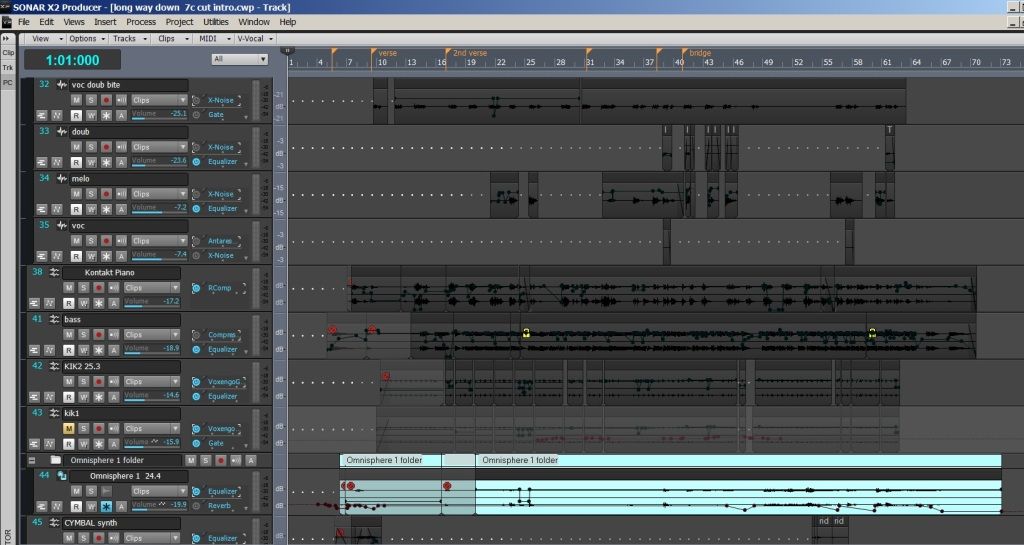

Not sure what's happening there but the top picture isn't what you should be seeing. All of the waveforms should be in different colours not all black as you are seeing. I would think you're best option would be contacting support, I'd imagine given the crashing and the screenshot that there is something seriously amiss with your install.
|
arachnaut
Max Output Level: -67 dBFS
- Total Posts : 1168
- Joined: 2007/05/05 17:24:33
- Location: Sunnyvale, CA USA
- Status: offline
Re:Not too happy with X2
2012/10/06 16:39:00
(permalink)
I see no reason to update a BIOS or any driver unless a specific problem is being addressed.
If crashes are erratic it could be anything - even memory-related.
I would do a few hour memory test, use the ASUS stress-test diagnostics or something serious like a LINPACK (Intel BUrn-in).
Run a thorough CHKDSK, check over your Event lists, etc. - routine maintenance stuff.
I have found the Windows debugging tools helpful - I install WINDBG to intercept crashes. The stack trace is usually enough to pinpoint problems. But this is not for everyone - I used to be a systems programmer, so geeky stuff suit me well.
Perhaps even a system file check may be warranted - (try 'sfc /verifyonly' and look at the logs to see if a scan is required).
- Jim Hurley - SONAR Platinum - x64 - Windows 10 Pro ASUS P8P67 PRO Rev 3.0; Core i7-2600K@4.4GHz; 16 GB G.SKILL Ripjaws X; GeForce GT 740; Saffire Pro14 MixControl 3.7; Axiom 61 64-Bit audio, SR: 48kHz, ASIO 256 samples latency, Rec/Play I/O Buffers 512k, Total Round Trip Latency 13 ms, Pow-r 3 dither
|
jbow
Max Output Level: -0.2 dBFS

- Total Posts : 7601
- Joined: 2003/11/26 19:14:18
- Status: offline
Re:Not too happy with X2
2012/10/06 17:18:21
(permalink)
Tim, IIRC, a lot of people were having problems with X1 when running 64bit and using 32bit plugs. I don't know if that will help or not. If I were you I would heed Danny's advice and talk to Jim before messing with the BIOS. I've had to fol with BIOS before becausse of some RAM change, I think... it has been a while but it was iffy and scary at best. I have stayed ALL 64bit and had no problems... (until tomorrow of course... knocks on wood) You could also have a bad download of X2. Some people have had to redo using Chrome. Best of luck to you! Julien
post edited by jbow - 2012/10/06 17:34:23
Sonar Platinum Studiocat Pro 16G RAM (some bells and whistles) HP Pavilion dm4 1165-dx (i5)-8G RAM Octa-Capture KRK Rokit-8s MIDI keyboards... Control Pad mics. I HATE THIS CMPUTER KEYBARD!
|
jbow
Max Output Level: -0.2 dBFS
- Total Posts : 7601
- Joined: 2003/11/26 19:14:18
- Status: offline
Re:Not too happy with X2
2012/10/06 17:32:58
(permalink)
quote]Just don't install the AI suite BIOS monitor. It's garbage and REFUSES to be uninstalled. Beepster, have you tried to uninstall it using Hijackthis ? It will usually uninstall anything. It will list everything in the registry in both a list and a page with checkboxes. That way if you aren't sure about something you can copy/paste into Google or processlibrary.com, if it is a .exe and see exactly what the file is. If you still have a problem, you can run it in safe mode. There is also a program called final uninstaller that might work. Good luck... but you should be able to get rid of it with HJT. http://majorgeeks.com/Trend_Micro_HijackThis_d5554.html http://download.cnet.com/Final-Uninstaller/3000-2248_4-203243.html Julien
Sonar Platinum Studiocat Pro 16G RAM (some bells and whistles) HP Pavilion dm4 1165-dx (i5)-8G RAM Octa-Capture KRK Rokit-8s MIDI keyboards... Control Pad mics. I HATE THIS CMPUTER KEYBARD!
|
jbow
Max Output Level: -0.2 dBFS
- Total Posts : 7601
- Joined: 2003/11/26 19:14:18
- Status: offline
nothing here except deleted stupidity...
2012/10/06 17:35:55
(permalink)
Sonar Platinum Studiocat Pro 16G RAM (some bells and whistles) HP Pavilion dm4 1165-dx (i5)-8G RAM Octa-Capture KRK Rokit-8s MIDI keyboards... Control Pad mics. I HATE THIS CMPUTER KEYBARD!
|
Beepster
Max Output Level: 0 dBFS

- Total Posts : 18001
- Joined: 2012/05/11 19:11:24
- Status: offline
Re:nothing here except deleted stupidity...
2012/10/06 18:06:21
(permalink)
@jbow... Thanks... I do actually have HiJackThis but it's not installed and I'm hesitant to use it on the DAW because it is such a powerful tool that it can seriously screw things up. Also considering the problem is an ASUS product I think I'd have a hard time pinpointing the right thing to delete because I'm sure they'll be quite a few ASUS entries. The AISuite isn't really hurting anything... it's just annoying because it is a startup item and I have startup programs disabled. So AISuite tries to run then fails giving me a little error message I have to close every time I boot up. More of a minor inconvenience than anything. I wish I had researched it a little more first before installing it because it's a crappy monitor not suited for a DAW. It's default setting is to automatically turn on and run in the background which is obviously no good. Not particularly impressed that ASUS did that but it's a nice board (aside from the bridged legacy PCI which made me have to buy a new interface). Like I said I planned to wipe this system at some point anyway now that I know more about config and optimization stuff. Cheers.
|
timidi
Max Output Level: -21 dBFS
- Total Posts : 5449
- Joined: 2006/04/11 12:55:15
- Location: SE Florida
- Status: offline
Re:nothing here except deleted stupidity...
2012/10/06 18:39:19
(permalink)
Thanks everyone. Yes, I never did install the ASUS manager thingy. It was recommended to install components individually which is what I did. Anyway, So, I did the BIOS update as Max instructed with the USB stick. No problem. Haven't noticed any problems except it did set my BIOS back to default and I forget what tweaks are needed. I disabled: HD Audio controller Bluetooth Is there anything else that should be disabled? JBOW.. So far I've only installed X2 32bit. And FBB. I diddled with the colors a little. Here's a new one. 
post edited by timidi - 2012/10/06 18:47:05
|
Beepster
Max Output Level: 0 dBFS
- Total Posts : 18001
- Joined: 2012/05/11 19:11:24
- Status: offline
Re:nothing here except deleted stupidity...
2012/10/06 18:51:09
(permalink)
If it's a dedicated DAW disable all startup programs. If you use anything other than Microsoft Security Essentials for an AV make the switch because it's good but resource light and other AVs will get screwed up after you disable startup programs. Disable power management as well because otherwise various components (like USB ports and hardrives) will go to sleep which can create obvious problems. There is an optimization guide here on the site and various other ones online. Cakewalk tech support recommended the Sweetwater optimization guide (just google it... it's a PDF from sweetwater) however there is one or two elements that are supposed to be avoided because Sonar apparent needs those option (which support didn't tell me but the forum did). I think the thread I posted about it was titled "Today is optimization day" and lots of folks chimed in to help and the info on what steps to avoid are there as well as a link to the guide. I'm too burnt to search it myself though. Hope it all ends up working out for you in the end. Seriously though if things keep being wacky just call support. They are extremely helpful. Cheers.
|
Beepster
Max Output Level: 0 dBFS
- Total Posts : 18001
- Joined: 2012/05/11 19:11:24
- Status: offline
Re:nothing here except deleted stupidity...
2012/10/06 18:53:27
(permalink)
Oh and you get a chance to laugh at my ultra mega n00b posts. Man, I'm afraid to look at what might have come out of my mouth back then... and that was only a few months ago. lol
|
timidi
Max Output Level: -21 dBFS
- Total Posts : 5449
- Joined: 2006/04/11 12:55:15
- Location: SE Florida
- Status: offline
Re:nothing here except deleted stupidity...
2012/10/06 19:00:32
(permalink)
Thanks Beepster. But, I was talking about BIOS tweeks. I don't use AV.
|
StarTekh
Max Output Level: -55 dBFS
- Total Posts : 2007
- Joined: 2004/03/09 12:02:20
- Location: Montreal
- Status: offline
Re:nothing here except deleted stupidity...
2012/10/06 19:05:52
(permalink)
|
Beepster
Max Output Level: 0 dBFS
- Total Posts : 18001
- Joined: 2012/05/11 19:11:24
- Status: offline
Re:nothing here except deleted stupidity...
2012/10/06 19:08:16
(permalink)
Well AV wasn't the only thing I mentioned there but if you've already gone through the system optimization process then I guess it's moot... however if you disable certian things that Sonar needs to run the some of those guides recommend to disable that could be causing some issues as well. As far as the ASUS BIOS unless it was disabled while I did my optimization ( I don't think any of that dealt with BIOS settings) I really didn't touch anything. I did however only install the more necessary stuff. ASUS's driver page for this board was CRAMMED full of various crap which was a little hard to sort through but I know for sure I installed the actual BIOS drivers, the USB 3.0 stuff, the firewire stuff and the SATA stuff. I may have installed some of the other gack but I forget. I'd have to pull out my notes. Cheers.
|
arachnaut
Max Output Level: -67 dBFS
- Total Posts : 1168
- Joined: 2007/05/05 17:24:33
- Location: Sunnyvale, CA USA
- Status: offline
Re:nothing here except deleted stupidity...
2012/10/06 19:42:50
(permalink)
timidi
I disabled:
HD Audio controller
Bluetooth
Is there anything else that should be disabled?
I disabled those two and the LAN. But if you need ethernet for something, keep it enabled. If you're not using all the SATA ports you can disable a pair of ports. If you get more drives you can enable them later.
- Jim Hurley - SONAR Platinum - x64 - Windows 10 Pro ASUS P8P67 PRO Rev 3.0; Core i7-2600K@4.4GHz; 16 GB G.SKILL Ripjaws X; GeForce GT 740; Saffire Pro14 MixControl 3.7; Axiom 61 64-Bit audio, SR: 48kHz, ASIO 256 samples latency, Rec/Play I/O Buffers 512k, Total Round Trip Latency 13 ms, Pow-r 3 dither
|
timidi
Max Output Level: -21 dBFS
- Total Posts : 5449
- Joined: 2006/04/11 12:55:15
- Location: SE Florida
- Status: offline
Re:nothing here except deleted stupidity...
2012/10/06 19:51:42
(permalink)
Thanks arachnaut. Yea, the Realtech LAN. I'll disable that. Is the "Realtech PXE Oprom" part of that? I mean should that be disabled? What is an Oprom anyway...? I just know that anything "Realtech" is probably suspect.
|
Beepster
Max Output Level: 0 dBFS
- Total Posts : 18001
- Joined: 2012/05/11 19:11:24
- Status: offline
Re:nothing here except deleted stupidity...
2012/10/06 19:52:13
(permalink)
Oh, that's right. I installed the LAN drivers as well. However I've never had to disable that or any SATA stuff. Seriously, timidi's rig shouldn't need extensive tweaking. Just the basic stuff like power management and start up programs. The really laborious tweaks are for low resource systems which his is not. The BIOS update was a big deal though so hopefully that fixes it. I would however take a closer look at your audio interface to see if anyone else is having similar problems. As I said that's the biggest difference between our systems. Also how old is that SSD? They're fast but can be problematic and is why I decided to stick with Caviar Blacks for programs and storage. I just don't trust SSDs yet and they're too expensive to replace. Anyway... I'm just blathering now 'cause I'm bored. Cheers.
|
timidi
Max Output Level: -21 dBFS
- Total Posts : 5449
- Joined: 2006/04/11 12:55:15
- Location: SE Florida
- Status: offline
Re:nothing here except deleted stupidity...
2012/10/06 21:06:16
(permalink)
I don't have an SSD Beepster.
|
Beepster
Max Output Level: 0 dBFS
- Total Posts : 18001
- Joined: 2012/05/11 19:11:24
- Status: offline
Re:nothing here except deleted stupidity...
2012/10/06 21:38:12
(permalink)
Ah, yeah sorry. For some reason I had twisted the Western Digital into being an SSD in my brain. I'm really spaced out today. Anyway, man it's fun to speculate and try to fix stuff and this thread has been interesting but you might as well give Cake a call. It's free (well you paid for support by buying it) and they'll usually know what to do. From what I've seen they truly do want to get people up and running and be happy with the software. It seems the easiest way is to put in a detailed email support ticket, get the ticket number and then reference it when you call so the tech has all the info on screen. I do hope it works out for you and sorry I probably wasn't much help. Cheers.
|
robert_e_bone
Moderator
- Total Posts : 8968
- Joined: 2007/12/26 22:09:28
- Location: Palatine, IL
- Status: offline
Re:nothing here except deleted stupidity...
2012/10/06 23:04:23
(permalink)
If your system has a parallel port you can disable that, as well. I think that the newest motherboards are starting to do away with those, but unless you are using a line-printer from way back when, you will not be using the parallel port. You can also review services that are running to see which you can alter to not automatically start. For example, if you do not have a printer hooked up to this computer, you could turn off the Print Spooler service. There are a bunch of network sharing ones too, that are used to broadcast your computer to the network and that sort of thing. Your audio-tweaked computer is likely not going to need those either. There is a Black Viper link out on the web that talks about which services you can safely turn off and which ones are needed for normal Windows processing. I think I saw it go by in one of the posts in this thread. That has good info in it. I think it is: www.blackviper.com If you run into problems with services after turning them off, you can always start in safe mode and undo the carnage - just make sure to note which services you had tweaked and set them back. Good luck, Bob Bone
Wisdom is a giant accumulation of "DOH!" Sonar: Platinum (x64), X3 (x64) Audio Interfaces: AudioBox 1818VSL, Steinberg UR-22 Computers: 1) i7-2600 k, 32 GB RAM, Windows 8.1 Pro x64 & 2) AMD A-10 7850 32 GB RAM Windows 10 Pro x64 Soft Synths: NI Komplete 8 Ultimate, Arturia V Collection, many others MIDI Controllers: M-Audio Axiom Pro 61, Keystation 88es Settings: 24-Bit, Sample Rate 48k, ASIO Buffer Size 128, Total Round Trip Latency 9.7 ms
|
FastBikerBoy
Forum Host
- Total Posts : 11326
- Joined: 2008/01/25 16:15:36
- Location: Watton, Norfolk, UK
- Status: offline
Re:nothing here except deleted stupidity...
2012/10/07 01:49:13
(permalink)
timidi
And FBB. I diddled with the colors a little. Here's a new one.
I still can't make out why there's no colour differences between clips, which was what I was referring to in my earlier post. I do sympathise with those that like to change their colours a lot more than I do but even with the basic changes I make which are track name colour, in focus track colour(doesn't currently work) and selected track colour this is what my standard install looks like. 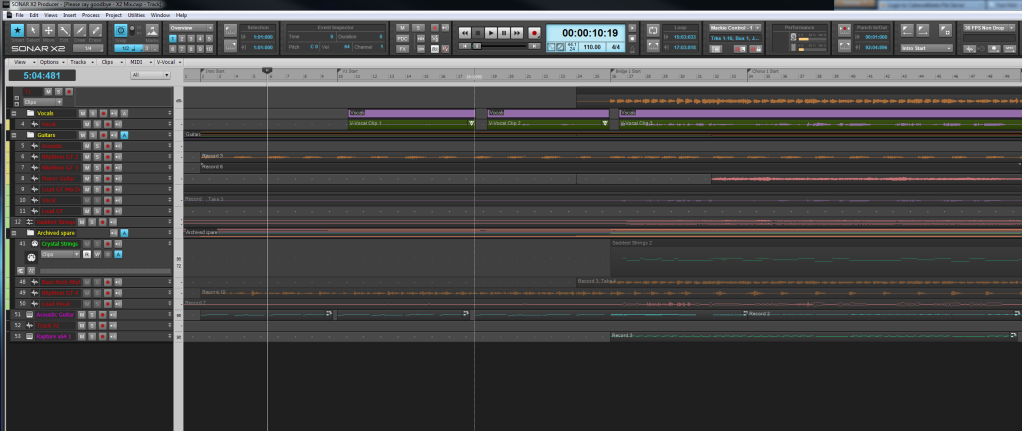 I haven't changed clip colours or anything like that, hence my comments as yours looks rather bland in comparison.
|
Freddie H
Max Output Level: -39 dBFS

- Total Posts : 3617
- Joined: 2007/09/21 06:07:40
- Status: offline
Re:Not too happy with X2
2012/10/07 02:18:26
(permalink)
timidi
BTW, there are other considerations:
Timidi AS I said before XP32 tweaks on Windows 7......no wonder you have problems. For example you have disable AERO in Windows 7, no wonder you have problems. TURNn it ON!!! SONAR X2 X1 need AERO to function right, you just make the performance of your computer worse by disable it on any program on Windows 7...Its not XP??? What more XP32 tweaks have you done on Windows 7 that are obsolete on your system?
-Highly developed spirits often encounter resistance from mediocre minds. -It really matters!
|