Anderton
Max Output Level: 0 dBFS

- Total Posts : 14070
- Joined: 2003/11/06 14:02:03
- Status: offline

Re:Not too happy with X2
2012/10/07 03:35:49
(permalink)
Beepster
Somewhat off topic but it really annoys me that in this day and age we have to watch out for video card mayhem when working with audio. It just shouldn't be a concern in my mind. I'm not playing friggen' Halo or whatever the heck kids are up to these days.
I hear you. My biggest problems with performance (not just Cakewalk by any means) have involved sound card issues. I tested an audio interface from a very reputable company and it was unusable until I upgraded my video card drivers. The PC Audio Labs guys recommended the nVidia card I'm using, and overall stability is much better than when I was using an ati. I think one reason why Sonar performs well for me is because of all the stuff I review. When multiple things start misbehaving, I HAVE to figure out a fix. If I mostly used only Sonar and it started screwing up, I'd assume it was Sonar-related. But I've also had occasions where Sonar would seem "buggy," then running some other program would result in an epic fail. When I fixed what caused the epic fail with the other program, Sonar became less buggy. It's times like that I understand why people buy Macs  But then I run Sonar simultaneously with Vegas Pro and HyperCam, with another instance of Vegas rendering in the background, and I'm reminded why I use Windows for most of my music and video work...
|
robert_e_bone
Moderator

- Total Posts : 8968
- Joined: 2007/12/26 22:09:28
- Location: Palatine, IL
- Status: offline
Re:Not too happy with X2
2012/10/07 03:49:43
(permalink)
Yeah - I think the Mac has a superior operating system in many regards, but I hate them as a company for something they did many years back when they left a bunch of folks out in the cold on support of a buggy motherboard (Apple IIe).
Anyways, Windows has grown up quite a bit and I am loving Windows 7.
I do agree with you that hardware for Windows PC's does not sometimes play nicely with other hardware - your example in point.
Hopefully, between everybody we can help Timidi get his system stabilized.
Bob Bone
Wisdom is a giant accumulation of "DOH!" Sonar: Platinum (x64), X3 (x64) Audio Interfaces: AudioBox 1818VSL, Steinberg UR-22 Computers: 1) i7-2600 k, 32 GB RAM, Windows 8.1 Pro x64 & 2) AMD A-10 7850 32 GB RAM Windows 10 Pro x64 Soft Synths: NI Komplete 8 Ultimate, Arturia V Collection, many others MIDI Controllers: M-Audio Axiom Pro 61, Keystation 88es Settings: 24-Bit, Sample Rate 48k, ASIO Buffer Size 128, Total Round Trip Latency 9.7 ms
|
Danny Danzi
Moderator
- Total Posts : 5810
- Joined: 2006/10/05 13:42:39
- Location: DanziLand, NJ
- Status: offline
Re:Not too happy with X2
2012/10/07 04:08:38
(permalink)
timidi
BTW, there are other considerations:
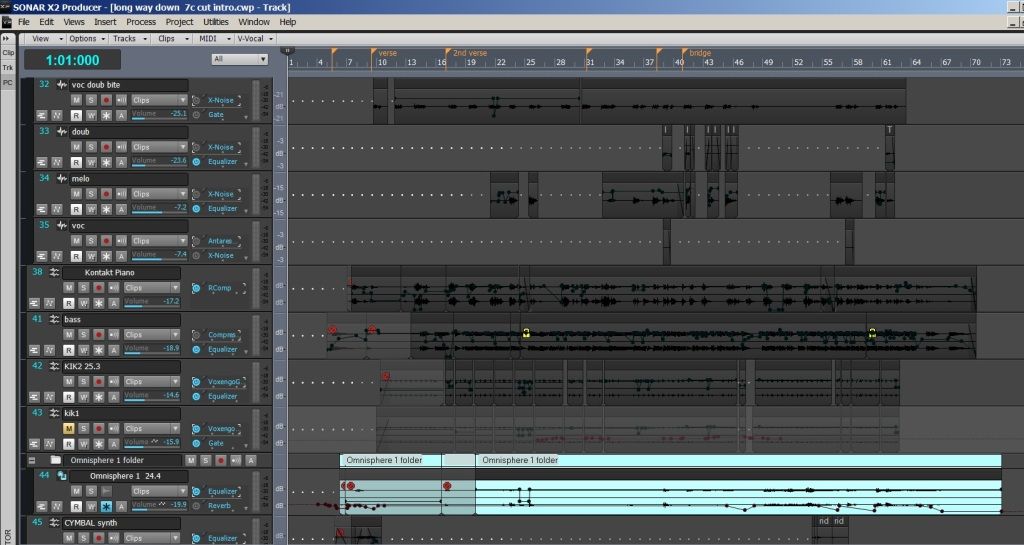

Tim, I know what this is with the color of the clips. Are you using an X1 or 8.5 color scheme inside of X2 that you imported? If so, that's what it is man. I have the same exact look as you do! As a matter of fact, I'm having someone take a look at my issue in about 5 minutes. That all black clip thing as well as your grey/blue border all through out is what I'm getting also....but it's only when I use an imported Sonar X1 scheme. When I switch to one of the X2 schemes, my clip colors change, my border somewhat changes....beige and that grey/blue mixed. If I do not import my X1 scheme, I get straight beige all through the borders. As soon as that X1 scheme gets imported though, it must over-write something somewhere because that grey/blue is there for life. I tried every color option to change it and it simply will not change. I even went to all colors, clicked the first color, held down shift and then clicked on the last color option so they were all hi-lited, and the changed them to purple. Restarted Sonar and that border was still grey/blue like you and on the borders of the clips. So something is screwy somewhere. I even decided to try and change every color option just to see if I could find that...and it will not change manually. I know you have other issues that you're sorting out, but the all black clips with the grey/blue border...I have on this end too. -Danny
My Site Fractal Audio Endorsed Artist & Beta Tester
|
Freddie H
Max Output Level: -39 dBFS

- Total Posts : 3617
- Joined: 2007/09/21 06:07:40
- Status: offline
Re:Not too happy with X2
2012/10/07 07:50:05
(permalink)
Anderton
Beepster
Somewhat off topic but it really annoys me that in this day and age we have to watch out for video card mayhem when working with audio. It just shouldn't be a concern in my mind. I'm not playing friggen' Halo or whatever the heck kids are up to these days.
I hear you. My biggest problems with performance (not just Cakewalk by any means) have involved sound card issues. I tested an audio interface from a very reputable company and it was unusable until I upgraded my video card drivers. The PC Audio Labs guys recommended the nVidia card I'm using, and overall stability is much better than when I was using an ati.
I think one reason why Sonar performs well for me is because of all the stuff I review. When multiple things start misbehaving, I HAVE to figure out a fix. If I mostly used only Sonar and it started screwing up, I'd assume it was Sonar-related. But I've also had occasions where Sonar would seem "buggy," then running some other program would result in an epic fail. When I fixed what caused the epic fail with the other program, Sonar became less buggy.
It's times like that I understand why people buy Macs But then I run Sonar simultaneously with Vegas Pro and HyperCam, with another instance of Vegas rendering in the background, and I'm reminded why I use Windows for most of my music and video work...
Yes its because on MACs no one can or have the ability to disable things or screw up the system doing tweaks that they shouldn't do in the first place. That is why it work better for some of the users that don't have the know how..but still think they do. Overall system, OS X is not near Windows 7, 8 in performance.
-Highly developed spirits often encounter resistance from mediocre minds. -It really matters!
|
timidi
Max Output Level: -21 dBFS

- Total Posts : 5449
- Joined: 2006/04/11 12:55:15
- Location: SE Florida
- Status: offline
Re:Not too happy with X2
2012/10/07 08:50:25
(permalink)
Thanks Danny. I think I have that worked out. There's another pic above that shows where I got to.
But yes, you're probably right about using a previous version template screwing things up.
Hey FREDDIE. Pretty sure that Aero is ON. I'll look again. Thanks.
|
Anderton
Max Output Level: 0 dBFS
- Total Posts : 14070
- Joined: 2003/11/06 14:02:03
- Status: offline
Re:Not too happy with X2
2012/10/07 14:04:59
(permalink)
timidi
Thanks Danny. I think I have that worked out. There's another pic above that shows where I got to.
But yes, you're probably right about using a previous version template screwing things up.
Hey FREDDIE. Pretty sure that Aero is ON. I'll look again. Thanks.
People say Aero shouldn't make a difference with most programs, but I was doing some album assembly on a laptop in Studio One Pro's mastering page and with Aero enabled, the audio engine would often quit, and the overall performance was very sluggish. As soon as I turned off Aero, it worked as it was supposed to. I also recall doing a Pro Tools update where the "read me" stated specifically that you HAD to turn off Aero for it to work properly...I think it was PT9, but that might also have carried over into PT10. And since I'm ranting about graphics cards and drivers...it's always disturbing to see that a new driver is available for a graphics card, but under the list of changes, see something like "now handles non-blurfled accelerated GPU functionality in head-slicing with 'Invaders from Planet Doom' when running at frame rates between 75 and 80 frames per second on systems using bifurcated fractal resolution." So...should I download the new driver, or not?
|
timidi
Max Output Level: -21 dBFS
- Total Posts : 5449
- Joined: 2006/04/11 12:55:15
- Location: SE Florida
- Status: offline
Re:Not too happy with X2
2012/10/07 14:08:10
(permalink)
So...should I download the new driver, or not? I've been pondering the same...
|
arachnaut
Max Output Level: -67 dBFS

- Total Posts : 1168
- Joined: 2007/05/05 17:24:33
- Location: Sunnyvale, CA USA
- Status: offline
Re:nothing here except deleted stupidity...
2012/10/07 14:38:49
(permalink)
timidi
Thanks arachnaut. Yea, the Realtech LAN. I'll disable that. Is the "Realtech PXE Oprom" part of that? I mean should that be disabled? What is an Oprom anyway...? I just know that anything "Realtech" is probably suspect.
If you disable the LAN you won't need to worry about the OPROM. Enabling that shows the boot prom startup mesages. It is just decoration unless you have some special startup needs.
- Jim Hurley - SONAR Platinum - x64 - Windows 10 Pro ASUS P8P67 PRO Rev 3.0; Core i7-2600K@4.4GHz; 16 GB G.SKILL Ripjaws X; GeForce GT 740; Saffire Pro14 MixControl 3.7; Axiom 61 64-Bit audio, SR: 48kHz, ASIO 256 samples latency, Rec/Play I/O Buffers 512k, Total Round Trip Latency 13 ms, Pow-r 3 dither
|
arachnaut
Max Output Level: -67 dBFS
- Total Posts : 1168
- Joined: 2007/05/05 17:24:33
- Location: Sunnyvale, CA USA
- Status: offline
Re:nothing here except deleted stupidity...
2012/10/07 14:45:35
(permalink)
robert_e_bone
If your system has a parallel port you can disable that, as well. I think that the newest motherboards are starting to do away with those, but unless you are using a line-printer from way back when, you will not be using the parallel port.
You can also review services that are running to see which you can alter to not automatically start. For example, if you do not have a printer hooked up to this computer, you could turn off the Print Spooler service. There are a bunch of network sharing ones too, that are used to broadcast your computer to the network and that sort of thing. Your audio-tweaked computer is likely not going to need those either. There is a Black Viper link out on the web that talks about which services you can safely turn off and which ones are needed for normal Windows processing. I think I saw it go by in one of the posts in this thread. That has good info in it. I think it is: www.blackviper.com
If you run into problems with services after turning them off, you can always start in safe mode and undo the carnage - just make sure to note which services you had tweaked and set them back.
Good luck,
Bob Bone
I second that on the old serial/parallel/legacy support in BIOS - get rid of them all. Also second that on Black Viper's site. Also, as said, this stuff is probably not going to change your problem - it looks like a bad install to me. I have had practically no problems with X1D and no problems yet after the X2 308 fix. I've made a lot of changes to my installation after X2 - moving all the samples around, removing the DXI functions, changing VST paths from 64 to 32-bit were appropriate, etc., etc. So my installation is not very normal - but still, I have no problems at all, so a 'normal' install should be 'better'. Little glitches here and there, maybe, but no crashes or audio-impacting events.
- Jim Hurley - SONAR Platinum - x64 - Windows 10 Pro ASUS P8P67 PRO Rev 3.0; Core i7-2600K@4.4GHz; 16 GB G.SKILL Ripjaws X; GeForce GT 740; Saffire Pro14 MixControl 3.7; Axiom 61 64-Bit audio, SR: 48kHz, ASIO 256 samples latency, Rec/Play I/O Buffers 512k, Total Round Trip Latency 13 ms, Pow-r 3 dither
|
arachnaut
Max Output Level: -67 dBFS
- Total Posts : 1168
- Joined: 2007/05/05 17:24:33
- Location: Sunnyvale, CA USA
- Status: offline
Re:Not too happy with X2
2012/10/07 14:58:45
(permalink)
timidi
So...should I download the new driver, or not?
I've been pondering the same...
The NVIDIA forums have been down for a while so I can't link to my posts there. What I discovered is that when I upgraded to a new video driver, it caused severe audio distortion on my Firewire card. Going back and forth a few times proved to me it was the newer driver. When I posted this on the NVIDIA user forum I discovered others had a similar thing happen. The discussion revolved around latency in the various older drivers and I tried the last few. Eventually I found an excellent older driver that had superb latency performance and I've stuck with that. Same thing with the Focusrite driver - I keep an older version because it seems better and I use the standard (not legacy) Windows Firewire driver - even though Focusrite recommends the legacy - I prefer the standard. Nothing beats trying things out for yourself - unlike Apple systems which are all the same - no two Windows systems are alike.
- Jim Hurley - SONAR Platinum - x64 - Windows 10 Pro ASUS P8P67 PRO Rev 3.0; Core i7-2600K@4.4GHz; 16 GB G.SKILL Ripjaws X; GeForce GT 740; Saffire Pro14 MixControl 3.7; Axiom 61 64-Bit audio, SR: 48kHz, ASIO 256 samples latency, Rec/Play I/O Buffers 512k, Total Round Trip Latency 13 ms, Pow-r 3 dither
|
arachnaut
Max Output Level: -67 dBFS
- Total Posts : 1168
- Joined: 2007/05/05 17:24:33
- Location: Sunnyvale, CA USA
- Status: offline
Re:Not too happy with X2
2012/10/07 15:03:43
(permalink)
What's up with this forum topic - the name keeps changing!
- Jim Hurley - SONAR Platinum - x64 - Windows 10 Pro ASUS P8P67 PRO Rev 3.0; Core i7-2600K@4.4GHz; 16 GB G.SKILL Ripjaws X; GeForce GT 740; Saffire Pro14 MixControl 3.7; Axiom 61 64-Bit audio, SR: 48kHz, ASIO 256 samples latency, Rec/Play I/O Buffers 512k, Total Round Trip Latency 13 ms, Pow-r 3 dither
|
StarTekh
Max Output Level: -55 dBFS

- Total Posts : 2007
- Joined: 2004/03/09 12:02:20
- Location: Montreal
- Status: offline
Re:Not too happy with X2
2012/10/07 15:16:29
(permalink)
arachnaut: GeForce GT 440..what driver did you use ? this 306.23 WHQL Release Date: 2012.09.13 Operating System: Windows 8, Windows Vista, Windows 7 Language: English (U.S.) File Size: 127 MB
|
soens
Max Output Level: -23.5 dBFS

- Total Posts : 5154
- Joined: 2005/09/16 03:19:55
- Location: Location: Location
- Status: offline
Re:Not too happy with X2
2012/10/07 15:25:27
(permalink)
timidi
Thanks Danny. I think I have that worked out. There's another pic above that shows where I got to.
But yes, you're probably right about using a previous version template screwing things up.
Hey FREDDIE. Pretty sure that Aero is ON. I'll look again. Thanks.
Yes! Audio and MIDI track BACKGROUNDs are no longer independant. Under Prefefences - Colors they are now listed as "Tracks x, xx, xx... Background" so when you import a pre-X2 color scheme the clip BACKGROUNDs will be unaltered from the default X2 black as seen in your 1st pic. Since your 8.5 FOREGROUNDs are all black, it makes a very dark color scheme. You now have to change the BACKGROUNDs in Preferences as seen in your 2nd pic. Oddly, they still list Midi Track Backgrounds, but these don't seem to work. Maybe they forgot to remove them from the list, like a lot of other unchangeable colors. Steve
|
arachnaut
Max Output Level: -67 dBFS
- Total Posts : 1168
- Joined: 2007/05/05 17:24:33
- Location: Sunnyvale, CA USA
- Status: offline
Re:Not too happy with X2
2012/10/07 15:37:41
(permalink)
StarTekh
arachnaut: GeForce GT 440..what driver did you use ? this 306.23 WHQL Release Date: 2012.09.13 Operating System: Windows 8, Windows Vista, Windows 7 Language: English (U.S.) File Size: 127 MB
My driver is dated 2011-05-20 version: 8.17.12.7533 in the device manager. That was the 275.33 WHQL package. I have not tried any newer ones in this past year, I'm happy with it. I compared several packages at the time I measured the latency: 266.58, 275.33, 280.26 and whatever was the latest version (the one that didn't work for me). I think the one you choose - you should choose, don't listen to other's, just try them and measure the latency. But if you play a lot of video games, maybe you should stay up-to-date.
- Jim Hurley - SONAR Platinum - x64 - Windows 10 Pro ASUS P8P67 PRO Rev 3.0; Core i7-2600K@4.4GHz; 16 GB G.SKILL Ripjaws X; GeForce GT 740; Saffire Pro14 MixControl 3.7; Axiom 61 64-Bit audio, SR: 48kHz, ASIO 256 samples latency, Rec/Play I/O Buffers 512k, Total Round Trip Latency 13 ms, Pow-r 3 dither
|
bapu
Max Output Level: 0 dBFS

- Total Posts : 86000
- Joined: 2006/11/25 21:23:28
- Location: Thousand Oaks, CA
- Status: offline
Re:Not too happy with X2
2012/10/07 15:49:08
(permalink)
arachnaut
What's up with this forum topic - the name keeps changing!
It's Juilen's fault 
|
Beepster
Max Output Level: 0 dBFS
- Total Posts : 18001
- Joined: 2012/05/11 19:11:24
- Status: offline
Re:Not too happy with X2
2012/10/07 15:56:35
(permalink)
@Anderton... That's encouraging. I bought my vid card as an afterthought and had to go cheap because I was out of money. I ended up with a Gigabyte but it's nvidia based. It was only $30 and seems to be doing the job without conflicts. I think the tides have changed in regards to Mac's out performing PCs in the audio world. For years I wanted a Mac but I am extremely happy with the PC I built and to get the equivalent power from a Mac I'd probably have had to pay at least an extra $1000 or more and that would have held up my studio another year (because I'm poor). I also find Macs confusing after so many years in front of PCs so that's yet one less learning curve wasting time I'd rather use making music. Off topic but if you're still around I've got a thread going in the Coffee house asking about budget vocal condenser mics... any thoughts on that topic? I'm sure you've tested quite a few. Cheers.
|
Bub 
Max Output Level: -3.5 dBFS

- Total Posts : 7196
- Joined: 2010/10/25 10:22:13
- Location: Sneaking up behind you!
- Status: offline
Re:Not too happy with X2
2012/10/07 18:01:56
(permalink)
Beepster
@Anderton... That's encouraging. I bought my vid card as an afterthought and had to go cheap because I was out of money. I ended up with a Gigabyte but it's nvidia based. It was only $30 and seems to be doing the job without conflicts. I think the tides have changed in regards to Mac's out performing PCs in the audio world. For years I wanted a Mac but I am extremely happy with the PC I built and to get the equivalent power from a Mac I'd probably have had to pay at least an extra $1000 or more and that would have held up my studio another year (because I'm poor). I also find Macs confusing after so many years in front of PCs so that's yet one less learning curve wasting time I'd rather use making music. Off topic but if you're still around I've got a thread going in the Coffee house asking about budget vocal condenser mics... any thoughts on that topic? I'm sure you've tested quite a few. Cheers.
I'm running a Galaxy GeForce 9500GT. It's old but it works and it's very stable. I threw out my ATI cards. Total junk and caused nothing but headaches. Actually I took them to an electronics recycling place along with a bunch of other stuff including my old DAW, an EMU 0404 PCI card, and some dead effects units. Not sure which Nvidia chipset you got, but they released a new driver a couple weeks ago. Their drivers usually cover a vast range of chipsets. You have the option to just install the driver without all the bloatware. Plus ... not sure if you are aware, but you can customize how each program runs. I go in and turn off all the extra 3D enhancement stuff, CUDA, and other things. Makes a noticeable difference, especially on low end cards. If you've never seen it or used it, just right click on your desktop, click Nvidia Control Panel, and go to Manage 3D settings. I also adjust my Image Settings for 'Performance'.
"I pulled the head off Elvis, filled Fred up to his pelvis, yaba daba do, the King is gone, and so are you."
|
robert_e_bone
Moderator
- Total Posts : 8968
- Joined: 2007/12/26 22:09:28
- Location: Palatine, IL
- Status: offline
Re:nothing here except deleted stupidity...
2012/10/07 18:05:03
(permalink)
arachnaut
robert_e_bone
If your system has a parallel port you can disable that, as well. I think that the newest motherboards are starting to do away with those, but unless you are using a line-printer from way back when, you will not be using the parallel port.
You can also review services that are running to see which you can alter to not automatically start. For example, if you do not have a printer hooked up to this computer, you could turn off the Print Spooler service. There are a bunch of network sharing ones too, that are used to broadcast your computer to the network and that sort of thing. Your audio-tweaked computer is likely not going to need those either. There is a Black Viper link out on the web that talks about which services you can safely turn off and which ones are needed for normal Windows processing. I think I saw it go by in one of the posts in this thread. That has good info in it. I think it is: www.blackviper.com
If you run into problems with services after turning them off, you can always start in safe mode and undo the carnage - just make sure to note which services you had tweaked and set them back.
Good luck,
Bob Bone
I second that on the old serial/parallel/legacy support in BIOS - get rid of them all.
Also second that on Black Viper's site.
Also, as said, this stuff is probably not going to change your problem - it looks like a bad install to me.
I have had practically no problems with X1D and no problems yet after the X2 308 fix. I've made a lot of changes to my installation after X2 - moving all the samples around, removing the DXI functions, changing VST paths from 64 to 32-bit were appropriate, etc., etc. So my installation is not very normal - but still, I have no problems at all, so a 'normal' install should be 'better'.
Little glitches here and there, maybe, but no crashes or audio-impacting events.
I forgot to mention that you can probably also get disable any IDE ports, unless you are still using one of those old -pin monstrosities. I also agree that installing over again looks warranted - hopefully between making some of the other changes and a nice new install, things will work better, Bob Bone
Wisdom is a giant accumulation of "DOH!" Sonar: Platinum (x64), X3 (x64) Audio Interfaces: AudioBox 1818VSL, Steinberg UR-22 Computers: 1) i7-2600 k, 32 GB RAM, Windows 8.1 Pro x64 & 2) AMD A-10 7850 32 GB RAM Windows 10 Pro x64 Soft Synths: NI Komplete 8 Ultimate, Arturia V Collection, many others MIDI Controllers: M-Audio Axiom Pro 61, Keystation 88es Settings: 24-Bit, Sample Rate 48k, ASIO Buffer Size 128, Total Round Trip Latency 9.7 ms
|
timidi
Max Output Level: -21 dBFS
- Total Posts : 5449
- Joined: 2006/04/11 12:55:15
- Location: SE Florida
- Status: offline
Re:nothing here except deleted stupidity...
2012/10/07 18:39:01
(permalink)
fwiw, I didn't have any problems till X2.
|
timidi
Max Output Level: -21 dBFS
- Total Posts : 5449
- Joined: 2006/04/11 12:55:15
- Location: SE Florida
- Status: offline
Re:Not too happy with X2
2012/10/07 19:00:44
(permalink)
The PC Audio Labs guys recommended the nVidia card I'm using, and overall stability is much better than when I was using an ati. Hi Craig. Which card is that exactly? A Newegg link would be great. Thanks, Tim
|
JonD
Max Output Level: -39 dBFS
- Total Posts : 3617
- Joined: 2003/12/09 11:09:10
- Location: East of Santa Monica
- Status: offline
Not to happy...
2012/10/07 19:18:19
(permalink)
IMO, your upgrade install screwed something up.... Chasing down those patches and doing tweaks are more than not likely to fix your problem. If it were me, I'd find some time and do a clean uninstall of X1 and X2 (everything, incl. registry entries), and then do a clean install of X1, then X2 (or just do X2, if you feel particularly brave). Do you use backup imaging (ie. True Image, Paragon Backup, Win7's built in uility, etc)? Your situation is a perfect example why one should always have the ability to "go back" to a safe point if an install/upgrade goes south. (I can recommend Paragon's free version, which I've been using for about 2 years with no problems whatsoever). BTW, I can add myself to the list of users who installed X2 without any issues. (It should be mentioned that I completely removed X1 first, as I am just a hobbyist and was in-between projects -- which made it a fairly easy decision for me). Good luck, whatever you do, and keep us posted.
SonarPlat/CWbBL, Win 10 Pro, i7 2600K, Asus P8Z68 Deluxe, 16GB DDR3, Radeon HD5450, TC Electronic Impact Twin, Kawai MP11 Piano, Event ALP Monitors, Beyerdynamic DT770 Pro, Too Many Plugins, My lucky hat.
|
Beepster
Max Output Level: 0 dBFS
- Total Posts : 18001
- Joined: 2012/05/11 19:11:24
- Status: offline
Re:Not too happy with X2
2012/10/07 19:20:18
(permalink)
Cool. Thanks for the tips, bub. I was meaning to really dig into all the weird settings on this vid card but got swept up in everything else. I'll definitely take a look at all that. Hope you are settling in well to the new place. Cheers.
|
timidi
Max Output Level: -21 dBFS
- Total Posts : 5449
- Joined: 2006/04/11 12:55:15
- Location: SE Florida
- Status: offline
Re:Not to happy...
2012/10/07 19:31:20
(permalink)
JonD
IMO, your upgrade install screwed something up.... Chasing down those patches and doing tweaks are more than not likely to fix your problem.
If it were me, I'd find some time and do a clean uninstall of X1 and X2 (everything, incl. registry entries), and then do a clean install of X1, then X2 (or just do X2, if you feel particularly brave).
Do you use backup imaging (ie. True Image, Paragon Backup, Win7's built in uility, etc)? Your situation is a perfect example why one should always have the ability to "go back" to a safe point if an install/upgrade goes south. (I can recommend Paragon's free version, which I've been using for about 2 years with no problems whatsoever).
BTW, I can add myself to the list of users who installed X2 without any issues. (It should be mentioned that I completely removed X1 first, as I am just a hobbyist and was in-between projects -- which made it a fairly easy decision for me).
Good luck, whatever you do, and keep us posted.
Jon, Your right. My upgrade to X2 screwed something up. Why would I want to try to re-install it? My computer was working just fine. How does one go about getting this thing totally uninstalled. I have a restore point. I even did a system image, however, that doesn't work. Will the restore point clean out the registry after an 'uninstall'?
|
arachnaut
Max Output Level: -67 dBFS
- Total Posts : 1168
- Joined: 2007/05/05 17:24:33
- Location: Sunnyvale, CA USA
- Status: offline
Re:Not to happy...
2012/10/07 20:20:59
(permalink)
timidi
Jon, Your right. My upgrade to X2 screwed something up. Why would I want to try to re-install it?
My computer was working just fine.
How does one go about getting this thing totally uninstalled. I have a restore point. I even did a system image, however, that doesn't work. Will the restore point clean out the registry after an 'uninstall'?
I think, maybe, we are hinting that you did something wrong or something went wrong the first time. But if you say that your system image doesn't work, I'd say that your system isn't working as well as you think. Personally I don't use system restore points, I just make full image backups before I make any major changes. I absolutely demand that image backup software work reliably, that's why I'm so hard on Acronis True Image 2012 and 2013.
- Jim Hurley - SONAR Platinum - x64 - Windows 10 Pro ASUS P8P67 PRO Rev 3.0; Core i7-2600K@4.4GHz; 16 GB G.SKILL Ripjaws X; GeForce GT 740; Saffire Pro14 MixControl 3.7; Axiom 61 64-Bit audio, SR: 48kHz, ASIO 256 samples latency, Rec/Play I/O Buffers 512k, Total Round Trip Latency 13 ms, Pow-r 3 dither
|
timidi
Max Output Level: -21 dBFS
- Total Posts : 5449
- Joined: 2006/04/11 12:55:15
- Location: SE Florida
- Status: offline
Re:Not to happy...
2012/10/07 22:19:24
(permalink)
Just to clear some things up. My main problem with this X2 install is how it has screwed up Rapture as explained here: http://forum.cakewalk.com/tm.aspx?m=2685335 Thanks for all the help and advice and links and stuff so far.....
|
brconflict
Max Output Level: -56.5 dBFS

- Total Posts : 1891
- Joined: 2012/10/05 21:28:30
- Status: offline
Re:Not too happy with X2
2012/10/17 15:49:17
(permalink)
Danny, I can be criticized for my lack of forum involvement in that issues I have had with X1 went largely unreported to the forums. Many times I would curse and restart Sonar, rather than go to the forums. Maybe the forums are better than Cakewalk Support (I certainly hope so). My experience with Support was fruitless (Cakewalk should look into Webex). Also, I reported a few bugs, but found the bug submission form klunky and not very easy to fill out for a semi-technical guy. My perception of Cakewalk is that it's not really a large group. If the CTO posts on here, that tells me it's a tightly-knit group, advantageous to free-flowing ideas and fast-paced advances. What it doesn't do, is instill me with a sense of in-house thoroughness that larger companies typically boast. I don't doubt the product was well-tested, and possibly some of the most constructive people brought in to help. But to be competitive, you have to keep these costs low. Understandable. So, its really a variable choice between amount of time spent on new ideas/features, or trying longer and with more resources to find and kill more bugs found. What I'm asking is that Cakewalk slow down the new-features list and place a little more emphasis on killing bugs. As a customer, I'm merely stating that I'd rather spend MY money on stability vs. new features. Side-note: I only use Intel CPUs and Motherboards (or ASUS), RME and CreativeLabs I/O's, Kingston RAM, nVIDIA Video cards, and Western Digital hard drives to keep the hardware variables to an absolute minimum. Windows 7 32-Bit and 64-Bit. I run into Sonar issues pretty frequently with X1, so my confidence in X2 has run the other way for the moment.
|
robert_e_bone
Moderator
- Total Posts : 8968
- Joined: 2007/12/26 22:09:28
- Location: Palatine, IL
- Status: offline
Re:Not too happy with X2
2012/10/17 16:00:04
(permalink)
Hey, Timidi - did you ever get that Rapture issue resolved? I didn't really check back on it - just curious.
Bob Bone
Wisdom is a giant accumulation of "DOH!" Sonar: Platinum (x64), X3 (x64) Audio Interfaces: AudioBox 1818VSL, Steinberg UR-22 Computers: 1) i7-2600 k, 32 GB RAM, Windows 8.1 Pro x64 & 2) AMD A-10 7850 32 GB RAM Windows 10 Pro x64 Soft Synths: NI Komplete 8 Ultimate, Arturia V Collection, many others MIDI Controllers: M-Audio Axiom Pro 61, Keystation 88es Settings: 24-Bit, Sample Rate 48k, ASIO Buffer Size 128, Total Round Trip Latency 9.7 ms
|
J-A-G
Max Output Level: -85 dBFS

- Total Posts : 260
- Joined: 2007/05/09 21:26:16
- Location: New Jersey
- Status: offline
Re:Not too happy with X2
2012/10/17 20:33:25
(permalink)
Timidi I feel for you in regard to a comment you made about not having the time to mess with fixing the issues. It seems that just about every upgrade I have ever done to Sonar has had issues. Especially with DimPro and Rapture. Every upgrade I wonder what issues I will run into and hope that Cakewalk would address and make it easier. I have to say that because of this I know what to expect and am able to troubleshoot and correct right away even before they patch. But some folks just want to install and go and I understand this. But I also have to say that I have never really experienced this with PC software in general. They are always fixing issues and bettering software. It is an ongoing process. I actually have not had one issue with X2 other than the DimPro/Rapture issues and I think it was well worth the upgrade price and I am so-far quite happy with it. I hope you find the time to figure it out or can get the new patch for DimPro/Rapture issues and start to enjoy the new X2 as much as I am. (love your music btw) Peace. John X2 Rapture Patch http://www.cakewalk.com/Support/kb/reader.aspx/2007013294
post edited by Meno - 2012/10/17 20:39:39
Music is moral law. It gives soul to the universe, wings to the mind, flight to imagination, a charm to sadness, and life to everything...Plato https://soundcloud.com/#astrat www.meadowridgesound.com i7-2600k 3.40GHz, 16GB RAM, 5TB Multi-Drives, GTX-760, Windows 8.1 64bit, Sonar Platinum 64bit/32 bit, , RME-BabyFace, Dual 27in ASUS Monitors Sonar Platinum 64 and 32bit
|
Splat
Max Output Level: 0 dBFS
- Total Posts : 8672
- Joined: 2010/12/29 15:28:29
- Location: Mars.
- Status: offline
Re:Not too happy with X2
2012/10/17 21:37:49
(permalink)
> Point is, I have better things to do than to try and search this forum or the net for answers to problems.
Wow people actually gave you advice after that statement...?~
> Thanks for all the help and advice and links and stuff so far.....
Too right! Clearly there are very nice people on this forum... eh?
Sell by date at 9000 posts. Do not feed. @48/24 & 128 buffers latency is 367 with offset of 38. Sonar Platinum(64 bit),Win 8.1(64 bit),Saffire Pro 40(Firewire),Mix Control = 3.4,Firewire=VIA,Dell Studio XPS 8100(Intel Core i7 CPU 2.93 Ghz/16 Gb),4 x Seagate ST31500341AS (mirrored),GeForce GTX 460,Yamaha DGX-505 keyboard,Roland A-300PRO,Roland SPD-30 V2,FD-8,Triggera Krigg,Shure SM7B,Yamaha HS5.Maschine Studio+Komplete 9 Ultimate+Kontrol Z1.Addictive Keys,Izotope Nectar elements,Overloud Bundle,Geist.Acronis True Image 2014.
|