ew
Max Output Level: -57 dBFS

- Total Posts : 1837
- Joined: 2004/01/27 21:24:49
- Location: Eagan, MN
- Status: offline

Re:Problem with the SONAR CPU meter please...?
2010/08/23 14:13:05
(permalink)
@ the OP- try turning off hyperthreading in your BIOS.
ew
|
benjamincharles
Max Output Level: -89 dBFS

- Total Posts : 83
- Joined: 2010/06/19 03:24:55
- Location: Boston MA
- Status: offline
Re:Problem with the SONAR CPU meter please...?
2010/08/23 21:52:58
(permalink)
ew
@ the OP- try turning off hyperthreading in your BIOS.
ew
I have already tried that. As well as core parking. I was away on family, back now....getting into the swing of things again. Report soon...
Basic info: Win7 32 bit, Sonar 8.5 PE, MaxMSP 5, MOTIF6,
EMU Proteus 1/2/3, ADAM A7, DAC1, Alphatrack
|
ivanSC
Max Output Level: -84 dBFS

- Total Posts : 325
- Joined: 2007/02/13 05:29:37
- Location: UK
- Status: offline
Re:Problem with the SONAR CPU meter please...?
2010/08/24 01:25:11
(permalink)
Damn! Was so pleased with my stuff working I felt sure we had collectively found the answer.
Fingers crossed, mate.
|
stickman393
Max Output Level: -60 dBFS

- Total Posts : 1528
- Joined: 2003/11/07 18:35:26
- Status: offline
Re:Problem with the SONAR CPU meter please...?
2010/08/24 13:52:06
(permalink)
Just to add some interesting findings. My new i7-930 Win7 64 DAW has been running pretty well, with no glitches since I upgraded to an Echo Layla3G audio interface... but that's another story. I was pretty sure that I'd disabled core parking (ValueMax=ValueMin=0 in the registry tweak documented elsewhere), and according to Regedit, I have. I just checked. But looky-here: 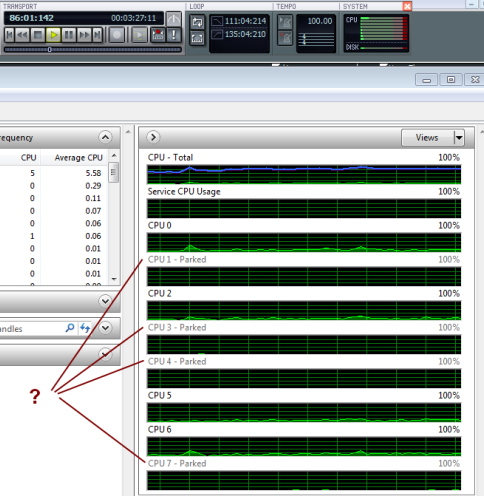 That's SONAR 8.5.3 (32-bit version) running one of my large-ish projects, with the Windows 7 Resource Monitor utility in the foreground. You can see from SONAR's CPU meter in the big transport toolbar that one CPU core is doing most of the work (this is typical and I don't think represents a problem on its own). However, Resource Monitor seems to be telling me that 4 cores are parked! So either I screwed up the Registry hack, or I forgot to completely power down (unlikely given the recent replacement of my PCI audio card!), or Resource Monitor is lying, or there is something else going on. Can we trust Resource Monitor? Can anyone else who has successfully disabled core parking (as far as they know) verify that Resource Monitor is not showing parked cores?
|
Sijel
Max Output Level: -81 dBFS

- Total Posts : 487
- Joined: 2009/11/29 21:21:56
- Status: offline
Re:Problem with the SONAR CPU meter please...?
2010/08/24 15:09:24
(permalink)
Interesting pic! I will need to recheck my parking when I get to my Sonar.
Just curious - have you changed any desktop or power management settings recently?
Microsoft Surface Book w/ Surface dock, dual 24-inch HD displays,
Sonar Platinum, THD 4, GuitarRig, Amplitube, (Kontakt4), Garritan PO, Trillian Bass 1.3, Roland Octa-Capture, Waves Gold & various Waves, PSP and T-Racks plugins.KRK Rokit6, Lefty Guitars & Bass, racks/pedals galore and many other fun things.
|
stickman393
Max Output Level: -60 dBFS
- Total Posts : 1528
- Joined: 2003/11/07 18:35:26
- Status: offline
Re:Problem with the SONAR CPU meter please...?
2010/08/24 16:09:33
(permalink)
@Sijel - No, not recently. However, since my last post I took a look at the Power Options and drilled down into the "Advanced Settings", and noticed the following: 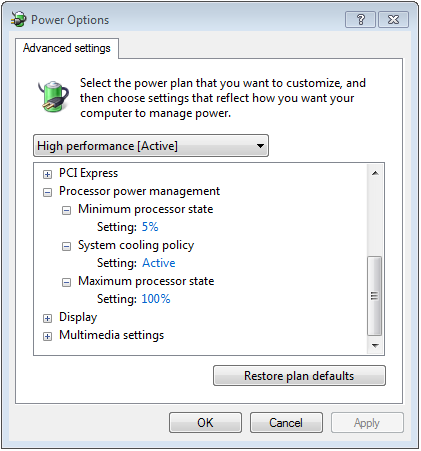 Interesting... but this does not have anything to do with core parking.
post edited by stickman393 - 2010/08/24 19:47:26
|
stickman393
Max Output Level: -60 dBFS
- Total Posts : 1528
- Joined: 2003/11/07 18:35:26
- Status: offline
Re:Problem with the SONAR CPU meter please...?
2010/08/24 16:20:15
(permalink)
The truth is, this is off-topic as far as Benjamin (OP) is concerned. If Reaper is running a certain workload without problems, but SONAR is not, then it's not Core Parking that is the problem.
Additionally, my understanding is that if you are experiencing audio glitching, *and* you have core parking enabled, then it may be that disabling the core parking will eliminate the glitches - if they are somehow due to some kind of thread scheduling conflict or whatever.
I don't think that the core parking evident on my system is causing a detrimental effect on my SONAR performance, at least not from an audible perspective.
On the other hand, the lop-sided CPU meter in SONAR has *always* bothered me.
|
stickman393
Max Output Level: -60 dBFS
- Total Posts : 1528
- Joined: 2003/11/07 18:35:26
- Status: offline
Re:Problem with the SONAR CPU meter please...?
2010/08/24 16:43:51
(permalink)
Just to finish up this Core Parking sub-topic: After following the instructions found here, my Power Options dialog has some new options: 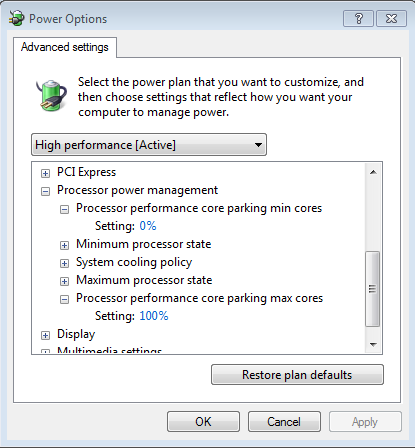 Note the "core parking max/min cores" percentages. To completely disable core parking, we need to set " core parking min cores" to 100%, and " core parking max cores" to 0%. Important note: If you've applied the other registry tweaks to try disabling core parking, then you might need to undo them, and set ValueMax back to 64, before these new Power Option settings shown above become editable. This was my experience, anyway.) After changing these settings as described above, I could see Resource Monitor change the display for the CPU cores to show that none of the cores were parked. And now, the SONAR test again: 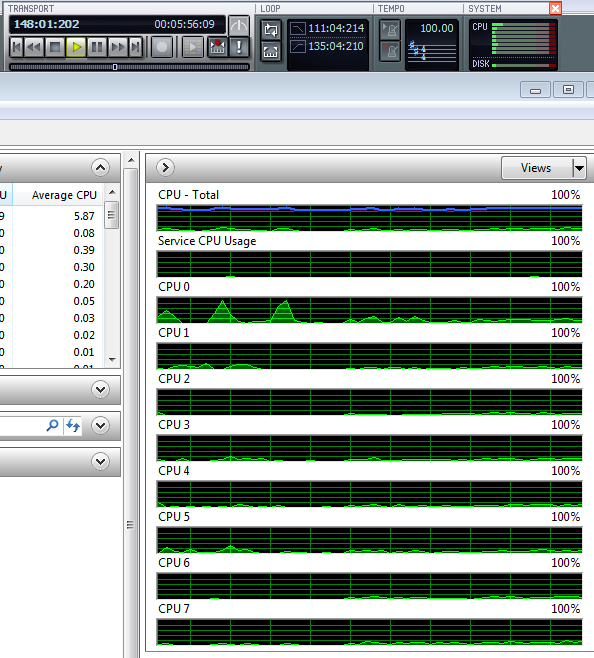 ... you know, I think the SONAR CPU meter is looking a little more balanced.
post edited by stickman393 - 2010/08/24 19:52:28
|
Sijel
Max Output Level: -81 dBFS
- Total Posts : 487
- Joined: 2009/11/29 21:21:56
- Status: offline
Re:Problem with the SONAR CPU meter please...?
2010/08/24 21:51:35
(permalink)
Good work and great documentation of your results - very plain to see! Here is a Microsoft document that provides more details on the registry entries you manipulated: http://download.microsoft.com/download/3/0/2/3027D574-C433-412A-A8B6-5E0A75D5B237/ProcPowerMgmtWin7.docx The table on page 34 defines the "core parking min cores" (the bold emphasis is mine): Description The minimum percentage of logical processors (in terms of all logical processors that are enabled on the system) that can be placed in the unparked state at any given time. For example, on a system with 16 logical processors, configuring the value of this setting to 25% ensures that at least 4 logical processors are always in the unparked state. The Core Parking algorithm is disabled if the value of this setting is not less than the value of the Processor Performance Core Parking Maximum Cores setting. GUID 0cc5b647-c1df-4637-891a-dec35c318583 PowerCfg Alias Not applicable Minimum Value 0 Maximum Value 100 Label Percentage (%) Hidden Yes You've set this value to 100% (which is more than the Max val), so Core Parking is Disabled. According to the table above, you should be able to set Min to anything greater than Max to disable Core Parking. Now that we've ellucidated the science, I'm not convinced people should be bothering with this Registry Tweak... theoretically, it should not produce a noticeable difference in performance if configured properly for High Performance. Afterall, if the OS thinks it doesn't need the extra cores to do its task scheduling and the unparked CPUs are not pegged, who are we to think the OS will do better by "unparking" all the remaining CPUs? So, I wonder: Would I just be creating more heat inside my DAW and making the air fans or water cooling work harder -which in turn produces more noise? As Homer Simpson would say, D'OH!!
post edited by Sijel - 2010/08/24 21:53:41
Microsoft Surface Book w/ Surface dock, dual 24-inch HD displays,
Sonar Platinum, THD 4, GuitarRig, Amplitube, (Kontakt4), Garritan PO, Trillian Bass 1.3, Roland Octa-Capture, Waves Gold & various Waves, PSP and T-Racks plugins.KRK Rokit6, Lefty Guitars & Bass, racks/pedals galore and many other fun things.
|
stickman393
Max Output Level: -60 dBFS
- Total Posts : 1528
- Joined: 2003/11/07 18:35:26
- Status: offline
Re:Problem with the SONAR CPU meter please...?
2010/08/25 01:32:30
(permalink)
I'm not convinced people should be bothering with this Registry Tweak... theoretically, it should not produce a noticeable difference in performance if configured properly for High Performance
Sijel, I would agree with you, except that my impression is that it made a noticeable difference to the visual balance of the SONAR CPU meter, for my system at least. Whether this actually makes a difference to how hard I can push the system before experiencing dropouts or glitches, I don't know. I wasn't having trouble before. I think the take-away is this: 1) If you're experiencing problems relating to dropouts or audio glitches that appear to be related to how hard SONAR is driving the system, then try disabling core parking. 2) Make sure you actually *have* disabled core parking, because my experience suggests that some of the techniques published for it don't actually work on every system. Here's hoping Benjamin gets some feedback from Cakewalk about his observations.
|
ivanSC
Max Output Level: -84 dBFS
- Total Posts : 325
- Joined: 2007/02/13 05:29:37
- Location: UK
- Status: offline
Re:Problem with the SONAR CPU meter please...?
2010/08/26 04:52:33
(permalink)
Interestingly, I went back and peeked at my "old" Sonar install on my now-obsolete AMD dual core. It shows the two cores in Task Manager without any disabling of core parking under winxp64, so possibly this is something introduced in win7.
Not sure but it all helps narrow in on the OP`s problem.
I`ll have a look at what Sonar reports internally re core parking, but can I reiterate that I tried the first "registry fix" in this thread unsuccessfully and it wasnt till I did the second one that all was well.
Probably me doing the first one ineptly, but worth a check.
|
Sijel
Max Output Level: -81 dBFS
- Total Posts : 487
- Joined: 2009/11/29 21:21:56
- Status: offline
Re:Problem with the SONAR CPU meter please...?
2010/08/26 08:49:49
(permalink)
Sorry - this is a ridiculously long thread. Which message # had the "first" reg fix and which message # had the second fix (that worked)?
Microsoft Surface Book w/ Surface dock, dual 24-inch HD displays,
Sonar Platinum, THD 4, GuitarRig, Amplitube, (Kontakt4), Garritan PO, Trillian Bass 1.3, Roland Octa-Capture, Waves Gold & various Waves, PSP and T-Racks plugins.KRK Rokit6, Lefty Guitars & Bass, racks/pedals galore and many other fun things.
|
stickman393
Max Output Level: -60 dBFS
- Total Posts : 1528
- Joined: 2003/11/07 18:35:26
- Status: offline
Re:Problem with the SONAR CPU meter please...?
2010/08/26 10:05:40
(permalink)
The first technique I encountered in my research did not successfully disable core parking in my system. I had to reverse the registry change in order for the second technique to work. I describe my experiences in detail in this message earlier in this thread. (ivanSC, please let us know if you followed a different set of techniques.)
|
bitflipper
01100010 01101001 01110100 01100110 01101100 01101

- Total Posts : 26036
- Joined: 2006/09/17 11:23:23
- Location: Everett, WA USA
- Status: offline
Re:Problem with the SONAR CPU meter please...?
2010/08/26 11:45:42
(permalink)
I went back and peeked at my "old" Sonar install on my now-obsolete AMD dual core. It shows the two cores in Task Manager without any disabling of core parking under winxp64, so possibly this is something introduced in win7. Core parking, I believe, only applies to systems with more than two cores/CPUs. It was introduced in Vista, I think.
 All else is in doubt, so this is the truth I cling to. My Stuff
|
ddundas
Max Output Level: -90 dBFS

- Total Posts : 17
- Joined: 2005/12/17 11:49:36
- Status: offline
Re:Problem with the SONAR CPU meter please...?
2010/08/26 22:22:26
(permalink)
@Ivansc: yes, as far as I know, I did the tweak that you said had "all six cores rocking"! (I'm jealous!)
This is what I did:
How to properly disable "Core Parking"
- Go to Regedit
- Find this key:- " 0cc5b647-c1df-4637-891a-dec35c318583 "
- Within this key, there is a value called: " ValueMax "
- This value represents the % number of cores the system will park - the default 100% ie: all Cores are potentially park-able
- Change the value from 64 to 0 so the " ValueMin " and " ValueMax " are both zero
- You will have to find the key a few times and repeat the process for each time it is found - the number of instances will depend on the number of power profiles in your system [ in my DAW it was only found twice ]
- Do a full shutdown and power-off and cold-re-start
|
ivanSC
Max Output Level: -84 dBFS
- Total Posts : 325
- Joined: 2007/02/13 05:29:37
- Location: UK
- Status: offline
Re:Problem with the SONAR CPU meter please...?
2010/08/27 13:27:35
(permalink)
Aw what a BUMMER! That is indeed the fix that I followed that worked for me.
I found two instances that needed changing to 0 from 64 and after that it all worked.
Doulbe check that when you did it you used the HEX option to change the values and not decimal. Although on reflection 0 is 0 regardless....
And you DID do a complete cold restart? LIke switch the `puter off and power down and all that good stuff?
You don`t need to take the mains plug out, but do make sure you are powered right down. Not a `restart` restart if you follow me.
|
ivanSC
Max Output Level: -84 dBFS
- Total Posts : 325
- Joined: 2007/02/13 05:29:37
- Location: UK
- Status: offline
Re:Problem with the SONAR CPU meter please...?
2010/08/27 13:30:37
(permalink)
As you can see from the above, sticky, I used what you described as the first method which was the second one I came across!
Confusing, eh?
And I`d like to confirm that a few days after, it is all still working so well I could poop myself for joy.
|
benjamincharles
Max Output Level: -89 dBFS
- Total Posts : 83
- Joined: 2010/06/19 03:24:55
- Location: Boston MA
- Status: offline
Re:Problem with the SONAR CPU meter please...?
2010/08/29 20:51:24
(permalink)
stickman393
Just to finish up this Core Parking sub-topic:
After following the instructions found here, my Power Options dialog has some new options:
Note the "core parking max/min cores" percentages.
To completely disable core parking, we need to set "core parking min cores" to 100%, and "core parking max cores" to 0%.
Important note: If you've applied the other registry tweaks to try disabling core parking, then you might need to undo them, and set ValueMax back to 64, before these new Power Option settings shown above become editable. This was my experience, anyway.)
After changing these settings as described above, I could see Resource Monitor change the display for the CPU cores to show that none of the cores were parked. And now, the SONAR test again:
... you know, I think the SONAR CPU meter is looking a little more balanced.
Yup, I've tried all that. All my cores are working fine, 100% across the board. I have tried everything I can try. This is very frustrating. But I sincerely want to thank all of you guys for trying to help me (and others) with this issue. I'll update as I find out anything else about this situation. Ben C
Basic info: Win7 32 bit, Sonar 8.5 PE, MaxMSP 5, MOTIF6,
EMU Proteus 1/2/3, ADAM A7, DAC1, Alphatrack
|
benjamincharles
Max Output Level: -89 dBFS
- Total Posts : 83
- Joined: 2010/06/19 03:24:55
- Location: Boston MA
- Status: offline
Re:Problem with the SONAR CPU meter please...?
2010/08/29 21:05:38
(permalink)
I just tried SONAR 8.5.3 - with an empty new project. Just one synth loaded now. Gladiator. Preset: PAD "PA AnalogFat MF". 256 voices, ultra quality. I played, with sustain pedal down, every single key on my 66 key MIDI controller pedal down.... SONAR dropped out, and I had to restart the engine after 4 seconds. I used my forearms to cluster the keys, in order to max out polyphony asap. Same test in Reaper. I could use forearm smash after smash, pedal down, nothing but smooth sounds. No glitching, freezes, or cracks/pops. CPU stayed at a meager 8% for 45 seconds, and finally after pounding and pounding I finally heard one glitch/pop in Reaper. So I stopped. Real Time CPU was about 30% or so, but it did peak once to about 80% (after that whole time). The 'actual' CPU of course, of my PC, and Reaper's "Total CPU" was 4% even through the glitching. Now, practically - of course I'd never compose like this. But, SONAR seems to not even be able to handle a real-world example, yet Reaper can handle 90% of an impractical and unlikely synth arrangement/polyphony/pedal style overflow. I do often use clusters and such, and SONAR can't seem to handle even the first 3 or 4 "clusters" at those settings. Yet Reaper could withstand so much more, regardless of the obvious lack of "Real World" application you could argue. I'll let you know if I find out anything else. Thanks everyone. I really appreciate the help. Ben C
post edited by benjamincharles - 2010/08/29 21:09:58
Basic info: Win7 32 bit, Sonar 8.5 PE, MaxMSP 5, MOTIF6,
EMU Proteus 1/2/3, ADAM A7, DAC1, Alphatrack
|
quibb
Max Output Level: -84 dBFS
- Total Posts : 308
- Joined: 2003/11/06 15:42:52
- Location: Utah
- Status: offline
Re:Problem with the SONAR CPU meter please...?
2010/08/30 00:15:37
(permalink)
Hey Ben, I had stated previously in this thread that I was having similar dropout problems on a I7 860 with 8GB RAM. I couldn't ever get more than about 10-15 seconds into a song before it started dropping out, and then it would frequently increase to every 3-5 seconds. It gets to be maddening and extremely frustrating, I know. I'm ecstatic to report that I figured my problem out Friday morning after over a month of grueling diagnostic attempts. My system is now everything I had hoped. What happened was I reached the point of completely removing Sonar 8.5 PE as well as my Focusrite drivers and doing a clean install. I was going through my Global settings to document them so I would remember what I had previously done, and I ran across my folder settings. I suddenly realized that my audio was mapped to my c-drive along with my project files (per project audio activated). This was my second recent install of 8.5 and I hadn't mapped it correctly the second time. This was a complete oversight in that I always map audio to my secondary drive. I thought to myself - it can't be that simple, but it was. I opened what was one of the more problematic songs and saved it to my F-drive (audio drive) using per project audio folders, hit play, and it played perfectly. I spent the rest of the afternoon saving the rest of my songs this way and I haven't had a dropout since. I was on my system 4 hours last pm without a hiccup. Unbelievable. Having the Sonar program files, project and audio files on the same drive was causing the problem. I don't know if you are set up in a similar manner, but I thought it was worth mentioning just in case. It's crazy how one setting like that can disrupt the whole system, especially on a screamin' machine. Hope to help... Vernon FWIW - Upgrading to Win7 x64, Sonar 8.5, a new Focusrite interface, not to mention the new I7 computer and new components, all within a month or two, made diagnostics a b^tch! BTW - I did contact Cake support, and they were very good. They suggested creating a 'ghost' audio track and arming 'echo input', stating that this can help with a known Windows 7 issue that causes dropouts. I guess an active track helps fool Windows to stay active itself. I tried this without luck, and was able to identify the problem .... finally!
post edited by quibb - 2010/08/30 00:17:02
I7, 8GB, Win 7 64-bit, Sonar Platinum, R11 driver, Focusrite Pro40, Helios II fly rod
|
John
Forum Host
- Total Posts : 30467
- Joined: 2003/11/06 11:53:17
- Status: offline
Re:Problem with the SONAR CPU meter please...?
2010/08/30 00:41:23
(permalink)
Under record options under the transport menu see if arm for recording while playback is checked if so uncheck it and see what that does.. Also in your options audio dialog you have no record timing master checked. Mine is set to my audio device as is the playback timing master. You also have no inputs selected in the driver tab.
|
Sijel
Max Output Level: -81 dBFS
- Total Posts : 487
- Joined: 2009/11/29 21:21:56
- Status: offline
Re:Problem with the SONAR CPU meter please...?
2010/08/30 10:22:09
(permalink)
I'll repeat. The issue is NOT Sonar. You have messed up some configuration in your Sonar install.
This weekend, I was working on a 26 track project with at least 55 plugins installed. Not a glitch or issue the whole time - and that included recording guitar along with full track playback.
Have you called this in to CW Support yet?
Otherwise, all I can think is: clear out all your Sonar config files (so Sonar doesn't use a "broken" file during your install) and re-install 8.5.3 from scratch.
Also, I noticed now that you added AlphaTrack... are you sure it's not contributing to problems?
Microsoft Surface Book w/ Surface dock, dual 24-inch HD displays,
Sonar Platinum, THD 4, GuitarRig, Amplitube, (Kontakt4), Garritan PO, Trillian Bass 1.3, Roland Octa-Capture, Waves Gold & various Waves, PSP and T-Racks plugins.KRK Rokit6, Lefty Guitars & Bass, racks/pedals galore and many other fun things.
|
stickman393
Max Output Level: -60 dBFS
- Total Posts : 1528
- Joined: 2003/11/07 18:35:26
- Status: offline
Re:Problem with the SONAR CPU meter please...?
2010/08/30 13:16:45
(permalink)
I downloaded the demo of Goliath last night. I'll install it and test tonight. I figure I should be able to either reproduce Benjamin's results described here, or not. And that will give us more information.
|
mephisto_loh
Max Output Level: -90 dBFS
- Total Posts : 1
- Joined: 2010/09/01 13:55:48
- Status: offline
Re:Problem with the SONAR CPU meter please...?
2010/09/01 13:58:41
(permalink)
Man i had the same problem. I had dropouts, delays and the best thing you can do is to make a new partition, install XP and work there.
I find windows 7 is not very stable with Sonar X.
|
thegeek
Max Output Level: -78 dBFS

- Total Posts : 631
- Joined: 2008/10/02 14:28:00
- Location: Athens,Greece
- Status: offline
Re:Problem with the SONAR CPU meter please...?
2010/09/01 16:19:49
(permalink)
to OP: I agree with you that "sonar" is the common factor always in your problems. With this in mind, try to pinpoint your problem by thinking which Sonar features are not there in other DAW software. For example, does Reaper have a 64 bit "double precision" engine? Try disabling that in Sonar, see what happens! ;) *just a suggestion, I thoroughly read all messages in this thread, my apologies if this has already been mentioned, tried and I didnt notice it* *edited for typo*
post edited by thegeek - 2010/09/01 16:32:53
|
stickman393
Max Output Level: -60 dBFS
- Total Posts : 1528
- Joined: 2003/11/07 18:35:26
- Status: offline
Re:Problem with the SONAR CPU meter please...?
2010/09/02 00:45:17
(permalink)
stickman393
I downloaded the demo of Gladiator last night. I'll install it and test tonight.
I figure I should be able to either reproduce Benjamin's results described here, or not. And that will give us more information.
With the demo, at least, I could not reproduce Benjamin's findings. I loaded up the Gladiator demo into Reaper, and made the CPU resource meters (both Reaper's and Windows') visible, and then played fast and lose with all 6 simultaneous voices, trying various patches all at ultra high quality. Then I did the same in a SONAR project. In neither case could I hear audio glitches, or experience dropouts, or anything negative in the SONAR case. I couldn't see any differences in the Windows CPU usage graphs. Of course, one can't compare the SONAR CPU meter with the equivalent display in Reaper (and I'm not sure I'm familiar enough with Reaper to know what to look for, anyway). The important thing is that there was no noticeable difference. Because I was using the DEMO version of Gladiator, I was limited to 6 voices, and Benjamin's test was done using all notes on a 66 key controller, so this is hardly a comparable test. I'm sure more simultaneous notes would exacerbate the differences between the two environments, and there's every chance my SONAR project would start exhibiting the symptoms that Ben described. Despite this, I was hoping to see some obvious CPU spikes in the SONAR meter to match Ben's experience, but I don't really think I saw any. Alas, this is probably not a useful exercise. Ben, if you can reproduce this with the Gladiator demo, or any demo or free VST that I can download, install, and test with, I'd be glad to do so.
post edited by stickman393 - 2010/09/03 11:17:26
|
Sijel
Max Output Level: -81 dBFS
- Total Posts : 487
- Joined: 2009/11/29 21:21:56
- Status: offline
Re:Problem with the SONAR CPU meter please...?
2010/09/02 16:16:54
(permalink)
Alas, this is probably not a usual exercise. I think your work is very useful since it shows Sonar can handle heavy loads when properly configured. I've tried to replicate the OP's issue with Dim Pro with Trillian and Pentagon and using 3-4 plugins on each output track and I just don't see a problem. (Thank goodness for me but not for the OP). I've been noticing that people that use other DAWs seem to have more problems than people that only run Sonar. I suspect there may be inter-DAW conflicts or that they are using habits/settings/tricks/tips from other DAWs that aren't holding up well with Sonar. Just a thesis at this point...
Microsoft Surface Book w/ Surface dock, dual 24-inch HD displays,
Sonar Platinum, THD 4, GuitarRig, Amplitube, (Kontakt4), Garritan PO, Trillian Bass 1.3, Roland Octa-Capture, Waves Gold & various Waves, PSP and T-Racks plugins.KRK Rokit6, Lefty Guitars & Bass, racks/pedals galore and many other fun things.
|
ivanSC
Max Output Level: -84 dBFS
- Total Posts : 325
- Joined: 2007/02/13 05:29:37
- Location: UK
- Status: offline
Re:Problem with the SONAR CPU meter please...?
2010/09/03 09:48:22
(permalink)
I just did the same dumbass thing yesterdy night. started a new poject and was really struggling with partial dropouts, till I relaised I had reconfigured the system and forgotten to tell it to record audio to my D drive.
C drive is no slouch but apparently didnt like it much. 3 audio tracks and a couple reverb plugs plus an EQ and compressor and I was in trouble again.
I am beginning to suspect that I STILL have something else configured wrong. I`ll go away and check it out fron scratch...
PCs (uncluding Apples) are a pain when it comes to recording, right up to the point where you finally get a useable system! (grin)
|
benjamincharles
Max Output Level: -89 dBFS
- Total Posts : 83
- Joined: 2010/06/19 03:24:55
- Location: Boston MA
- Status: offline
Re:Problem with the SONAR CPU meter please...?
2010/09/03 20:30:34
(permalink)
Sijel
I'll repeat. The issue is NOT Sonar. You have messed up some configuration in your Sonar install.
Also, I noticed now that you added AlphaTrack... are you sure it's not contributing to problems?
I disagree. It is SONAR, I've ruled everything else out. I've reinstalled my OS, SONAR, apps/drivers, etc. - it doesn't matter. Alphatrack or not. SONAR has a conflict, or whatever you'd like to call it. Other DAWs seem to handle my VSTi load just fine. I won't rehash my findings. I've messed nothing up.
Basic info: Win7 32 bit, Sonar 8.5 PE, MaxMSP 5, MOTIF6,
EMU Proteus 1/2/3, ADAM A7, DAC1, Alphatrack
|
benjamincharles
Max Output Level: -89 dBFS
- Total Posts : 83
- Joined: 2010/06/19 03:24:55
- Location: Boston MA
- Status: offline
Re:Problem with the SONAR CPU meter please...?
2010/09/03 20:34:29
(permalink)
stickman393
stickman393
I downloaded the demo of Gladiator last night. I'll install it and test tonight.
I figure I should be able to either reproduce Benjamin's results described here, or not. And that will give us more information.
With the demo, at least, I could not reproduce Benjamin's findings.
I loaded up the Gladiator demo into Reaper, and made the CPU resource meters (both Reaper's and Windows') visible, and then played fast and lose with all 6 simultaneous voices, trying various patches all at ultra high quality.
Then I did the same in a SONAR project.
In neither case could I hear audio glitches, or experience dropouts, or anything negative in the SONAR case. I couldn't see any differences in the Windows CPU usage graphs. Of course, one can't compare the SONAR CPU meter with the equivalent display in Reaper (and I'm not sure I'm familiar enough with Reaper to know what to look for, anyway).
The important thing is that there was no noticeable difference.
Because I was using the DEMO version of Gladiator, I was limited to 6 voices, and Benjamin's test was done using all notes on a 66 key controller, so this is hardly a comparable test. I'm sure more simultaneous notes would exacerbate the differences between the two environments, and there's every chance my SONAR project would start exhibiting the symptoms that Ben described.
Despite this, I was hoping to see some obvious CPU spikes in the SONAR meter to match Ben's experience, but I don't really think I saw any.
Alas, this is probably not a useful exercise.
Ben, if you can reproduce this with the Gladiator demo, or any demo or free VST that I can download, install, and test with, I'd be glad to do so.
Hello :) Thank you for your attempt, but sadly, it seems that only when you max out polyphony in the VSTi's I'm working with, then you see the problems. SONAR has no issues at all on my end, when you use "simple" light VSTi (low voice count etc). But try a project with Absynth, Rhino, Gladiator, Rapture, and Zebra, each synth have between 32 and 256 voices each, and SONAR crumbles, period. I am not interested in having this thread turn into a flame fest - everyone has a right to their opinions. And I absolutely respect that - don't confuse that please. I am simply saying, SONAR is the problem. It's a conflict/CPU/issue of some kind. Not my PC. Doesn't matter if I defrag, clean my cookies, reinstall Sound Forge, it's just a SONAR issue - of some kind. CPU usage is out of control, within SONAR, and within other DAWs and in my Windows Resource Monitor - all is well. I'll repeat what I've said all along - I truly appreciate all the help guys! :) I hope that SONAR 9 perhaps is more CPU-efficient with regards to the new i7's, or "CPU intensive" synths that are popular these days. Hope you all have a safe/happy labor day weekend! Ben
Basic info: Win7 32 bit, Sonar 8.5 PE, MaxMSP 5, MOTIF6,
EMU Proteus 1/2/3, ADAM A7, DAC1, Alphatrack
|