SimpleM
Max Output Level: -86 dBFS

- Total Posts : 203
- Joined: 2007/07/30 22:14:00
- Location: Greensboro, NC
- Status: offline

Re: Don't Like Sonar Professional
2015/11/24 11:17:51
(permalink)
AnthonyMangos
Once I get the drumbeat, the bass should be like before. I record direct, so it should be a matter of arming the track and setting the punch in/out points. Please tell me that's it.
Yep, that's it. As long as you have your routing right. If you are staying "in the box" it should already be set to master. If you are using a multi input/output interface you might have to route it to the inputs/outputs you want but that is just a simple drop down in the first part of the track view where you arm the recording. 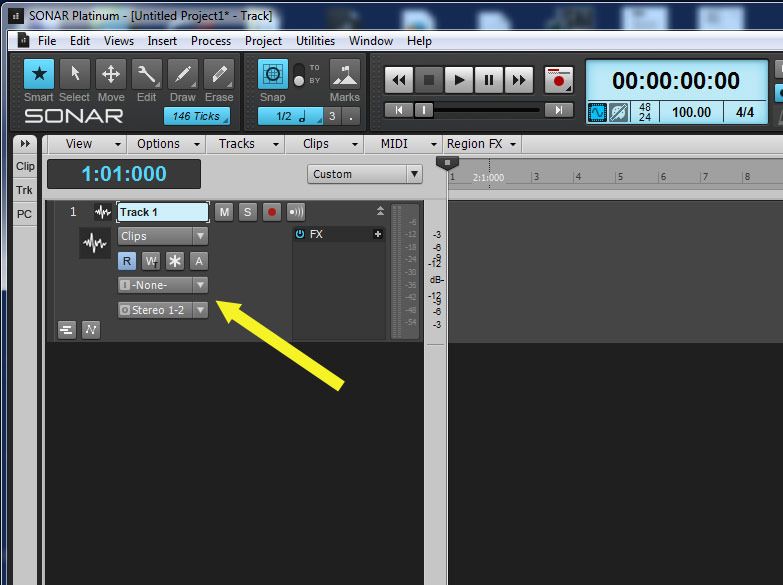
post edited by SimpleM - 2015/11/24 11:29:22
|
AnthonyMangos
Max Output Level: -90 dBFS

- Total Posts : 37
- Joined: 2015/10/28 12:40:47
- Status: offline
Re: Don't Like Sonar Professional
2015/11/25 09:49:46
(permalink)
No luck. I have the Addictive Drums drum map, no sound. I closed the file in frustration and re-opened it. An error message said I was missing a console emulator. Per cakewalk help and looking at my directory it turns out my computer wasn't set to recognize short and long names of files. Went into the command prompt and fixed that. I still get the error message. Some of the drums will sound in the step sequencer and then they don't. Set the output for both master and Quadcapture - no difference.
I only bought Sonar because I wanted to collaborate with an old college friend - PA9 wasn't good enough for him.
I initially begged off a few months ago and then he e-mailed about a month ago and I decided to do it. He should have just left well enough alone.
I am going to wait the weekend. After that, I am going to uninstall Sonar and give ProTools a try via their trail period. If I can't get 20 seconds of recorded professional sounding music within a week, then the problem is me. If I can, I will switch.
I was up half of the night, and have to drive 8 hours today.
|
kitekrazy1
Max Output Level: -40 dBFS

- Total Posts : 3524
- Joined: 2014/08/02 17:52:51
- Status: offline
Re: Don't Like Sonar Professional
2015/11/25 10:01:08
(permalink)
☄ Helpfulby John 2015/11/25 19:11:17
AnthonyMangos
In response to kitekrazy1 - In the meantime I was trying to get started - and I work during the week.
Glad you made it back. We know what it's like to drop money on something that doesn't work at first.
Sonar Platinum, W7 Pro 32GB Ram, Intel i7 4790, AsRock Z97 Pro 4, NVidia 750ti, AP2496 Sonar Platinum, W7 Pro, 16GB Ram, AMD FX 6300, Gigabyte GA 970 -UD3 P, nVidia 9800GT, Guitar Port, Terratec EWX 2496
|
kevinwal
Max Output Level: -69 dBFS

- Total Posts : 1066
- Joined: 2007/07/27 19:07:43
- Location: Rogers, AR
- Status: offline
Re: Don't Like Sonar Professional
2015/11/25 14:03:26
(permalink)
☄ Helpfulby John 2015/11/25 19:10:47
AnthonyMangos
No luck. I have the Addictive Drums drum map, no sound. I closed the file in frustration and re-opened it. An error message said I was missing a console emulator. Per cakewalk help and looking at my directory it turns out my computer wasn't set to recognize short and long names of files. Went into the command prompt and fixed that. I still get the error message. Some of the drums will sound in the step sequencer and then they don't. Set the output for both master and Quadcapture - no difference.
I only bought Sonar because I wanted to collaborate with an old college friend - PA9 wasn't good enough for him.
I initially begged off a few months ago and then he e-mailed about a month ago and I decided to do it. He should have just left well enough alone.
I am going to wait the weekend. After that, I am going to uninstall Sonar and give ProTools a try via their trail period. If I can't get 20 seconds of recorded professional sounding music within a week, then the problem is me. If I can, I will switch.
I was up half of the night, and have to drive 8 hours today.
Man, it's really painful reading this thread, I feel for ya dude. I imagine everyone posting here would head straight to your place and fix the problem for you if that were possible. For what it's worth, your experience is not at all like mine was when I followed the upgrade path to the X series. In fact, I'd say your experience is not typical at all, so there's something else besides just the new software in play here, I think. As I recall (and I could be wrong), drum maps shouldn't have much to do with whether or not you're generating sound at all, they simply provide a nice labelling of patches for the specific virtual instrument. In fact I've never used drum maps because I hate the UI :) but I still manage to use both Session Drummer and Addictive Drums just fine. FYI, I've never used any books or videos or anything like that, and I've never used any other DAW so I'm not some digital recording expert just new to Sonar. Once I figured out the ASIO and interface drivers, it was pretty much arm, record, export. Sonar isn't that different from previous versions. Yeah, there are new instruments and new capabilities, but those weren't too hard to figure out. A streamlined UI and window layout model, sure, which can make finding stuff that you know is there a bit time consuming and frustrating initially, but a lot of the basic dialogs are very similar to older versions and the underlying concepts of simply recording and generating output are pretty much the same, imho. All of this is meant to suggest that you might well have some issues with configuration. If I recall correctly, Cake support has been known do a remote troubleshooting session which might help you figure out what is probably a very simple issue in short order. I just can't imagine pro tools being any less complex for you if Sonar has been such a challenge. Best of luck to you, I hope you figure out some way to start making some tunes. Kevin
post edited by kevinwal - 2015/11/25 14:14:38
|
Beepster
Max Output Level: 0 dBFS

- Total Posts : 18001
- Joined: 2012/05/11 19:11:24
- Status: offline
Re: Don't Like Sonar Professional
2015/11/25 14:18:24
(permalink)
☄ Helpfulby John 2015/11/25 19:10:55
Honestly I think the drum map thing is most likely what's screwing things up for you. I never use them. I intend to at some point but they are totally not necessary. That's advanced stuff and I've seen lots of issues reported about them.
Using them JUST to get kit peice names as a total beginner... sounds like a bad idea. They need to be set up really well with quite a bit of insight. That's pretty much why I've avoided them because I get by well enough as it is for now.
I don't use the Step Sequencer either but based on what I know it's pretty easy to get going without screwing with drum maps. You just need to watch the vids about the SS and it'll make sense. No drum maps needed. I cannot help beyond that without reviewing a bunch of material and I'm balls deep in some other really complicated crap at the moment.
Just look for the Step Sequencer vids in that SWA series and wherever else you can find instructions on it (and whatever drum sampelrs you are using).
Cheers.
|
Doktor Avalanche 
Max Output Level: -32.5 dBFS

- Total Posts : 4294
- Joined: 2015/03/26 18:02:02
- Status: offline
Re: Don't Like Sonar Professional
2015/11/25 15:46:43
(permalink)
AnthonyMangos
No luck. I have the Addictive Drums drum map, no sound. I closed the file in frustration and re-opened it. An error message said I was missing a console emulator. Per cakewalk help and looking at my directory it turns out my computer wasn't set to recognize short and long names of files. Went into the command prompt and fixed that. I still get the error message.
Hmm not 100% sure what this means, was it truncating filenames into the DOS 8.3 format peviously? If so you may be looking at having to do an uninstall and reinstall. Cakewalk support would give the definitive answer... Or just do it anyway.. Kingston is out as well... If there are other qwirks going on you may need to look at a clean os install...
post edited by Doktor Avalanche - 2015/11/25 15:59:37
Sonar Platinum(64 bit),Win 8.1(64 bit),Saffire Pro 40(Firewire),Mix Control = 3.6,Firewire=VIA,Dell Studio XPS 8100(Intel Core i7 CPU 2.93 Ghz/16 Gb),2 x 1TB SSD (Samsung EVO 850),GeForce GTX 460,Yamaha DGX-505 keyboard,Roland A-300PRO,Roland SPD-30 V2,FD-8,Triggera Krigg,Shure SM7B,Yamaha HS5. Rap Pro,Maschine Studio+Komplete 9 Ultimate+Kontrol Z1,Addictive Keys,Waves Silver,Izotope Nectar elements,Overloud Bundle,Geist,Acronis True Image 2015.
|
Beepster
Max Output Level: 0 dBFS
- Total Posts : 18001
- Joined: 2012/05/11 19:11:24
- Status: offline
Re: Don't Like Sonar Professional
2015/11/25 16:32:16
(permalink)
☄ Helpfulby John 2015/11/25 19:11:01
Anthony... there is likely a much simpler solution than what was just posted above ^^^^.
I do not recommend blowing up your system to sort this out and Kingston JUST came out and is getting some weird reviews so I don't recommend that just yet either.
Watch the vids about the Step Sequencer and read the manual and dump the drum maps for now unless you can get a real handle on what they are doing (and if you do well... you are digging into some advanced shiz).
In the SS, IIRC, you just need to use the SS sound/MIDI note picker to map each row to a kit piece (or whatever synth you have routed to the SS). You don't need a drum map for that.
If I get a chance I'll review the material myself. I really should bone up on this crap anyway.
Cheers.
|
Doktor Avalanche
Max Output Level: -32.5 dBFS
- Total Posts : 4294
- Joined: 2015/03/26 18:02:02
- Status: offline
Re: Don't Like Sonar Professional
2015/11/25 18:02:00
(permalink)
^^^^ I stated "If there are other qwirks going on you may need to look at a clean os install...". Sometimes there comes a time what too much is much crap going on and and OS reinstall is necessary. Looks like this is a quite an old OS install with loads of software on it, what friggin' know what is going on here. Not sure what you mean by "blowing up" but anyway... I am obviously not suggesting this be done straight way. I also suggested he might try uninstall/reinstall/upgrade as he's done something via command prompt (would like to know exactly what it is), and he might check with cakewalk. BTW with JP I experienced crashing with drum maps (linked to single core cpu overload confirmed bug it seems), it didn't gel at all (lots of other weird behaviour), no issue with previous version, have not had time to test Kingston yet, I would hope it is fixed otherwise I'm screwed for yet another month... You say you have a " simpler solution", please let us know I'm all ears here.
post edited by Doktor Avalanche - 2015/11/25 18:15:26
Sonar Platinum(64 bit),Win 8.1(64 bit),Saffire Pro 40(Firewire),Mix Control = 3.6,Firewire=VIA,Dell Studio XPS 8100(Intel Core i7 CPU 2.93 Ghz/16 Gb),2 x 1TB SSD (Samsung EVO 850),GeForce GTX 460,Yamaha DGX-505 keyboard,Roland A-300PRO,Roland SPD-30 V2,FD-8,Triggera Krigg,Shure SM7B,Yamaha HS5. Rap Pro,Maschine Studio+Komplete 9 Ultimate+Kontrol Z1,Addictive Keys,Waves Silver,Izotope Nectar elements,Overloud Bundle,Geist,Acronis True Image 2015.
|
Beepster
Max Output Level: 0 dBFS
- Total Posts : 18001
- Joined: 2012/05/11 19:11:24
- Status: offline
Re: Don't Like Sonar Professional
2015/11/25 18:17:42
(permalink)
☄ Helpfulby John 2015/11/25 19:11:04
Yeah, the simpler solution is learning the ins and outs of the SS and how to trigger things from it (without drum maps). Yanno... like I said.
Don't confuse the guy.
|
jb101
Max Output Level: -46 dBFS

- Total Posts : 2946
- Joined: 2011/12/04 05:26:10
- Status: offline
Re: Don't Like Sonar Professional
2015/11/25 20:28:33
(permalink)
Beepster
Anthony... there is likely a much simpler solution than what was just posted above ^^^^.
Yeah, the simpler solution is learning the ins and outs of the SS and how to trigger things from it (without drum maps). Yanno... like I said.
Watch the vids about the Step Sequencer and read the manual and dump the drum maps for now unless you can get a real handle on what they are doing
(@Alex) Don't confuse the guy.
This is sage advice.
|
mettelus
Max Output Level: -22 dBFS

- Total Posts : 5321
- Joined: 2005/08/05 03:19:25
- Location: Maryland, USA
- Status: offline
Re: Don't Like Sonar Professional
2015/11/25 20:31:13
(permalink)
☄ Helpfulby Doktor Avalanche 2015/11/25 20:53:10
The long/short files names did catch me off guard. I went back through this thread searching for specs on your new machine and didn't see it. Can you let us know what machine you got as a replacement, operating system, etc.? Also what OS you came from (assuming XP) would be helpful, as the jump from XP->W7 can make older external hardware not function. When I saw the long/short comment it made me worry we are all chasing the wrong rabbit.
post edited by mettelus - 2015/11/25 20:42:31
ASUS ROG Maximus X Hero (Wi-Fi AC), i7-8700k, 16GB RAM, GTX-1070Ti, Win 10 Pro, Saffire PRO 24 DSP, A-300 PRO, plus numerous gadgets and gizmos that make or manipulate sound in some way.
|
Doktor Avalanche
Max Output Level: -32.5 dBFS
- Total Posts : 4294
- Joined: 2015/03/26 18:02:02
- Status: offline
Re: Don't Like Sonar Professional
2015/11/25 20:42:18
(permalink)
mettelus
When I saw the long/short comment it made me worry we are all chasing the wrong rabbit.
Exactly... More info please! I was afraid the pit maneuver above might have distracted my point here. Thx for repeating it.
post edited by Doktor Avalanche - 2015/11/25 20:57:48
Sonar Platinum(64 bit),Win 8.1(64 bit),Saffire Pro 40(Firewire),Mix Control = 3.6,Firewire=VIA,Dell Studio XPS 8100(Intel Core i7 CPU 2.93 Ghz/16 Gb),2 x 1TB SSD (Samsung EVO 850),GeForce GTX 460,Yamaha DGX-505 keyboard,Roland A-300PRO,Roland SPD-30 V2,FD-8,Triggera Krigg,Shure SM7B,Yamaha HS5. Rap Pro,Maschine Studio+Komplete 9 Ultimate+Kontrol Z1,Addictive Keys,Waves Silver,Izotope Nectar elements,Overloud Bundle,Geist,Acronis True Image 2015.
|
Ozz
Max Output Level: -84 dBFS

- Total Posts : 332
- Joined: 2010/01/27 02:41:40
- Location: Upstate NY
- Status: offline
Re: Don't Like Sonar Professional
2015/11/25 21:37:37
(permalink)
Wow..this thread got pretty big....I think he's on the road....so let me chime in for him...
He just got the computer....I think he ended up with a Dell (can't remember the model)...but it's an i5 processor, 8GB RAM, single 1TB HDD, Windows 10 OS
Roland Quad Capture for an interface
No external controllers.....he's strictly micing his guitar amp....goes direct in with the bass (I believe) and is trying to get used to VST's....specifically drums....specifically Addictive Drums 2 (or Session Drummer, I suppose...though I've tried to get him to concentrate on AD2)
Not a lot of software on it, I wouldn't think...as far as I know, the only thing he's installed is the software for Sonar, Addictive Drums 2 and whatever else came with the Sonar Professional package.
He'll correct me if I'm wrong...
I think that he's got some settings or configurations incorrectly set, and/or he's just not sure where to look for things or how to use them when he finds them.
I'm also wondering if at least a small part of his issue could be some sort of conflict between his onboard audio and the Roland....I know I turned my onboard off in the BIOS when I built my current machine....and that cleared up a couple of weird issues I was having at the time. I suggested turning off his onboard either in BIOS or device manager, but not sure if he did or not.
I highly doubt a complete system reinstall is necessary at this point....not out of the realm of possibility...but...I'm pretty hopeful that his issues are just a number of minor things that can be fixed without too much hassle. :)
I've been trying to get him to let me remote into his machine so that I can take a look and maybe help him figure some of his issues out....as I'm too far away to just drop in and sit at his desk.
Maybe after the Holiday weekend....
Sonar Platinum, Win 10 Pro 64, Intel i7 4770K, 16GB DDR3 1600, 1 x 250GB SSD, 2 x 2TB SATA, Roland OctaCapture, Roland XP-30 (Controller only), Shure KSM-44, Rode NT-1, Shure SM57, Numerous Guitar Amp sims, Komplete 6/7, Alchemy, Custom built guitar, Carvin Amplifiers.
|
sausy1981
Max Output Level: -83 dBFS

- Total Posts : 385
- Joined: 2013/12/13 14:22:32
- Location: Dublin, Ireland
- Status: offline
Re: Don't Like Sonar Professional
2015/11/26 02:27:07
(permalink)
Hi Anthony, I have a youtube channel on which I do tutorial videos on mixing. If you like you can PM me with details about what you would like to know, and if I know, I can do a video for you, then after the first video you can tell me what you want to cover next and so on. I'm sure your not the only one to have problems so I would have no issue doing the vids, Just let me know the specifics of what you want to know. I'm a sonar user since x1 and like you I use a roland quad capture and I use Addictive drums 2 in all my projects.
All the best,
Andrew
|
AnthonyMangos
Max Output Level: -90 dBFS
- Total Posts : 37
- Joined: 2015/10/28 12:40:47
- Status: offline
Re: Don't Like Sonar Professional
2015/11/26 08:05:34
(permalink)
Okay this help is really wonderful. I think I need to look at the step sequencer. I am stuck in the paradigm of the drum machine. I am used to programming a Dr. Rhythm drum machine using PA9 to trigger via MIDI and then physically recording on two tracks. I will chuck the drum map. Ad2 and session drummer both work fine (as far as sound) when loaded by themselves. I'm confused as to how to get the drums named on the step sequencer and then to get that info to an Audio track. I never use loops. Punching in beat by beat in the step sequencer is really appealing to me. Love the drum sounds. I think my failure to understand soft synths is the road block. How to get the step sequencer patterns to an audio clip. Timescale, step sequencer, everything else is set.
The long/short name was a help recommendation in cakewalk. It was based on the error message I only got with the drum map-loaded cakewalk file. Looking in the directory on my computer I did have that 'problem'. Short names were not visible.
|
Doktor Avalanche
Max Output Level: -32.5 dBFS
- Total Posts : 4294
- Joined: 2015/03/26 18:02:02
- Status: offline
Re: Don't Like Sonar Professional
2015/11/26 08:19:25
(permalink)
AnthonyMangos
The long/short name was a help recommendation in cakewalk. It was based on the error message I only got with the drum map-loaded cakewalk file. Looking in the directory on my computer I did have that 'problem'. Short names were not visible.
I'm assume this is it...? http://forum.cakewalk.com/tm.aspx?m=2681013I see the cakewalk quote: 'Ultimately we will try and move away from this dependency but it involves backwards compatibility issues with projects so we can't completely sever this tie.'. That was in 2012 not sure if anything changed or not. This isn't a hack I'd like to dive into anyway.
post edited by Doktor Avalanche - 2015/11/26 08:33:25
Sonar Platinum(64 bit),Win 8.1(64 bit),Saffire Pro 40(Firewire),Mix Control = 3.6,Firewire=VIA,Dell Studio XPS 8100(Intel Core i7 CPU 2.93 Ghz/16 Gb),2 x 1TB SSD (Samsung EVO 850),GeForce GTX 460,Yamaha DGX-505 keyboard,Roland A-300PRO,Roland SPD-30 V2,FD-8,Triggera Krigg,Shure SM7B,Yamaha HS5. Rap Pro,Maschine Studio+Komplete 9 Ultimate+Kontrol Z1,Addictive Keys,Waves Silver,Izotope Nectar elements,Overloud Bundle,Geist,Acronis True Image 2015.
|
Bristol_Jonesey
Max Output Level: 0 dBFS
- Total Posts : 16775
- Joined: 2007/10/08 15:41:17
- Location: Bristol, UK
- Status: offline
Re: Don't Like Sonar Professional
2015/11/26 08:38:01
(permalink)
One thing I don't think has been mentioned about drum maps. If you open the map you must ensure that the Out Port on each mapped key corresponds to whatever VSTi you're using, otherwise nothing will sound
post edited by Bristol_Jonesey - 2015/11/26 09:27:05
CbB, Platinum, 64 bit throughoutCustom built i7 3930, 32Gb RAM, 2 x 1Tb Internal HDD, 1 x 1TB system SSD (Win 7), 1 x 500Gb system SSD (Win 10), 2 x 1Tb External HDD's, Dual boot Win 7 & Win 10 64 Bit, Saffire Pro 26, ISA One, Adam P11A,
|
AnthonyMangos
Max Output Level: -90 dBFS
- Total Posts : 37
- Joined: 2015/10/28 12:40:47
- Status: offline
Re: Don't Like Sonar Professional
2015/11/26 08:39:04
(permalink)
Just to let everyone know. I received an e-mail from Addictive Drums with helpful hints ( won't be at my computer until Saturday to try anything). The customer service from Cakewalk and XLN is above and beyond.
|
jb101
Max Output Level: -46 dBFS
- Total Posts : 2946
- Joined: 2011/12/04 05:26:10
- Status: offline
Re: Don't Like Sonar Professional
2015/11/26 10:02:26
(permalink)
☄ Helpfulby charlyg 2015/11/26 11:05:04
AnthonyMangos
Just to let everyone know. I received an e-mail from Addictive Drums with helpful hints ( won't be at my computer until Saturday to try anything). The customer service from Cakewalk and XLN is above and beyond.
+1
|
robert_e_bone
Moderator

- Total Posts : 8968
- Joined: 2007/12/26 22:09:28
- Location: Palatine, IL
- Status: offline
Re: Don't Like Sonar Professional
2015/11/26 10:16:33
(permalink)
☄ Helpfulby John 2015/11/26 10:39:05
I have seen only a small number (2-3) that I can recall, where someone did indeed have some sort of conflict where turning off their on-board sound resolved it.
The far more usual things (in my opinion) that I have seen is where folks:
1) Had ASIO4ALL installed from some attempt at using it, but left it on their machine after moving on to the ASIO drivers of an actual audio interface, where ASIO4ALL somehow had interfered with the other ASIO drivers.
2) Were having issues trying to use ASIO with multiple audio interfaces from different manufacturers at the same time.
3) Were using the ASIO drivers of their audio interface, BUT also had the Windows Default Audio Device trying to access the ASIO drivers of their audio interface, and conflicts arose.
4) Had ASIO drivers available for an audio interface, (which others were using successfully), but for some reason were using WDM/MME (non-ASIO) drivers, and getting poor performance. (please note that for some, better success has been reported using WDM rather than ASIO for their particular audio interface)/
Some folks also choose to go into Windows Device Manager, and disable their on-board audio drivers there, rather than going into the BIOS.
Others, like myself, run using the ASIO drivers for their audio interface, and have their Windows Default Audio Device set to the on-board audio, and then run the output from the computer's audio to 1 of 3 places: 1st - a set of separate speakers than what the audio interface uses, 2nd - they feed the computer's audio output back into the audio interface into an input channel on the interface (sacrificing an input for the sake of better sound than computer speakers), or 3rd - (and this is what I do), I use multiple HDTV's as display monitors, and I select an HDMI output for my Windows Default Audio Device, and it sends the audio through the HDMI cable to one of the monitors - using its built-in speakers.
I think that when the original poster becomes available, and perhaps with your assistance, as well as others here in the forum, that we can methodically go through a review of the connections, settings, and such, and likely get his computer up and running properly. The fact that there are not bunches of people posting about Sonar failing to produce audio output is a good indicator that the issues are local to that computer and its setup/configuration for audio streaming with Sonar, and therefore quite likely able to be resolved with some interactive guidance.
There will still be a learning curve, but really, for basic recording, playback, and editing, many of the functions are the same, it's just a matter of remapping the 'how to do them' that is needed. Newer features can be learned after figuring out the basics of it all in the new user interface.
Bob Bone
Wisdom is a giant accumulation of "DOH!" Sonar: Platinum (x64), X3 (x64) Audio Interfaces: AudioBox 1818VSL, Steinberg UR-22 Computers: 1) i7-2600 k, 32 GB RAM, Windows 8.1 Pro x64 & 2) AMD A-10 7850 32 GB RAM Windows 10 Pro x64 Soft Synths: NI Komplete 8 Ultimate, Arturia V Collection, many others MIDI Controllers: M-Audio Axiom Pro 61, Keystation 88es Settings: 24-Bit, Sample Rate 48k, ASIO Buffer Size 128, Total Round Trip Latency 9.7 ms
|
Ozz
Max Output Level: -84 dBFS
- Total Posts : 332
- Joined: 2010/01/27 02:41:40
- Location: Upstate NY
- Status: offline
Re: Don't Like Sonar Professional
2015/11/26 11:21:56
(permalink)
robert_e_bone
I have seen only a small number (2-3) that I can recall, where someone did indeed have some sort of conflict where turning off their on-board sound resolved it.
I can't and won't speak for everyone, I just know it worked for me. And it's just one option. And yup....you can do it in device manager as well, and that would work just fine...BIOS is the way I chose to do it. But I agree....I think he has settings /configurations improperly......set. :)
Sonar Platinum, Win 10 Pro 64, Intel i7 4770K, 16GB DDR3 1600, 1 x 250GB SSD, 2 x 2TB SATA, Roland OctaCapture, Roland XP-30 (Controller only), Shure KSM-44, Rode NT-1, Shure SM57, Numerous Guitar Amp sims, Komplete 6/7, Alchemy, Custom built guitar, Carvin Amplifiers.
|
AnthonyMangos
Max Output Level: -90 dBFS
- Total Posts : 37
- Joined: 2015/10/28 12:40:47
- Status: offline
Re: Don't Like Sonar Professional
2015/11/26 12:04:50
(permalink)
Bob thanks-
I'm now getting Audio fine except when I use a file with a drum map I downloaded. The drum map I loaded got me the names of the drums and had them routed to tracks but I couldn't then get sound.
All other audio works when I don't use the drum map file.
I am going to read up and find how I can get drum names onto the step sequencer and then how to get that onto an audio track. X3 Power does not really explain that.
Getting drum names and then getting the step sequencer patterns to a track are my hurdles now.
|
Beepster
Max Output Level: 0 dBFS
- Total Posts : 18001
- Joined: 2012/05/11 19:11:24
- Status: offline
Re: Don't Like Sonar Professional
2015/11/26 12:23:25
(permalink)
AnthonyMangos
Bob thanks-
I'm now getting Audio fine except when I use a file with a drum map I downloaded. The drum map I loaded got me the names of the drums and had them routed to tracks but I couldn't then get sound.
All other audio works when I don't use the drum map file.
I am going to read up and find how I can get drum names onto the step sequencer and then how to get that onto an audio track. X3 Power does not really explain that.
Getting drum names and then getting the step sequencer patterns to a track are my hurdles now.
You may want to take a look at the MIDI map in AddictiveDrums. It's a pop up page that shows what each kitpiece/articulation is mapped to which MIDI Note (on a keyboard graphic to make it easier to understand). You can compare that to your Step Sequencer "Rows" to make sure each "Row" triggers the desired kit piece/articulation. You just set the row to trigger the correct note for each element (like Kick, Snare, Hats, Bass, etc and you can add rows for the "articulations" as well like Snare Stick Hit, Hi Hat open and Close, etc). I cannot recall how (or if) you can manually rename the Step Sequencer rows but just looking at that AD2 map might help you start making more sense of it all. Essentially your Step Sequencer "Rows" each trigger a different "MIDI Note" that then triggers the corresponding note in AD2 (according to AD2's MIDI Map). You just make sure the note aside to each row corresponds with the correct kit piece/articulation on the AD2 MIDI Map. The AD2 manual will show you how to access the MIDI Map. You can even adjust the map to make things easier if you want so if you want to keep all your kit pieces in the C1-C2 range just change the AD2 map to do something like put your Kick at C1, your Snare at D1, your hats on E1, your ride on F1, etc. That way it's all compact. Then you can save your new AD2 MIDI keymap as a map preset and access it whenever you want for step sequencer work (so just load the MIDI Map in AD2 and use those notes in SS for a simple, MIDI note based SS row setup). Just some cool stuff to chew on that might help you wrap your head around the relationship between the SS and AD2. Cheers. PS: That is NOT a Sonar Drum Map situation. In fact it totally avoids drum maps intentionally. It's super simple once you take a look at what I'm talking about. That is all referring to the internal MIDI Note mapping INSIDE AD2... so disable your drum maps if you intend to do this.
|
Bristol_Jonesey
Max Output Level: 0 dBFS
- Total Posts : 16775
- Joined: 2007/10/08 15:41:17
- Location: Bristol, UK
- Status: offline
Re: Don't Like Sonar Professional
2015/11/26 12:26:30
(permalink)
AnthonyMangos
Bob thanks-
I'm now getting Audio fine except when I use a file with a drum map I downloaded. The drum map I loaded got me the names of the drums and had them routed to tracks but I couldn't then get sound.
All other audio works when I don't use the drum map file.
I am going to read up and find how I can get drum names onto the step sequencer and then how to get that onto an audio track. X3 Power does not really explain that.
Getting drum names and then getting the step sequencer patterns to a track are my hurdles now.
Also check what I said in post #137
CbB, Platinum, 64 bit throughoutCustom built i7 3930, 32Gb RAM, 2 x 1Tb Internal HDD, 1 x 1TB system SSD (Win 7), 1 x 500Gb system SSD (Win 10), 2 x 1Tb External HDD's, Dual boot Win 7 & Win 10 64 Bit, Saffire Pro 26, ISA One, Adam P11A,
|
Beepster
Max Output Level: 0 dBFS
- Total Posts : 18001
- Joined: 2012/05/11 19:11:24
- Status: offline
Re: Don't Like Sonar Professional
2015/11/26 12:47:53
(permalink)
Bristol_Jonesey
Also check what I said in post #137
Indeed and just in case it was missed here it is again... Bristol_Jonesey
One thing I don't think has been mentioned about drum maps.
If you open the map you must ensure that the Out Port on each mapped key corresponds to whatever VSTi you're using, otherwise nothing will sound
Without routing THROUGH the Drum Map using a bunch of drum map voodoo on the track(s) you're boned. That's why I was saying that perhaps that getting just a little too advanced at this point because Drum Maps do a TON of stuff and need to be set up/routed just right. I think based on the limited time to OP has to play with things and limited experience with the program direct mapping would be better to see what's going on there and THEN digging into the Drum Map stuff can take it to the next level if he needs it. IDK... I try to be a "path of least resistance" dude and based on what Anthony has said it sounds like he just wants to program a simple beat in the SS to trigger AD2 and then go apeballs with his guit and bass over top of it. I can TOTALLY sympathize with/understand that because that's where I was when I started and really what I do now isn't far off from that setup.
|
John
Forum Host

- Total Posts : 30467
- Joined: 2003/11/06 11:53:17
- Status: offline
Re: Don't Like Sonar Professional
2015/11/26 12:50:31
(permalink)
☄ Helpfulby kevinwal 2015/11/26 15:45:23
To use Drum Maps they have to be setup right. You get to them via the Drum Map manager. 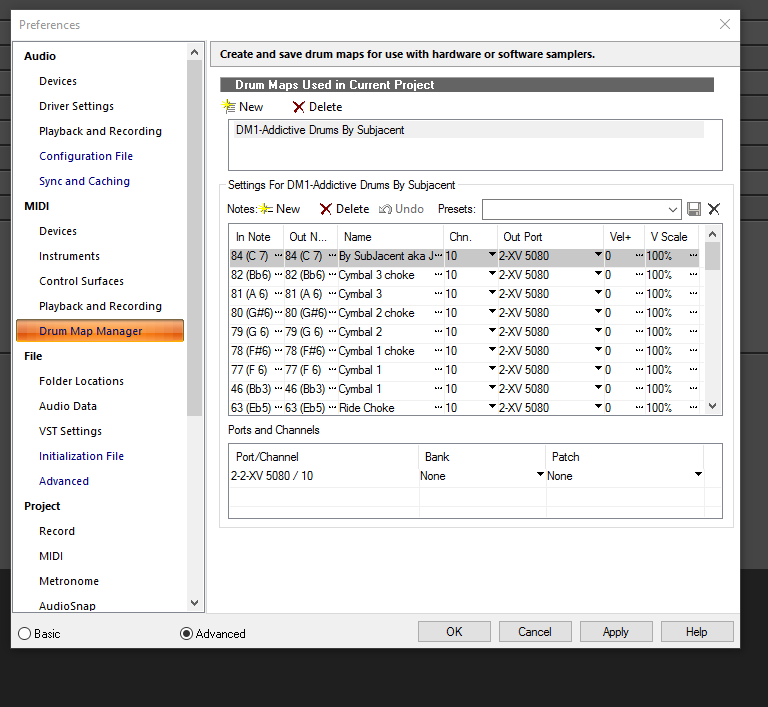 The picture is the default outs for the drum map. Clearly it will not trigger AD 2. It is set for in this case to my XV5080 Roland hardware synth. 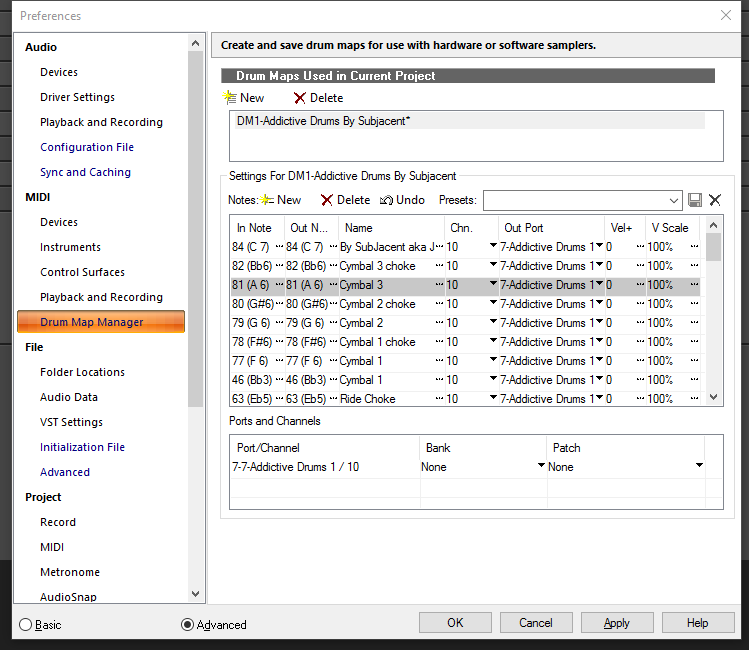 Now you see it set to Addictive Drums. The way I do this is while holding down Shift + Ctrl and clicking on the drop down arrow I set it to AD and all the outs will set to the same. From there when you open the SS or the PRV (Piano Roll View) you will see the names of drums not notes.
|
ricoskyl
Max Output Level: -84 dBFS
- Total Posts : 327
- Joined: 2015/03/15 13:19:05
- Location: Clarkston, MI USofA
- Status: offline
Re: Don't Like Sonar Professional
2015/11/26 13:07:48
(permalink)
Bristol_Jonesey (#137) had the same thought I did. Drum maps not only specify note value for each drum trigger, but also a midi port. This is a valuable feature if you want to create kits using a combination of different drum sources. This value might be mis-set as a global value for the entire drum map, or it might apply to individual note/trigger mappings, so be sure to check both. (I'm personally not too map savvy.)
And, AnthonyMangos, be patient. The flexibility of the SPLAT (Sonar Platinum) interface gives you the flexibility to work the way you want once you get past the initial learning curve. And the CCC control panel--while initially a bit unfamiliar--ends of creating an expressway for new features and improvements to flow into your system. Most ideas stem from discussions on these forum (fora?) so you have already contributed your experience into the community.
BTW, I really agree with an earlier post about the challenges of accessing documentation. Again, the frequent updates make flexible docs essential. You can't make monthly improvements and expect paper (or even pdf docs) to stay perfectly in synch. </feature_suggestion> Bakers, why not put links to documentation onto the CCC installation page for each application? </feature_suggestion>
If you want to make enemies, try to change something. -Woodrow T. WilsonTurbulence is a life force. It is opportunity. Let’s love turbulence and use it for change. -Ramsay Clark ----------------------Sonar Platinum Win 10 x64 on HP Pavilion i7 5500 12Gb RAM, Tascam US-16x08, NVidia 840 8Gb vram, Multi-Screen, Multi-Touch
|
mettelus
Max Output Level: -22 dBFS
- Total Posts : 5321
- Joined: 2005/08/05 03:19:25
- Location: Maryland, USA
- Status: offline
Re: Don't Like Sonar Professional
2015/11/26 18:24:44
(permalink)
☄ Helpfulby kevinwal 2015/11/26 19:00:59
AnthonyMangos
Getting drum names and then getting the step sequencer patterns to a track are my hurdles now.
Another thing occurred to me that has not been mentioned yet. AD2 uses it own proprietary drum map (internally) to take advantage of its entire kit. Realistically (and especially first starting out and wanting to make something), you may be more familiar with General MIDI (GM format). In the upper right of the AD2 UI, the "?" has a "Map Window" option. In the upper left of that window, you can change "Map Preset" from "AD2 Standard" to "GM" A few options to expedite things: - Open an old project you made and save it with a new project name (so the original is not altered). With AD2 set to GM per above, you can insert an instance of AD2, choose a kit, and set the Output of your original drum MIDI track to AD2. Play the project, and should sound with the AD2 kit (versus what you originally used).
- If creating a new project, leave the AD2 internal drum map set to its default (AD2 Standard). On the Beats tab in AD2, "Sync Tempo" in the lower right allows you to change SONAR tempo and have AD2 stay synced. Two things you can do:
- Drag a beat pattern from the left pane into your AD2 MIDI track for editing. Doing this, you will then need to right click that clip and "Convert MIDI Clip(s) to Step Sequencer" and a popup will give you resolution. Just choose default initially, and then double clicking that clip should open the Step Sequencer (but no names). If you then output the AD2 MIDI track to ->New drum Map->AD2 Standard (for the templates in the blog above), the names should then appear.
- Alternatively, can use a MIDI controller to enter notes. Unfortunately, just clicking on kit pieces in AD2 does not create any MIDI track data (which would be simplest).
- I am also not a drum map fan, but IIRC, there used to be an issue that drum map names did not show unless at least one MIDI event existed on the track.
Having said that, I do copy/paste a lot for MIDI events using Piano Roll View (PRV). After inserting an instance of AD2, again set the output to "New Drum Map"-->AD2 Standard (and leave AD2's internal map to "AD2 Standard" as well). If you have already been playing around, that with actually be in the first-tier output options. - Right click the empty MIDI track for AD2->View->Piano Roll View (PRV).
- Hit Shift-D to maximize this view.
- Tricky part (but important you know this) - by default, the PRV will only show you keys, and is not obvious that there is another pane ABOVE those keys. Hover the mouse over the top key until you get an "=" with and arrow at top/bottom (will drag the pane divider). When you get that cursor, left click and drag it to the bottom of the PRV... now the left pane should show kit piece names.
- Single clicking in that left pane will "fire" any pieces mapped in the kit... can even left click and move the mouse up/down the kit to find pieces.
- Double clicking in the right pane will add transient events based on your snap-to-grid settings.
- With a few notes added, you can right click and drag to lasso-select things, then copy (ctrl-c), select a new time position at the top, then paste (ctrl-v).
- "D" will restore/minimize the Multidock (containing the PRV) to help you jump back and forth between Track View (TV) and PRV.
- Say you have created 2 bars that you like and want to loop it (as you would with Step Sequencer)... hit D to see the Track View, then left click/drag through your looping content. Right click and "Bounce to Clip(s)" to meld them into one unit (needed if you used copy/paste in the PRV). Then right click again and select "Groove Clip Looping" - this creates a loop and visually will lop the corners off the clip. If you hover over the right edge, you will see a "<-|->" cursor... left click that and you can drag your loop to any length and it will auto repeat as it fills. Right click and bouncing to clip(s) will render a single clip to easily chop/swap things in the middle, add transients/fills, etc.
- You can also copy/paste into the track view, and bouncing/groove clip looping is convenient.
- You can also use multiple MIDI tracks to feed the same AD2 instance, so can keep Hi Hats/Cymbals on one, Kick/Snare on another, or whatever you choose.
I just wanted to throw that second option out for you, as I typically use TV/PRV combo to lay down drums (even if pulling a MIDI clip from AD2's "Beats" tab initially). The Step Sequencer and I have not gotten along well, so I admittedly have not used it seriously for some time.
post edited by mettelus - 2015/11/26 19:41:19
ASUS ROG Maximus X Hero (Wi-Fi AC), i7-8700k, 16GB RAM, GTX-1070Ti, Win 10 Pro, Saffire PRO 24 DSP, A-300 PRO, plus numerous gadgets and gizmos that make or manipulate sound in some way.
|
AnthonyMangos
Max Output Level: -90 dBFS
- Total Posts : 37
- Joined: 2015/10/28 12:40:47
- Status: offline
Re: Don't Like Sonar Professional
2015/11/29 10:00:21
(permalink)
Thanks to everyone fro their help, but this is all I want to accomplish:
1) I create a new file - basic
2) I have track 1 - audio, track 2 - midi
3) A was able to load Addictive Drums to the audio track under FX - AD2 is set for Studio Rock - Perfect.
4) I wasn't able to load Addictive Drums to the midi track - do I even need to?
5) The step sequencer view is not selectable.
At this point, I can't worry about the drum names. My sound is working.
I want to:
1) Make the step sequencer selectable
2) Then enter a beat into it (I know how to do that)
3) Get that beat to an audio track.
What are the steps -
1) What track(s) do I need to create; what will the settings be?
2) What will their purpose be?
3) How do I arm them for the MIDI?
I've read hundreds of pages and not found the above. I've spent three more hours this morning.
X3 Power keeps wandering off to information that is beyond me. The AD Manual just shows set up. And Sonar Help is of little use in this matter. Being able to do this will allow me to understand how these work and what is happening. One of the tutorials showed how I could create a groove track and split/edit it, but not how to set it up.
Plus since I've always entered drumbeats note by note, this will allow me to enter any drumbeat I want with the studio rock kit.
|
scook
Forum Host
- Total Posts : 24146
- Joined: 2005/07/27 13:43:57
- Location: TX
- Status: offline
Re: Don't Like Sonar Professional
2015/11/29 10:14:39
(permalink)
When getting started, it might be easiest to add AD2 via one of the menu options instead of adding tracks and then adding the synth. To add AD2 either 1) From the main menu Insert > Soft Synth > VST2 > select AD2 from list or 2) From the browser click the Plugins tab, click the instruments button, open the VST2 folder in the treeview and drag and drop AD2 into the project or 3) Click the synth tab in the browser, click the plus to insert a synth and follow that menu to AD2. All of these will open the "Insert Soft Synth Options" dialog. To add a synth with an audio and a MIDI track, click MIDI Source and First Synth Audio Ouput to create the tracks to use by the synth.  Select the MIDI track Open the Step Sequencer view This will create an audio and MIDI track with AD2 as the audio track input and the MIDI track output. The last two step also add the Step Sequencer ready to add data to the MIDI track. There is no need to arm any track for recording when entering data directly into the Step Sequencer or Piano Roll Views. Arm the MIDI track if you wish to record MIDI from your controller and/or arm the audio track if you want to record the synth directly.
|